
Business Growth · UK Guide 2026
Explain Appointment Availability Without Overpromising
JASOTO · Updated 5 November 2026 · 1,624 words
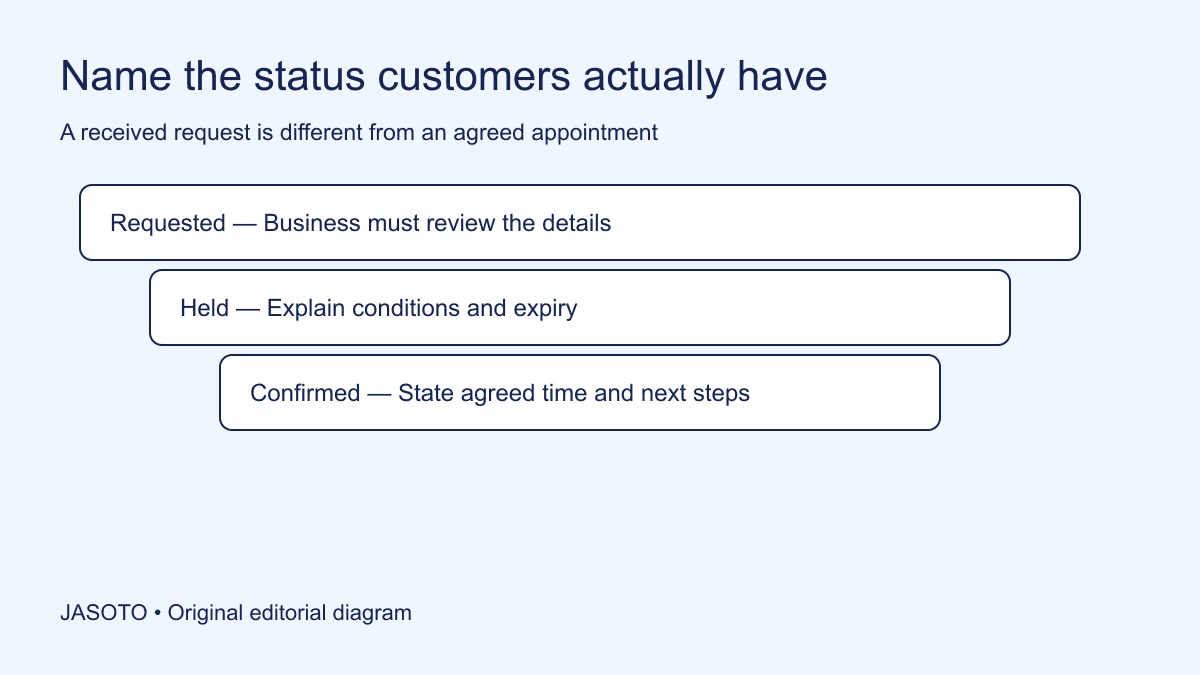
Original JASOTO editorial diagram. Its complete workflow is explained in the article; no actual customer outcome is depicted.
Explain appointment availability by naming what the customer can actually obtain: an available slot they can book immediately, a time they can request, a provisional hold, or a confirmed appointment. Put that distinction beside the action they take and repeat it in the next message. If staff must review the service, location or duration first, a submitted form should not look like a guaranteed visit.
This guide provides an editorial method for an ordinary UK appointment-based business. It is not clinical, legal or emergency-service advice. The booking situations are fictional. Use your actual process, contractual terms and any sector-specific requirements when deciding what the business can promise, and seek appropriate advice where those decisions require it.
The practical answer
- Describe the actual booking state before choosing reassuring language.
- Explain any review step before customers submit a request.
- Use dated estimates only when there is evidence and an update owner.
- Keep confirmation messages consistent with the system and staff process.
Map the booking process before editing the words
Walk through the process from the customer's first visit to the final confirmation. Identify what the calendar shows, whether a selected time is reserved, what staff check, and when the appointment becomes agreed. Include manual messages, phone calls and changes made outside the booking tool. The customer experiences the whole sequence, even if different staff own individual steps.
Record the state after each action in plain language. “Form received” does not establish that the requested service is available. “Time selected” may not establish that a slot is held. Ask the person operating the system to demonstrate what happens, rather than inferring behaviour from a button label. The wording should describe the verified process instead of encouraging staff to live up to an accidental promise.
Give each status a distinct meaning
Define requested, under review, held, confirmed and unavailable only if those states exist in your process. A request records the customer's preference. A hold needs explicit conditions and an expiry if applicable. Confirmation should state the agreed details and relevant next steps. Avoid using several friendly variations of “booked” to describe different states that have materially different consequences.
Make the definitions available to staff and whoever maintains the website. If one colleague says “your booking is received” while another says “we have not booked anything yet,” the customer must resolve a contradiction the business created. Choose clear phrases that colleagues can use naturally without changing their meaning. Keep internal codes separate from customer language unless the codes genuinely help someone understand their position.
Explain the review step before submission
If the business checks suitability, location, required duration or staff availability, say so before the customer sends the request. Explain the minimum relevant dependencies without reproducing the whole operating manual. For example: “Choose a preferred time. We will review the job details and contact you to confirm whether we can offer that appointment.” Use this only if it reflects the actual process.
Review the page's overall impression. [The CAP Code's misleading advertising section](https://www.asa.org.uk/type/non_broadcast/code_section/03.html) addresses misleading impressions and qualifications. Use current regulatory guidance where applicable; this article does not determine compliance for a particular page. Operationally, a clear sentence below the form cannot repair a headline or button that strongly tells customers they already have a guaranteed appointment.
Match the action label to the outcome
Use a button such as “Request this time” when the action submits a preference for review. Use a confirmation-oriented label only when the process actually secures the appointment under the applicable terms. Check the next screen as well as the button. A careful request label followed by “You are booked!” still creates an inconsistent message at the most consequential point.
Avoid relying on icons, colour or a calendar highlight alone to communicate status. Put the meaning into readable text. If a selected slot expires while the customer completes the form, explain the actual behaviour and how they can recover. Do not invent a countdown or scarcity message to encourage faster action. Availability information should help people plan rather than manufacture pressure that the system cannot substantiate.
Describe current capacity using evidence
Before writing “next-day appointments” or “usually available this week,” ask what evidence supports the statement and how often it is checked. A single open slot does not establish a continuing service promise. If capacity varies by service or area, state the relevant distinction. Do not generalise from one staff member's calendar to the whole business.
An estimate can be useful when it is honestly labelled, based on current information and maintained. Record its owner and review point. If nobody can keep a public estimate current, provide a reliable way to check availability instead of displaying a stale claim. Date-sensitive language needs an operating process behind it; the fact that it was accurate when first published does not keep it accurate indefinitely.
Make the acknowledgement useful and accurate
A request acknowledgement should identify what was received, repeat the requested details with the right status, and explain the next step. If the business gives a response timeframe, use one it has evidence and capacity to support. Distinguish working periods where relevant. Do not suggest a staff review has happened merely because an automated message was sent immediately.
For a fictional example: “We received your request for a Thursday afternoon repair visit. This is not yet a confirmed appointment. Our scheduling team will review the service details and contact you using the information provided.” Add a response expectation only if the business has agreed it. Give a relevant contact route for corrections, and avoid encouraging customers to submit duplicate requests to obtain a faster response.
Explain holds and expiry precisely
If the business offers a provisional hold, state what is being held, what the customer must do and when the hold ends. Confirm whether any remaining checks affect the appointment. A phrase such as “reserved for you” can create a stronger expectation than staff intend. Use the actual terms and ensure the booking system supports the described arrangement.
Test the expiry process with the team. Does the slot release automatically, does a colleague review it, and what message reaches the customer? Do not publish a precise expiry that nobody monitors or a consequence the system does not apply. If payment or acceptance is part of the process, obtain the relevant specialist review for those terms rather than improvising them as marketing copy.
Give cancellation-list customers a truthful position
Explain what joining the cancellation list does and does not mean. State how openings are offered using the actual allocation process. Avoid claiming that customers will move steadily up a numbered queue if suitability, location or staff requirements affect which appointment can be offered. A simple list may be useful without creating a fictional promise of priority.
Record customer preferences accurately and explain how they can update or withdraw them through the business's normal process. Keep any message about an opening specific to what is available at that point. An invitation to discuss a possible slot is different from a confirmed offer. The distinction matters when a customer is considering rearranging work, caring responsibilities or travel in response.
Prevent premature travel or preparation assumptions
Identify what customers should do only after confirmation, such as travelling to premises or arranging access for a visit. Phrase this helpfully, using actual business instructions. Do not give generic advice that could conflict with the customer's circumstances. For ordinary planned appointments, make the confirmation message the clear reference for the agreed place, time and any relevant preparation.
Research travel on JASOTO when planning a journey, with the appointment status understood. The service page should also make the location or coverage limitation clear before requesting detailed information. If customers frequently arrive with an unconfirmed request, review the whole journey: search listing, page headline, form action, acknowledgement and staff replies. The cause may be an early promise rather than the customer's failure to read a later disclaimer.
Test the wording with realistic customer tasks
Give a colleague the page and ask: “Have you secured an appointment, what happens next, and what should you do if the requested time is unavailable?” Ask them to show the text supporting each answer. Then repeat the test after submission using the real message sequence in an appropriate test environment. This checks the meaning people can retrieve, rather than whether the wording sounds reassuring in a meeting.
Include an awkward situation: a slot disappears, staff need more information, or a customer requests a service outside the normal area. Check that the messages stay truthful through those transitions. Record specific confusion and revise the relevant step. Avoid claiming that this informal exercise proves all customers will understand; it provides evidence of issues worth fixing and a practical basis for a more focused review.
Give ownership to the continuing promise
Name the person who reviews availability claims and the person who resolves individual requests. Explore reception roles if the volume requires dedicated capacity, or find business support providers when the booking system or process needs help. A software change should be assessed against the real customer journey, including the work staff perform after the form arrives.
Keep earlier wording and a change record so misleading changes can be reversed promptly. Review recurring questions, unconfirmed arrivals and missed expectations after the update, noting other changes that may affect the comparison. The practical goal is a customer who understands their current position and next step. Any claim about reduced workload or increased bookings requires separate evidence rather than being assumed from clearer prose.
Put the guide into practice
- Map what each displayed slot actually means.
- Distinguish a request from a held or confirmed appointment.
- Explain review dependencies before submission.
- Test acknowledgements and staff replies together.
- Review claims when capacity or the booking process changes.
Frequently asked questions
Can we say ‘appointments available’ if staff must review every request?
Only use wording that accurately explains the offer and its limitations. If a customer is requesting a time rather than securing one, make that clear beside the action and in the next message. Review the overall impression, including buttons and headlines, instead of relying on a distant qualification.
Should an automated reply contain an appointment date?
It can repeat the requested date if it clearly labels it as requested and explains the current status. Do not present it as a confirmed visit unless the process has actually confirmed it. A receipt message should also tell the customer what happens next and where to ask a genuine booking question.
How should we describe a cancellation list?
Explain that joining records an interest in possible openings and does not guarantee an offer or a particular date. State how the business contacts people and what they need to do if offered a slot, using the actual process. Avoid claiming a queue position or priority rule that staff cannot reliably maintain.
Explore JASOTO tools
Continue with JASOTO
Compare your next step
Discover UK businesses, compare services and request written quotes before making a decision.