
Websites & Visibility · UK Guide 2026
Create a Change Log for a Business Listing Update
JASOTO · Updated November 5, 2026 · 1,545 words
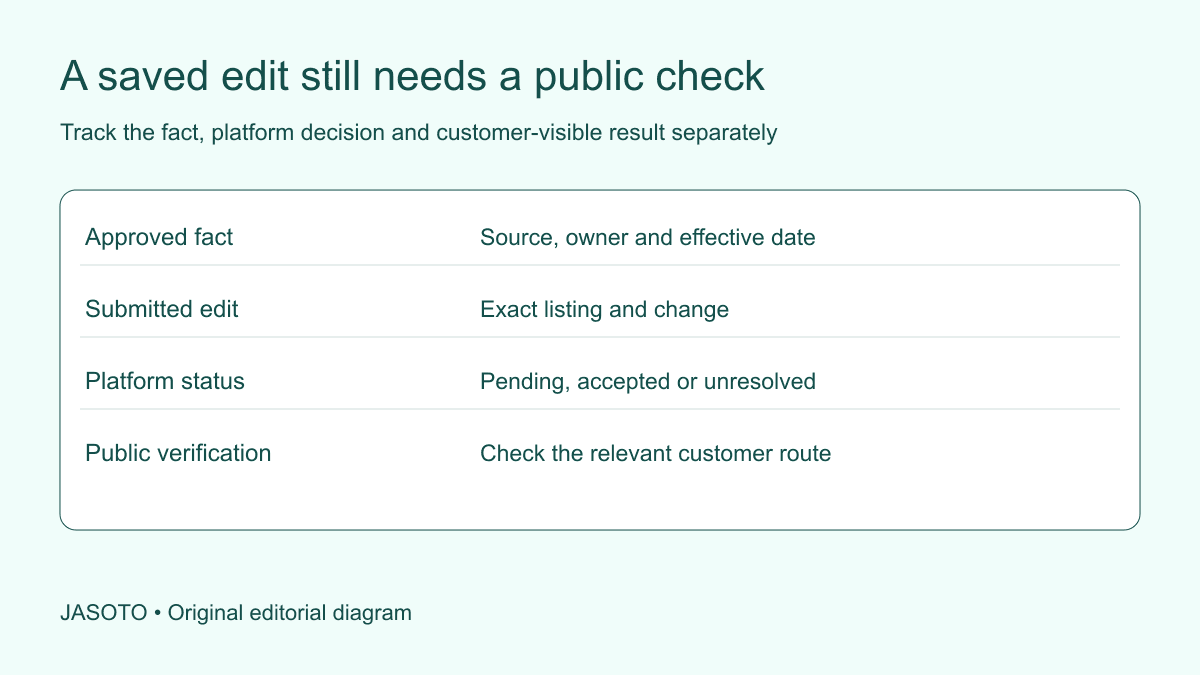
Original JASOTO editorial diagram. Its complete workflow is explained in the article; no actual customer outcome is depicted.
Create a business-listing change log by recording the exact listing, the old value, the approved new fact and the reason for the update. Track submission, platform status and public verification separately. Preserve relevant earlier evidence and assign unresolved issues. The log should let another colleague explain what changed, why it was authorized and whether customers can actually see the intended information.
This guide uses fictional updates for a small United States business. It focuses on an auditable editing workflow without claiming a ranking or traffic benefit. Use each platform's current rules and the organization's access process. The business's real facts must support the listing, while verification should examine the public route customers use.
The practical answer
- Record the actual fact being corrected and its approved source.
- Keep submitted, accepted and publicly verified states distinct.
- Check connected customer routes rather than only the editing screen.
- Preserve earlier information and a controlled correction path.
Identify the exact listing and authority
Record the platform, listing address or stable identifier, business location and authorized editor. A business may have several branches or similarly named entries. Confirm the intended one before making or documenting a change. Avoid treating a search result screenshot as sufficient proof of account control or the correct location.
Keep account access details in appropriate secure systems rather than the general log. The record can identify a responsible role and controlled reference. If the business cannot edit the listing directly, document the legitimate correction route and owner. Do not imply that a request sent to another organization is already an authorized completed edit.
Confirm the fact being changed
Name the field and explain the problem with the current value. Examples might concern an outdated address, a misleading service statement or an incorrect contact route. Use the responsible business owner's approved source. Do not add a broader claim simply because the platform field has space or a competitor uses similar wording.
Record the effective point where it matters. A future move or temporary schedule change can be accurate only within a particular date context. The log should distinguish current facts from planned arrangements. If the underlying business decision remains unsettled, identify that dependency before submitting a value that customers could interpret as available now.
Preserve the before state appropriately
Keep the existing value and relevant public reference through the organization's process. A screenshot can help document appearance, while a structured field record makes comparison easier. Record the capture date and scope. Do not collect unrelated customer reviews or personal information merely because they appear beside the edited field.
The before record supports review and correction if the wrong fact or listing is changed. It does not mean every earlier value should automatically be restored during a rollback. The owner must choose an accurate current state. Preserve the reason for the original correction so later editors do not accidentally reinstate a known error.
Write a precise change entry
Use fields such as change identifier, listing reference, affected field, old value, approved value, evidence source, owner, submission date and current status. Add a verification note and next action. Keep the structure proportionate to the work rather than creating a large audit system for a few ordinary edits.
Describe the change factually. “Correct contact destination to the approved service inbox” is more useful than “optimize profile.” The latter hides what happened and why. A clear entry helps an agency, staff member or later owner understand the task without needing the original editor to explain a private conversation.
Separate business approval from platform review
Confirm the business's authorization for the fact and edit through its actual process. Then record what the platform does with the submitted change. These are different decisions. An accurate business-approved update may remain pending or need further information, while a platform accepting text does not independently prove every claim is true.
[Google's profile-edit guidance](https://support.google.com/business/answer/3038311?hl=en) describes edit states including accepted, pending and not approved. Follow the current provider process for the actual listing. The log should preserve those states accurately rather than compressing a saved submission into a universal completed label.
Record what was actually submitted
Capture the final value and relevant version, especially when wording changed during review. A draft request to an agency may differ from the text eventually entered. Link the submission evidence through appropriate access. Keep unrelated attachments and confidential details out of a broadly shared status sheet.
If several fields change together, identify each meaningful item. A single entry can group a coordinated update while retaining field-level differences and verification. Avoid a vague all-updated note that makes it impossible to discover whether the address, phone and service description were all included or only discussed.
Check the customer-visible result
Open the relevant public view and verify the actual fact. Record the check time and what was observed. Distinguish a platform status from a public display when they differ. If an external channel has not updated, keep the issue open with an owner and use the proper support route where needed.
Check relevant contexts without claiming exhaustive coverage. A direct listing view, search result and map may show different information or update at different points. Define what was checked. Do not report the entire internet as corrected because one screen displays the new value. Verification should be precise enough that another person can assess its practical limit.
Follow the action links and visit information
Test the website, contact or booking link affected by the update through an appropriate authorized process. A correctly displayed URL can still lead to an outdated or broken destination. Confirm the intended customer next step and its owner. Keep a request route distinct from an appointment confirmation where the service requires review.
For location edits, inspect the relevant destination and arrival information before customers plan travel. Do not assume a new address automatically corrects every map or directions service. Use verified local information and the actual platform process. Record pending discrepancies instead of leaving staff unaware that customers may still encounter an old route.
Coordinate connected channels deliberately
Identify the website, other profiles, templates and documents that state the same fact. Give each an owner and update status. A listing correction can expose a broader inconsistency, but it should not lead to uncontrolled edits across unrelated material. Confirm the shared source and effective point before coordinating changes.
Keep historical references distinct from current operational information. An older dated story may legitimately mention previous premises, while an active contact page needs the current arrangement. Record the decision rather than removing every old reference automatically. The change log should help the team maintain a coherent current customer journey while preserving accurate context.
Work through a fictional phone-route correction
Imagine a service listing shows a general number that no longer reaches the team handling appointments. The business approves the maintained contact route and records the old value. The authorized editor submits the change, then checks the platform status and public display. A separate verification confirms the actual customer route reaches the intended coverage process.
The entry remains open for a connected directory awaiting correction. This fictional example illustrates factual and operational verification without claiming improved rankings or more bookings. It does not establish that another business should publish the same type of contact route or that a displayed phone number alone guarantees useful handling.
Handle rejection or unexpected changes transparently
If the platform rejects or alters information, record its actual message and the next legitimate action. Review the approved source and current rules with the responsible owner. Do not repeatedly submit speculative variants simply to force acceptance. A material uncertainty may need investigation rather than more persuasive wording.
If another party or automated process changes a field later, preserve evidence and assess the current fact. Keep the log open enough to record the new event without rewriting earlier history. The business should be able to explain which change it submitted and which outcome it later observed, including unresolved differences.
Distinguish verified correction from measured benefit
Close the factual task when the agreed evidence establishes the intended update and any relevant route. Record what remains outside that verification. Search appearance, inquiries and business outcomes require separate appropriate measurement. An edit's publication date is a useful reference, not proof that every later change in demand was caused by it.
Avoid manufactured completion claims such as fully optimized or guaranteed visibility. Research listing support with specific evidence and needs when outside help is useful. A precise correction can be valuable because it improves current information, even when no performance uplift has yet been established.
Maintain ownership and a correction path
Assign ongoing responsibility, considering listing maintenance roles when volume requires capacity. Keep approved facts, earlier values, status and verification together. Use review triggers such as moves, contact changes or service revisions. A record is useful only if someone can act when the fact changes again.
Retain the log according to the organization's process and avoid unnecessary personal or access information. Review repeated issues to improve the source and handover workflow. The practical result is a listing update that remains concrete, reviewable and correctable, with an honest distinction between what was submitted, what the platform accepted and what customers were actually shown.
Put the guide into practice
- Identify the exact listing and authorized editor.
- Record the old value, approved new fact and reason.
- Log submission and platform status accurately.
- Verify the relevant public view and links.
- Assign pending issues and review triggers.
Frequently asked questions
Does saving a listing edit mean customers can see it?
Check the platform's actual status and the public result. A submitted or pending change is different from an accepted visible update. Record those events separately and use the provider's current process for unresolved issues rather than reporting the edit as complete solely because the dashboard saved it.
Should the log include passwords or recovery details?
Keep secrets in the organization's appropriate secure systems. The change log can identify the authorized role and controlled account reference without storing credentials. Its purpose is factual traceability and verification, not becoming a broadly shared access document.
Can we claim the update improved rankings immediately?
Record the factual correction and verified publication first. Search visibility and customer outcomes need separate evidence with context and time. A changed listing field or an accepted edit does not by itself prove a ranking improvement, increased inquiries or any guaranteed future position.
Explore JASOTO tools
Continue with JASOTO
Compare your next step
Discover UK businesses, compare services and request written quotes before making a decision.