
Travel · UK Guide 2026
Coordinate a Client Visit Across Local Time Zones
JASOTO · Updated November 5, 2026 · 1,621 words
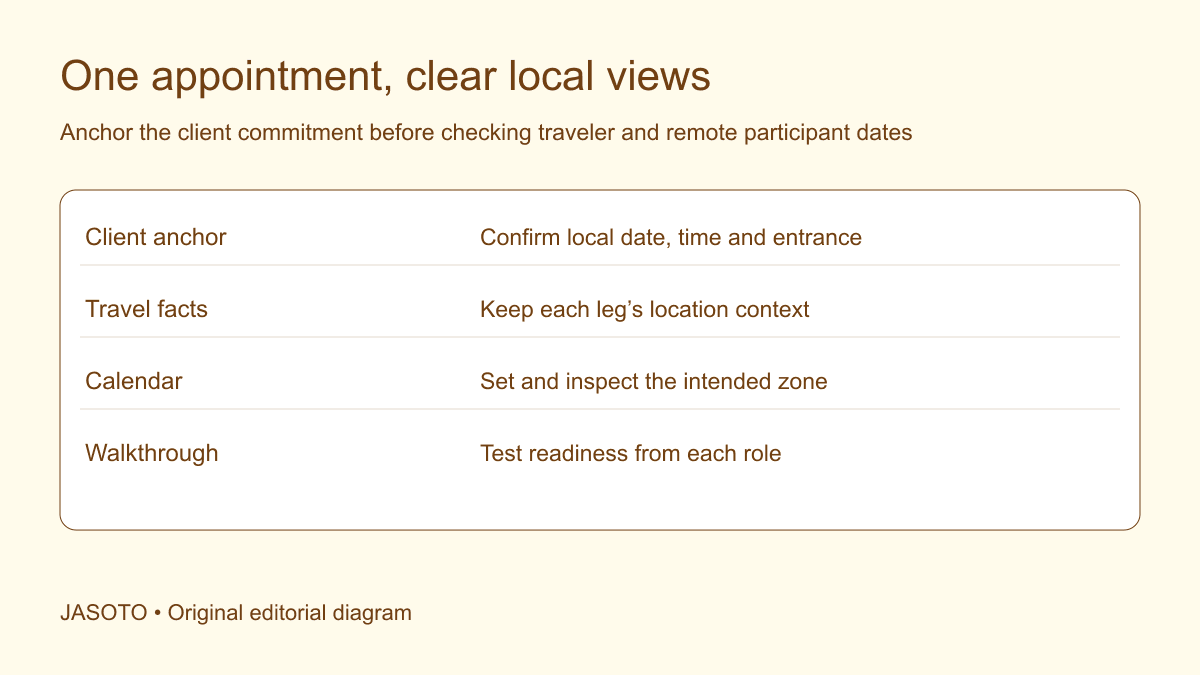
Original JASOTO editorial diagram. Its complete workflow is explained in the article; no actual customer outcome is depicted.
Coordinate a client visit across time zones by recording each appointment in the venue's local date and time, then checking how it appears for travelers and remote participants. Keep transport departures and arrivals tied to their actual locations. Confirm the client's required arrival point and setup window before converting the schedule into a calendar. A correct flight time and a correct meeting time can still form an impossible visit when they refer to different local dates.
This original guide is for US-based teams arranging a visit across regions or countries. NIST publishes US daylight-saving information, and Google Calendar documents event time zones and local display. Use the actual date and relevant locations for checks. The coordination method below does not assume one permanent time difference or replace provider confirmations; it organizes the handoff between travel facts and the client's appointment.
The practical answer
- Anchor the appointment in the client’s local context.
- Check conversions for the actual date.
- Keep transport locations and dates explicit.
- Verify arrival feasibility separately from display accuracy.
Anchor the visit in the client's local context
Ask the host to confirm the venue, local date, start time and required arrival before the discussion. Include the relevant time zone or location context in the maintained record. If setup or reception must happen first, record it separately. The meeting's calendar start may not describe when a traveler must reach the building, and that difference matters when comparing arrival transport.
Use a clear written date in messages that cross regions with different numeric date conventions. Avoid “next morning” unless the actual date is also explicit. A coordinator and client can each interpret a relative phrase correctly from their own location while referring to different days. Establish the local appointment as a confirmed anchor before adding conversions, travel options or remote participants who need a view in another zone.
Record transport in its actual departure and arrival places
Read each provider confirmation carefully and preserve its relevant date and location context. Do not assume that a departure and arrival shown on one line occur on the same local day. Keep the route, service reference and actual arrival location together. A town name alone may conceal a different airport, station or terminal from the one used in the transfer plan.
Build the complete route from the arrival point to the client's required entrance. Include the local transfer, site entry and setup. The time-zone calculation does not remove these ordinary dependencies. A traveler arriving in the destination region at the right clock time may still be unable to reach the meeting ready to work. Keep that feasibility check separate from confirming that the conversion itself is correct, so one successful check is not mistaken for readiness of the entire visit.
Convert for the actual appointment date
Use current time-zone information for the specific places and date. US daylight-saving rules and exceptions require attention to the actual location, and other countries may use different change dates. NIST's guidance is useful for its US scope, while the relevant official information should be checked for other places. Avoid a permanent handwritten offset in a reusable client-visit template.
If the appointment moves, repeat the affected conversion rather than changing the date only. A move across a clock-change period can affect how a shared event appears. Record the source of a material check where appropriate. The purpose is a practical verified schedule, not an elaborate table of every zone. Focus on the locations actually involved and the times that determine travel feasibility, host availability and remote participation.
Set the calendar event's intended zone
Use the calendar's supported time-zone controls and inspect the event after saving. Google Calendar allows an event to be created with a specified zone and displays it for invitees in their local context. Follow the current product instructions for your actual tool. Do not rely solely on typing a time into the title while leaving an inconsistent event field underneath.
Keep any written local-time explanation aligned with the event. A later edit can change the calendar while leaving an old time in the description or briefing. Check both. Ask the client or a relevant participant to confirm the time they see where uncertainty remains. A calendar being technically capable of conversion does not prove the organizer selected the intended date and zone, or that another device's display context is the one its user expects.
Separate the traveler's view from the remote team's view
Decide which people need to attend in person and which join remotely. Give each the practical information relevant to their role while preserving one confirmed appointment. The traveler needs the venue entrance and arrival route; a remote colleague needs the joining method and their verified local time. Do not make a remote participant interpret a transport itinerary to discover when the actual client conversation begins.
Identify who can answer questions while the traveler is in transit. A business approver in another region may not be available during the destination's morning. Agree the decision route beforehand for material changes. Avoid assuming that a colleague's daytime phone number is monitored around the clock. The visit plan should make the contact's purpose and relevant availability clear enough that the traveler knows what can be decided locally and what requires another arrangement.
Confirm the host's receiving and setup arrangements
Check when the building and room are available and who receives the visitor. A meeting planned for one local time may require equipment access earlier. The host should understand the traveler's actual arrival constraint and any approved fallback. Keep the request factual and specific, without assuming a room will be available simply because the business operates during that part of the day.
For an invented client demonstration, the visiting team needs a short approved setup and a remote specialist for one part of the discussion. The coordinator confirms the room window in the client's local time, checks the traveler's complete arrival route and verifies the specialist's displayed appointment. These are related checks with different evidence. The team does not label the visit ready after confirming only that the video call appears at a plausible hour in the coordinator's own calendar.
Use local dates in practical messages
When sending arrival updates, identify the relevant place and date. A message that says “we arrive at eight” can be unclear when the reader sees it during another local day or when several legs are active. State the actual arrival point and the context needed for the host's next action. Keep the wording concise enough to use during travel without a long explanation of every conversion.
Avoid manually converting every message into several zones when that creates more chances for error. Provide the main venue-local instruction and a verified calendar or focused secondary view where needed. The important point is that each person can identify the commitment relevant to them. If a conversion is supplied, keep it tied to the actual date and recheck it after changes. A short accurate statement is more useful than a large table containing an obsolete offset.
Prepare the change process before departure
Agree who tells the client if travel or timing changes and who can approve a revised appointment. Keep provider changes separate from client acceptance. A later service being available does not establish that the host can receive the traveler at the resulting time. The coordinator should obtain the necessary answers and update the maintained record through the established route.
If a delay threatens the appointment, report the confirmed current position and the decision needed. Do not promise a precise arrival before checking the remaining local route. Keep proposed alternatives labelled until the client and relevant business owner agree them. Once a new appointment is confirmed, update the zone-aware event and any written local-time details together. This prevents a revised invitation and an old arrival message from giving different instructions to the same group.
Test the itinerary from each role's perspective
Ask the traveler to identify when they leave, where they arrive and when they must reach the client entrance, using the relevant local dates. Ask a remote participant to identify the actual joining time they see. Check the host's receiving contact and the business decision route. This walkthrough reveals gaps that a coordinator can miss when they mentally translate the whole plan from their own home zone.
Explore travel options while confirming actual services with operators and the appointment with the client. For local services found through business listings, verify the exact destination, date and pickup arrangement. If cross-region coordination is a recurring responsibility, describe it accurately in relevant roles, including the difference between maintaining the itinerary and approving a changed client commitment. Shared understanding needs a named owner as well as a tool that can display multiple clocks.
Recheck the changed element and preserve one current plan
Review the important details before departure and whenever a material date, venue or service changes. Preserve the confirmed facts and recheck the affected dependency rather than rebuilding the whole trip unnecessarily. Mark older instructions replaced and ensure relevant offline copies are current. A traveler using a saved page should not have to infer that a message sent later from another zone silently supersedes it.
After the visit, note the specific ambiguity or display issue that needs correction. Keep the lesson connected to the actual route and tool rather than declaring a fixed offset suitable for all future trips. The rollback for a confused schedule is to return to the confirmed venue-local appointment, then rebuild the travel and participant views from that anchor. A useful cross-zone visit plan lets every person identify the same commitment through the dates, locations and practical actions that apply to them.
Put the guide into practice
- Confirm host and setup requirements.
- Inspect the actual saved calendar event.
- Agree the cross-zone change contact route.
- Replace written and offline details together.
Frequently asked questions
Should I use the client’s local time in the main instruction?
Anchor the venue appointment in its confirmed local date and time, with the relevant zone or location context. Then provide verified participant views where needed. Keep transport times tied to their own departure and arrival places so the complete itinerary remains understandable.
Can I reuse the same time difference for every visit?
Check the actual places and date. Clock-change periods and regional exceptions can affect the relationship between locations. Recheck an appointment moved across a relevant date rather than changing the calendar day while preserving a remembered offset.
Does a correct calendar conversion prove the visit is feasible?
No. Check the complete travel route, site entry, setup and host availability as separate dependencies. A correctly displayed meeting can still be impossible to reach from the confirmed transport arrival. Verify both timing accuracy and practical readiness.
Explore JASOTO tools
Discover providers and check support for your specific task.
Explore roles and responsibilities →Consider the practical responsibilities involved when recruiting or joining a team.
Plan work-related travel →Research a journey when joining, training or meeting colleagues in person.
Continue with JASOTO
Compare your next step
Discover UK businesses, compare services and request written quotes before making a decision.