
Business Growth · UK Guide 2026
Keep a Reliable Spare-Parts Lookup Sheet for Support
JASOTO · Updated November 5, 2026 · 1,611 words
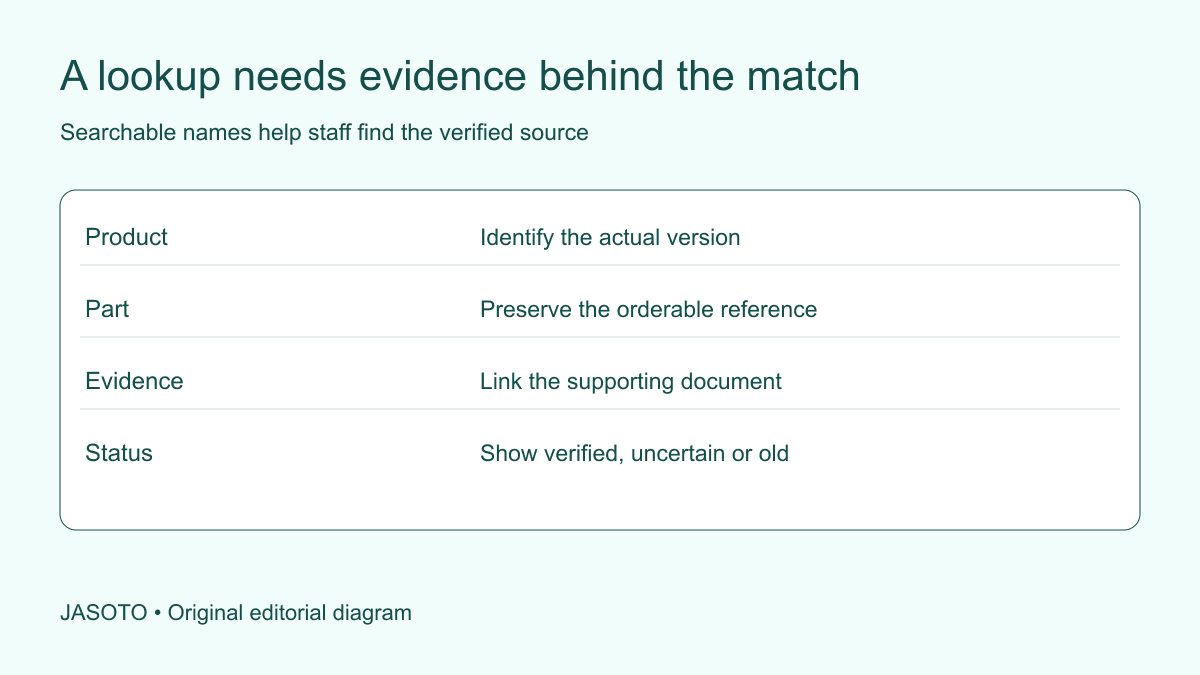
Original JASOTO editorial diagram. Its complete workflow is explained in the article; no actual customer outcome is depicted.
Keep a spare-parts lookup sheet by connecting the exact product version, the orderable part reference and the source supporting the match. Add clear statuses for uncertainty and superseded information. Customer support should be able to find the relevant verified record without treating a familiar nickname, similar photograph or old email as proof that a component fits.
This guide is an original reference-management method for small businesses in the United States supporting a defined product range. It covers the shared sheet and support handover rather than diagnosing faults or fitting parts. The example concerns an invented flat-pack storage range whose instruction diagrams and product versions need to remain connected as staff answer routine enquiries.
The practical answer
- Keep product identity, part identity and compatibility evidence separate.
- Link each supported match to an authoritative current source.
- Use aliases to find information without treating them as technical proof.
- Make uncertain and superseded entries visible to support staff.
Define which products the sheet supports
Start with a manageable current range and identify the person responsible for maintaining it. Do not build an apparently comprehensive list from unverified web searches. State whether older versions are included and how staff should handle products outside scope. A clear boundary is useful: it prevents a blank search result from being interpreted as proof that no part exists.
Link the sheet to the business's actual product register. Keep stable identifiers alongside understandable names. A product may be marketed under a new title while support still receives enquiries using the earlier name. Preserve that relationship deliberately rather than relying on long-serving employees to remember it. The reference should remain usable when those employees are absent or the support team changes.
Separate product identity from part identity
Use different fields for the product model or article reference and the component reference. They answer different questions. A number printed on packaging may identify the product, an instruction document or another manufacturing reference rather than the orderable spare. Ask the appropriate source what each number means before copying it into a column labeled part number.
Record relevant version information where the manufacturer says it matters. A storage unit with the same broad name may use different hardware after a design change. Do not assume that one match applies to every production version. If the business cannot establish the version, the sheet should show the escalation route rather than encouraging staff to select the nearest-looking entry.
Link the match to an authoritative source
For each supported entry, record the relevant manufacturer document, official parts system or appropriate specialist confirmation. Include the source reference and review date. The sheet should point staff to the evidence behind a match, not merely contain a conclusion whose origin has disappeared. A copied list from an unknown marketplace seller is not equivalent to a verified manufacturer reference.
As one manufacturer-specific example, [IKEA's U.S. support FAQ](https://www.ikea.com/us/en/customer-service/faq/) distinguishes product article information from numbered hardware in assembly instructions. That is its own system, not a universal format for all furniture brands. Follow the actual source for the supported range and avoid importing another company's numbering conventions into the sheet because they appear familiar.
Keep the document version visible
Record the instruction or parts-document identifier where available, not just a general homepage link. An official page can change while an older customer still owns a previous product version. Ask the responsible specialist how the business should preserve appropriate historical references. Keep the current and historical records distinguishable so staff know which evidence applies to which product.
Check that authorised colleagues can open the source through the intended support system. A link saved from an administrator's session may not work for ordinary staff. Do not solve that problem by sharing private credentials or moving restricted documents into an uncontrolled folder. Use an appropriate business process so the evidence is accessible to the people authorised to use it.
Add aliases for searching, with clear limits
Customers may describe a shelf support as a small peg or refer to a product by an old catalogue name. A carefully maintained alias field can help staff find the relevant entry. Keep aliases separate from verified technical names and part references. Their purpose is retrieval, not compatibility proof. A broad everyday term may point to several different components.
Ask staff to capture useful new terms through a review process. Do not let every hurried support note automatically become an approved synonym. An incorrect alias can send future enquiries to the wrong component while appearing helpful. Record who reviewed the relationship and keep ambiguous terms connected to a question or shortlist rather than one asserted match.
Use statuses that support a decision
Useful statuses can include verified for the identified version, awaiting source confirmation, superseded reference or unsupported product. Define them plainly and explain what staff should do next. Avoid a single approved checkbox that hides whether the entry has current evidence or merely passed an administrative review. Support employees need to know the strength and scope of the record.
Give uncertain entries a named owner and next action. If the manufacturer must confirm a replacement reference, record the enquiry and appropriate follow-up. Do not insert a guessed part number to keep the sheet complete. An honest unresolved status can prevent a wrong recommendation, while a confident empty-evidence entry transfers uncertainty to the customer without warning.
Keep availability and compatibility distinct
A verified match may be unavailable, while a stocked component may be unsuitable for the customer's version. Use separate fields or appropriate linked systems for these facts. Do not let an available-to-order label imply compatibility, and do not promise stock based on a historical note. Check current availability through the actual supplier process when responding to the enquiry.
If the manufacturer identifies a replacement or alternative, preserve the source and conditions. Ask whether it applies to all versions or only specified configurations. Support staff should not broaden a qualified answer into a universal substitution. Where the question needs technical assessment, route it appropriately and record the result without turning the lookup sheet into an improvised engineering decision tool.
Build a support response from the evidence
A useful response identifies the product information received, the verified reference if established and the appropriate ordering or support route. Explain any remaining information needed. Avoid saying this should fit when the sheet records only a possible lead. The wording should reflect the actual confidence and scope of the evidence rather than smoothing uncertainty away to sound decisive.
Keep installation advice separate. The customer may need manufacturer instructions, competent fitting or another appropriate service. Link the current authorised guidance and explain the route for further questions. Do not write a short home-made repair sequence into a general response template merely because staff repeatedly receive the same part enquiry. A reliable lookup is a starting point for appropriate support, not permission for every repair.
Worked example: two versions of a storage unit
Imagine a retailer supporting a flat-pack storage unit whose earlier and current versions use different shelf fittings. The lookup sheet records both product references, relevant document versions and verified component identifiers. A customer's phrase little shelf peg appears as a search alias that leads to the version question, rather than selecting one fitting automatically. Staff ask for the information needed to identify the actual product.
Once the version is established, the response uses the appropriate source and checks availability separately. This invented example claims no particular manufacturer's policy or guaranteed repair. It shows how a well-designed sheet can preserve the distinction between finding a likely record and making a supported recommendation for the customer's actual item.
Test the sheet with a realistic enquiry
Ask an authorised colleague unfamiliar with the range to work through a fictional request. Can they identify the product, find the supporting source and recognise an uncertain match? Test an old nickname, an incomplete reference and a superseded part as separate cases. Improve the field or instruction that causes confusion. A sheet is useful only if ordinary staff can interpret its limits.
Record substantive corrections rather than silently replacing the evidence history. If an entry was wrong, identify whether customer communications or open enquiries need review through the appropriate process. Keep the earlier version so the change can be understood, with access and retention appropriate to its contents. Avoid claiming the sheet eliminates wrong orders without measuring actual comparable outcomes.
Maintain the reference as the range changes
Keep a correction request distinct from an immediate catalogue edit. A staff member may report a customer's description that appears inconsistent with the sheet, but the cause could be an unidentified version or incomplete information. Ask the owner to review the evidence and record the outcome. If the existing entry remains correct, preserve the useful clarification without creating a duplicate part. If it needs revision, update the current instruction and relevant open enquiries through the appropriate process. This prevents a helpful search aid becoming less reliable with every unreviewed support comment.
Review new product versions, changed documents and recurring support questions with the responsible owner. Make maintenance part of the catalogue workflow rather than a one-off cleanup project. If nobody owns the next review, an accurate sheet can gradually become an archive of old assumptions. Keep the current status and appropriate escalation contact easy for staff to find.
Use JASOTO businesses to discover suitable product-support specialists and verify relevant capability directly. If reference maintenance becomes continuing work, explore support operations roles within a staffing review. For an agreed store or specialist visit, research travel after confirming the information required. A useful lookup sheet helps staff find the right evidence and makes an unresolved match visible before a part is recommended.
Put the guide into practice
- Choose the supported product range and responsible owner.
- Record product, part and source references accurately.
- Define uncertainty, review and escalation statuses.
- Test a realistic enquiry without relying on staff memory.
Frequently asked questions
Can staff suggest a part from its photograph?
A photograph can help identify a question or possible lead, but should not become an unsupported compatibility decision. Use the actual manufacturer's information or an appropriate specialist confirmation. Mark uncertain matches clearly and follow the escalation process.
Should the sheet contain installation instructions?
Keep the lookup purpose clear. Link to the appropriate current product guidance and support route rather than writing improvised fitting instructions. Some parts require competent installation or assessment, and a reference sheet does not establish that a customer should fit them.
What if the manufacturer changes a part number?
Record the change and the source confirming it. Keep the old reference searchable as a historical alias while making the current verified position clear. Do not assume that a similar new number automatically replaces every earlier version.
Explore JASOTO tools
Discuss the actual product range and escalation requirements directly.
Explore customer support operations roles →Consider staffing when maintaining technical references becomes continuing work.
Research a confirmed parts-support visit →Plan travel after a store or specialist confirms the appointment and required information.
Continue with JASOTO
Compare your next step
Discover UK businesses, compare services and request written quotes before making a decision.