
Business Growth · UK Guide 2026
Write Clear Condition Notes for Display Stock
JASOTO · Updated 5 November 2026 · 1,610 words
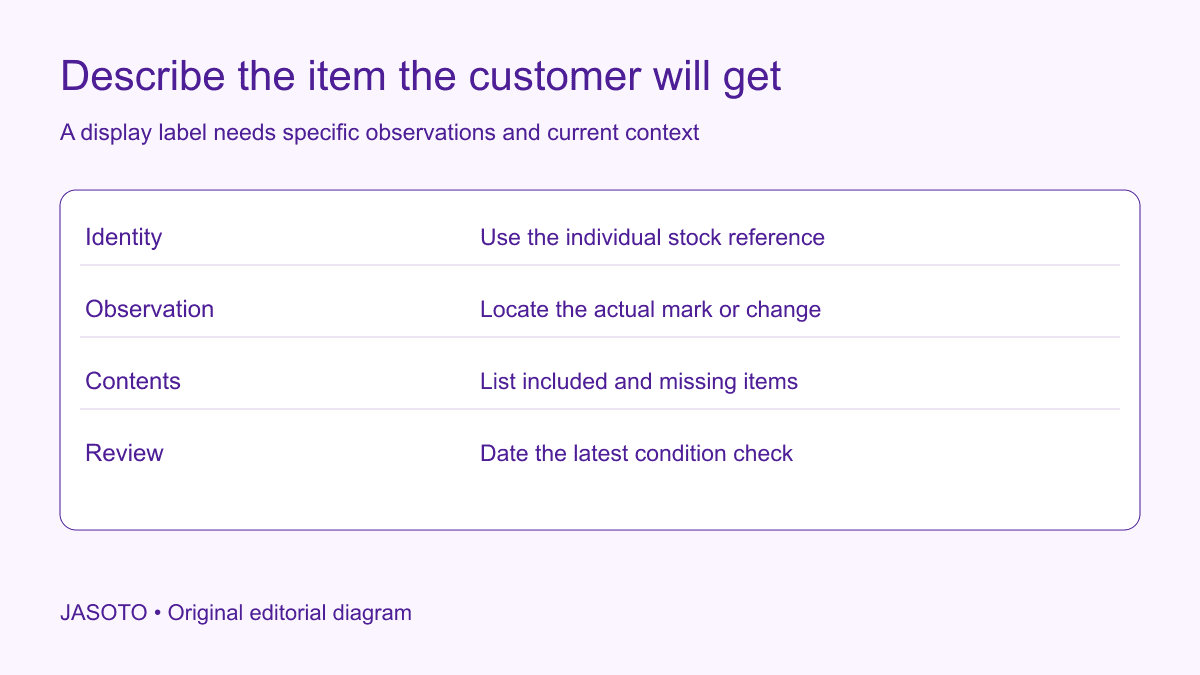
Original JASOTO editorial diagram. Its complete workflow is explained in the article; no actual customer outcome is depicted.
Write a display-stock condition note for the exact item being sold. Identify it, describe relevant observed condition with locations, state what is included and connect the note to current photographs. Ex-display is useful context, but it does not tell a customer whether the item has a visible scratch, missing packaging or an accessory that differs from the standard product listing.
This guide gives UK retailers an original administrative method for documenting ordinary display items. It does not provide technical inspection, safety approval or a legal ruling on a particular sale. Use appropriate expertise for those matters. The example uses an invented display side table and separates straightforward cosmetic observations from claims about performance that a visual note cannot establish.
The practical answer
- Identify the exact display item rather than relying on a standard product description.
- Describe visible condition with specific locations and evidence.
- Keep cosmetic observations separate from technical and safety claims.
- Update all customer-facing descriptions when the item's condition changes.
Identify the individual item
Give the display item its own stock reference and connect it to the standard model information. Record any relevant variant, size or finish accurately. If several identical models are displayed, a customer should be able to tell which one the condition note describes. Do not attach a photograph of the best example to every item merely because they share a product code.
Keep the reference stable when the item moves from showroom to storage. Staff need a way to match the label, online listing, photographs and physical object. Use the business's appropriate stock identification process rather than marking an item in a way that causes damage or conceals relevant information. A clear identity is the foundation for an accurate description and later handover.
Describe the display history without overclaiming
State the history the business genuinely knows. It may have been assembled for display, handled by customers or used for demonstrations. Do not say unused if it has actually been operated, and do not invent a precise display period from memory. If the history is incomplete, keep the uncertainty visible rather than adopting a reassuring phrase that nobody can support.
Separate the history from current condition. An item on display for a short period can still have a visible mark, while a longer-displayed item may present differently. The customer needs the actual description, not a conclusion based only on elapsed time. Avoid labels such as nearly new unless their meaning is clear and justified in the particular listing.
Record observations in concrete language
Use a consistent orientation when describing location. For furniture, front left can be ambiguous if one colleague views the item from behind. Explain the viewing position or connect the description to a labelled overall photograph. Keep the convention simple enough for sales staff and customers to understand. A precise-sounding note that points to the wrong edge can create more confusion than a broader description. Ask the reviewer to find the feature using the note alone before treating the wording as ready for the listing.
Describe the feature and location: a small mark on the front right edge is more useful than minor wear. Explain what the reviewer can actually see without guessing the cause. If a mark is visible only from a particular angle, say that accurately rather than promising it is invisible in ordinary use. Avoid absolute claims such as perfect when the review has not established them.
Use a consistent internal note format: item reference, observation, location, evidence and date. This helps another employee confirm whether the same condition is being discussed. It does not require a long narrative for every surface. Focus on information relevant to the customer's understanding while ensuring that a broad flattering summary does not hide a specific issue found during review.
Keep cosmetic notes separate from technical judgments
A visual record can describe a scratch, missing cap or damaged carton. It cannot by itself establish electrical safety, structural suitability or long-term performance. If an observation raises a technical concern, follow the business's proper assessment process and seek competent advice. Do not reclassify a potentially functional issue as cosmetic merely because the sales team wants to keep the description short.
Likewise, avoid writing fully tested unless the business can explain what testing actually occurred and by whom. A staff member switching an item on is not automatically a comprehensive assessment. Use precise supported wording and retain the relevant records where appropriate. The condition note should accurately communicate the offered item, not manufacture technical assurance from a general showroom check.
Check the actual contents and accessories
Compare the display item with what will be supplied, including relevant accessories, instructions and packaging. A standard product page may show items that are not present with this individual unit. Identify the difference before the customer commits. Ask the appropriate product specialist about any missing component whose significance is unclear rather than assuming that an apparently small item is optional.
Keep included, missing and separately available items distinct. If a replacement accessory can be ordered, verify the actual reference and availability before offering it as a solution. Do not promise compatibility or delivery from a vague online match. A customer should understand the offer as it stands, including any separate purchase needed, rather than discovering an assumption while unpacking the item.
Use photographs that explain the note
Take an overall image of the actual item and relevant closer views through the business's appropriate process. Use file references that connect to the stock record. A close-up of a mark should have enough context to show where it appears. Avoid dramatic framing that exaggerates a minor feature or flattering framing that makes the described issue impossible to see.
Do not edit out the condition being disclosed. Ordinary image adjustments can still affect color, surface texture and visibility, so review the result against the item. Explain where images are illustrative standard product views and where they show the specific unit. A polished catalog photograph can support model information, but it should not silently stand in for evidence about an individual display item's condition.
Keep customer information consistent across channels
Check the shelf label, online listing and staff sales notes against the same current condition record. If an item develops a new mark, update the information before treating the older description as current. A customer reading an online listing should not receive a different account at the counter simply because one team updated a private note and another did not.
[Business Companion's goods guidance](https://www.businesscompanion.info/en/quick-guides/goods/selling-and-supplying-goods) explains consumer expectations concerning descriptions and display models in its England-and-Wales context. This article does not determine the legal effect of a particular disclosure. Use accurate information and appropriate advice, and do not present a condition label as a blanket removal of rights or a substitute for the applicable sales rules.
Worked example: a display side table
Imagine a shop selling a specific display side table. The standard model page shows a boxed item, while the display unit is assembled and has a mark on one rear edge. Staff give it an individual reference, photograph the whole table and the relevant edge, and state the actual packaging arrangement. They do not describe the mark as proof of a technical fault or claim it has no consequence beyond what they know.
The shelf label and online description use the same current note. If the customer wants to view the item, the shop confirms that this is the unit available. This invented example claims no customer outcome or sales improvement. It shows how a specific, limited description can reduce ambiguity without relying on a vague ex-display label or unsupported assurance about the item's entire condition.
Review condition again when the item changes hands
Before an agreed collection or dispatch, follow the business's appropriate check and compare the item with its current record. If something has changed, pause the ordinary handover and use the relevant customer-service process. Do not quietly retain an old note because the customer already placed an order. The business needs an accurate account of what is actually being supplied.
Record the handover facts and keep relevant sales information linked to the individual item. Do not imply that a customer's glance or signature necessarily settles every legal issue. Use the actual agreement and applicable process. If a disagreement arises, preserve the evidence and seek appropriate advice rather than altering the original condition note to make the history appear more favorable.
Make the method practical for the shop team
Test the record with an employee who did not inspect the item. Can they find the unit, locate the described feature and explain what is included? If not, improve the identification or wording. This is a communication check, not a technical assessment. Keep a previous version when a substantive correction is made so the history can be understood where it matters.
Review repeated customer questions about display items. If people frequently ask whether a pictured accessory is included, clarify that field in the listing process. Do not claim fewer disputes without measuring comparable evidence. A useful improvement addresses an observed information gap and can be revised if it creates confusion. Avoid adding stock phrases that become detached from the condition of each actual item.
Use JASOTO businesses to discover relevant retail or cataloguing support and verify suitability directly. If maintaining individual stock records is continuing work, explore retail operations roles within a staffing review. For a confirmed viewing, research travel after checking the item and appointment. The practical result should be an honest, current description that a customer and colleague can connect to the same physical product.
Put the guide into practice
- Match the item to its own stock reference.
- Record observed marks and included items accurately.
- Check photographs and wording against the physical item.
- Keep the sales description and handover record consistent.
Frequently asked questions
Is ex-display a complete condition description?
No. It explains an aspect of the item's history but does not tell a customer which marks, missing items or other relevant characteristics apply. Describe the actual item accurately and use appropriate advice for legal or safety questions.
Can a condition note remove a customer's rights?
Do not treat it as a blanket waiver or replace the applicable consumer rules with sold-as-seen wording. The purpose is accurate information about the actual item. Obtain appropriate advice about the particular sale and any consequences of a disclosed issue.
Should a photograph replace a written note?
Use both where useful. A photograph may show a mark but fail to explain its location or visibility, while text alone can be hard to interpret. Keep the image tied to the exact item and avoid editing that conceals the condition being described.
Explore JASOTO tools
Discuss relevant cataloguing or product support needs with suitable providers.
Explore retail operations roles →Consider support when maintaining item records becomes recurring work.
Research a confirmed viewing journey →Plan travel once the shop confirms the actual item and viewing arrangements.
Continue with JASOTO
Compare your next step
Discover UK businesses, compare services and request written quotes before making a decision.