
Customer Communication · UK Guide 2026
Prepare a Service Glossary for a Distributed Support Team
JASOTO · Updated November 5, 2026 · 1,547 words
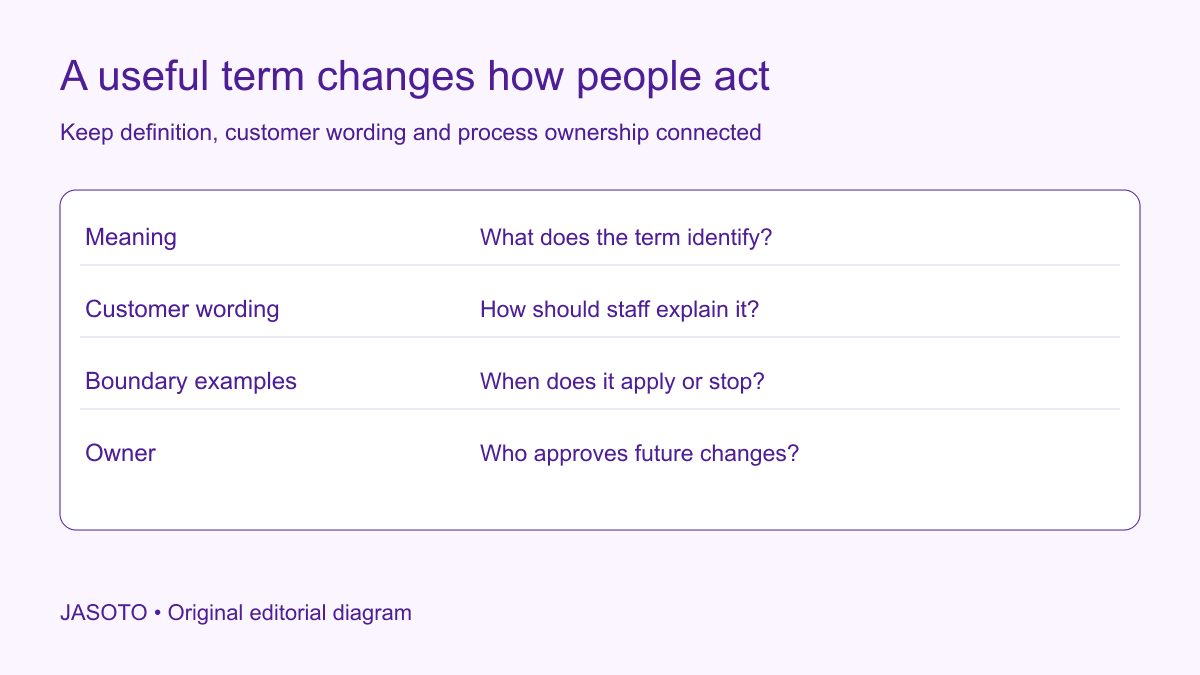
Original JASOTO editorial diagram. Its complete workflow is explained in the article; no actual customer outcome is depicted.
Prepare a service glossary for a distributed support team by choosing terms that affect decisions, confirming their meanings with service owners and adding clear examples and limits. Keep customer-facing wording linked to the current process. Make the entries easy to find during a handover or live question, then review them when the service changes. A glossary is useful when it prevents colleagues from giving the same label different operational meanings.
Begin with the actual questions and disagreements the team encounters across locations or shifts. The fictional examples here concern a United States business. The proposed structure manages service terminology; it does not replace approved policy, contractual terms or specialist instructions. Link those authoritative records so staff can locate the appropriate detail when a question exceeds the entry's scope.
The practical answer
- Prioritize terms that change customer expectations or staff actions.
- Define meaning, limits and useful examples in the actual service context.
- Keep approved customer wording linked to process owners.
- Test the glossary in handovers and update it when the service changes.
Collect terms that cause an observable problem
Ask colleagues for examples of words that led to different answers, reassignment or customer clarification. Capture the context and consequence. “Priority,” “approved” or “complete” may sound ordinary while affecting promises and next actions. Start with those terms rather than copying a general business dictionary into the team's workspace.
Keep the original observation separate from the proposed definition. A colleague saying a case was “closed” does not establish whether that means resolved, archived or awaiting another department. Record what each person understood and ask the process owner to clarify. The evidence should explain why the entry is needed and what task it should help people perform consistently.
Define the glossary's scope and audience
Identify the services, teams and channels covered. A term may have an established meaning in one product area and a different meaning elsewhere. Decide whether to create a shared definition with explicit context or separate labelled entries. Avoid a universal answer that is simple but wrong for part of the organization.
Distinguish internal workflow labels from customer language. Staff may need a system code while customers need an ordinary explanation. Record both and the relationship between them. Do not expose an internal label automatically in a template because it exists in the glossary. The entry should help the team choose the right expression for the audience and task.
Confirm the underlying service meaning
Give each disputed term to the person authorized to settle its operational or policy meaning. Ask what conditions make it true, what action follows and where the approved rule is recorded. If the process itself is undecided, mark the entry as unresolved and assign the decision. Avoid making a draft definition appear authoritative before that work is complete.
Use appropriate specialist review for terms with legal, technical or safety consequences. The glossary editor should not decide those matters through wording alone. Record the authority and source reference without copying sensitive material unnecessarily. This makes later review practical: a colleague can find the owner when the service changes instead of treating the glossary as an independent policy-making document.
Give each entry a compact structure
Include the term, plain definition, applicable service, preferred customer wording, examples, limits, source and owner. Add common search variants where useful. Keep the information concise enough to scan during work. A long narrative can conceal the one distinction a colleague needs before replying to a customer.
[Google's documentation word list](https://developers.google.com/style/word-list) illustrates how usage guidance and context can accompany preferred wording. Its choices belong to its own documentation setting. Use it as a primary example of a maintained style resource, while defining your service terms from your actual operations rather than importing an unrelated company's terminology as policy.
Preserve distinctions between service states
Check terms describing requests, review, holds, approval and completion. Write the entry so staff can identify the state from evidence rather than intuition. For example, a request received may still need assessment before an appointment is confirmed. The glossary should point to the relevant process and avoid collapsing those stages into one friendly but inaccurate word.
Add a boundary example that shows what does not qualify. If “confirmed” requires a specific agreement, an unanswered request should not meet the definition. Keep examples fictional and clearly labelled, using no customer details. The useful outcome is a decision aid that helps staff recognize the state and communicate the next step honestly.
Record customer wording with realistic limits
Provide a short approved explanation or phrase where it helps consistency. Explain which conditions must remain attached. A template sentence such as “we will review your preferred date” should not be shortened into “your date is booked” because it sounds more positive. Make the meaning-preserving constraint visible to writers and supervisors.
Allow staff to use natural language while preserving the decision. The glossary should not force a script into every conversation or prevent a colleague from explaining an unusual case. Give a route to ask about uncertain situations. Repeated uncertainty can identify a gap in the definition or an unresolved process, providing evidence for the next revision.
Handle synonyms and prohibited shortcuts carefully
List common variants so people can find the entry using the words they know. Explain whether a variant is acceptable, ambiguous or unsuitable in a particular context. Do not ban a familiar word without explaining the customer or operational problem. A rationale makes the guidance easier to apply when a new expression appears.
Keep capitalization, acronyms and product names consistent where useful. Expand unfamiliar abbreviations and connect them to the actual service. Avoid making the glossary depend on another unexplained internal dictionary. A new colleague should be able to understand the entry without asking the person who originally wrote it to translate the team's shorthand.
Support multilingual use without automatic equivalence
If the team uses several languages, give suitable reviewers the approved meaning, examples and source. Record target terms with their context and approval. A one-word translation may not preserve the same distinction between service states. Do not treat a machine-generated equivalent as settled merely because it appears consistently in several documents.
Explore language support where appropriate expertise is needed. Keep the original and target entries linked through a stable identifier. If the underlying process changes, review each affected version and template. Language variation should not become a reason for different unauthorized promises across support locations or shifts.
Work through a fictional escalation term
Imagine a support team using “priority review” to mean several things. One shift believes it guarantees an immediate reply; another uses it for a case awaiting a specialist's assessment. The process owner confirms the actual category and the next action, without inventing a universal response promise. The entry records the definition, customer wording and source process.
A handover test then asks colleagues to classify a fictional case and explain what the customer should expect. Where answers differ, the team revises the entry or process. This example shows the glossary as a tool for resolving observable ambiguity. It does not recommend a particular escalation policy or claim the exercise has improved measured response time.
Put the resource where work happens
Make entries searchable from the tools staff use and check access across locations. A glossary hidden in a private folder will not support a live conversation. Assign a stable location and explain how drafts differ from approved entries. Avoid several uncontrolled copies that can remain open after a revision.
Test retrieval with a new colleague. Ask them to find a term using a common synonym, identify its boundary and locate the owner. For relevant visit or travel-related questions, check that terms such as arrival, transfer or appointment are defined for the actual service. A generic everyday meaning may not describe the arrangement the customer has purchased or requested.
Review changes through realistic team tasks
Ask colleagues on different shifts to use the glossary on the same fictional scenario and compare their next actions. Record disagreement and investigate its cause. A definition can read clearly while the supporting process or system label remains inconsistent. Fix the source of that conflict rather than adding another paragraph that tells staff to use their judgment.
Research support providers with the actual knowledge-management task when outside help is needed. Define responsibilities before exploring support knowledge roles. The owner needs access to service decisions and a route to reviewers, not merely permission to edit text. That operating connection keeps the glossary from becoming a static editorial project.
Maintain ownership and retire obsolete meanings
Give each entry a review trigger, such as a process change, new service or repeated conflicting use. Record revisions and affected templates. Keep earlier definitions appropriately so past case notes remain interpretable, while making the current approved meaning unmistakable. Do not silently overwrite a term if historical records need the distinction to understand what staff meant at the time.
Review real clarification and handover issues after changes, noting sample limits and other operational factors. Avoid claiming a productivity improvement from the existence of a glossary alone. Its immediate value is a shared, traceable vocabulary that helps distributed colleagues make the intended decision and explain the service consistently, with a clear owner when meaning needs to change.
Put the guide into practice
- Collect disputed or confusing terms from real work.
- Confirm each underlying service meaning with its owner.
- Record preferred wording, limits and references.
- Assign language and policy questions to appropriate reviewers.
- Test retrieval and maintain a change trail.
Frequently asked questions
Should the glossary include every word used by support?
Start with terms that cause inconsistent decisions, unclear handovers or misleading customer expectations. A smaller maintained set can be more useful than a large dictionary nobody consults. Add entries when evidence shows a distinct need and retire obsolete ones when the service or process changes.
Can one preferred term replace every synonym?
Check context. Two expressions may genuinely describe the same thing, while similar words may refer to different service states. Record useful search synonyms and explain the approved distinction. Do not merge requested, held and confirmed merely to make the vocabulary look simpler.
Who decides disputed definitions?
The person responsible for the actual service or process should settle the underlying meaning, with appropriate specialist review where needed. Editors and language reviewers help communicate it clearly. A glossary meeting should not invent policy by choosing whichever phrase sounds most natural.
Explore JASOTO tools
Brief providers using the actual terminology and decision requirements.
Explore support knowledge roles →Define ownership for glossary review and team adoption.
Review travel-related terms →Clarify visit, arrival and transfer wording in the relevant service context.
Explore terminology support →Consider suitable language review for multilingual team use.
Continue with JASOTO
Compare your next step
Discover UK businesses, compare services and request written quotes before making a decision.