
Jobs & Careers · UK Guide 2026
Equipment for a Distributed New Starter: A Practical Plan
JASOTO · Updated 5 November 2026 · 1,673 words
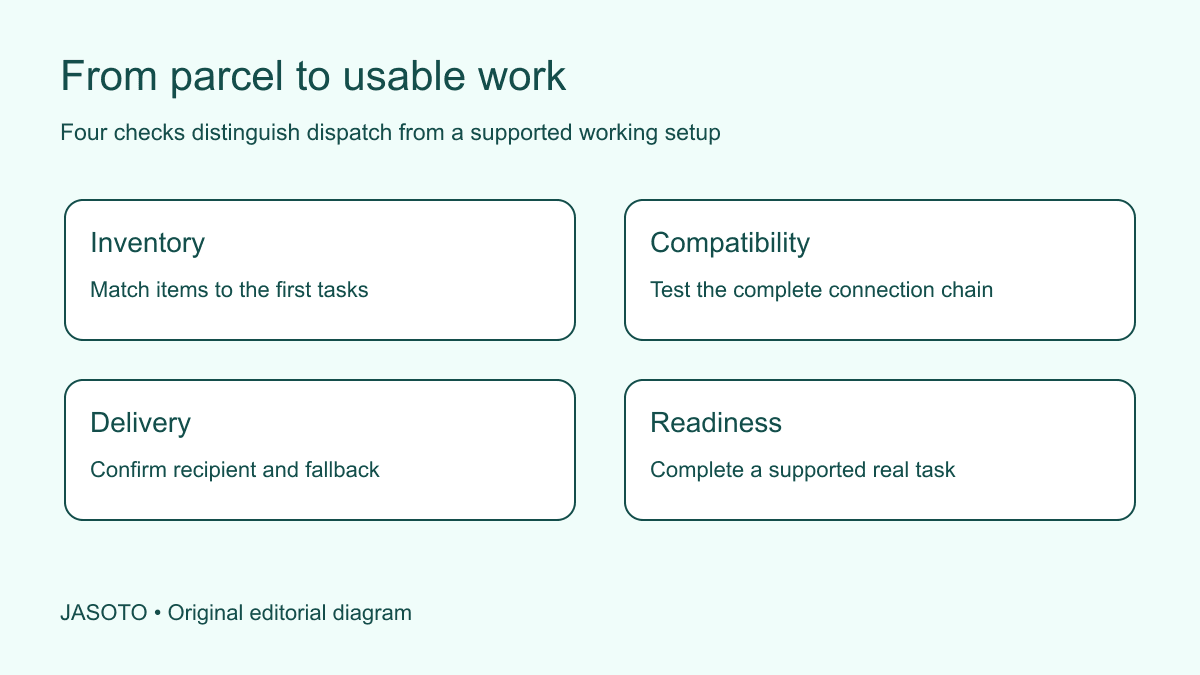
Original JASOTO editorial diagram. Its complete workflow is explained in the article; no actual customer outcome is depicted.
Prepare a distributed new starter's equipment by working backwards from their first real task, then check the complete setup before the first working session. A delivered laptop is not the same as a usable workstation. The person also needs the right connections, suitable working arrangements, an agreed support route and a clear plan for anything that arrives late.
This original planning guide is for small UK teams sending equipment to colleagues who will not collect it from the office. HSE's guidance on using computers at home explains that employers should assess relevant display-screen arrangements and use the assessment to identify what is needed. The inventory and delivery method below are editorial tools, rather than a substitute for that assessment or for competent technical setup.
The practical answer
- Order for actual tasks and assessed needs.
- Test cables and accessories together.
- Separate received from working.
- Give delivery failures a named owner.
Define the work before choosing the box
Write down the starter's first three ordinary activities. A customer-support colleague might need to read a shared knowledge base, make a call and prepare a response. A designer might need to open a representative file and join a review. These tasks produce different equipment questions. Start with the task and its actual requirements, rather than ordering the same bundle everyone received several years ago.
For each activity, identify a way to test readiness. A support call needs more than a headset appearing in the inventory: the headset must connect to the supplied device, work with the approved calling software and produce understandable audio. A design file should be a safe sample of the expected format. Ask the hiring manager to approve these tests, so the equipment coordinator is not making unspoken decisions about how the job will operate.
Separate assigned equipment from useful extras
Build an inventory that distinguishes the items the business is supplying, items already agreed with the starter and open questions. Include model or asset identifiers where appropriate, together with the intended user and delivery destination. Record the charger, connecting cables and adapters as separate entries. A monitor without the compatible lead can be physically present while remaining completely unusable for the planned welcome session.
Avoid treating a personal possession as available merely because the employee mentioned owning it. Ask what has actually been agreed and follow the business's arrangements. If an item depends on an assessment or an individual requirement, mark that dependency instead of assuming a standard bundle resolves it. Keep the practical delivery inventory distinct from sensitive assessment records. The courier needs a destination and contact instructions, not personal information about why a particular piece of equipment is required.
Check compatibility as a complete chain
Place the intended setup together before dispatch where practicable. Connect the laptop, power supply, display, keyboard, mouse and headset using the actual cables that will go in the parcel. Check that each connection serves the intended purpose; similar-looking ports and adapters do not establish compatibility. Record any setup step the starter must perform and keep it short enough to follow without specialist vocabulary.
If a supplier dispatches items directly, ask for exact product identifiers and confirm the required connections before ordering. Do not rely on a general photograph of a desk arrangement. For an invented analyst joining remotely, the essential test might be opening a sample spreadsheet on the external display while taking a practice call. This catches a missing adapter and an audio-routing problem before either becomes an unexplained interruption during induction. It does not establish that every future workload has been tested.
Complete technical preparation through authorised support
Have the responsible technical person prepare the device according to the organisation's arrangements. Ask them to confirm the state of the machine, the approved software and the route for account activation. The shipping coordinator should not invent an alternative setup by turning off controls that make the initial test inconvenient. A problem encountered before dispatch is valuable information for the person responsible for resolving it.
Keep account secrets outside the parcel inventory and general welcome document. Tell the starter how to recognise expected setup instructions and whom to contact if a screen differs from those instructions. If a service requires the employee to finish activation, say so explicitly. Record “employee activation outstanding” rather than “software ready” when the account has not yet been tested. An honest readiness state helps the manager arrange the first day around what is actually available.
Arrange delivery with the person receiving it
Confirm the delivery address, agreed recipient, contact method and any practical restrictions through an appropriate channel. Ask about receiving arrangements without assuming somebody can stay home all day at short notice. Establish who will monitor the delivery and deal with changes. A tracking link is useful, but it does not replace an accountable person when a parcel is delayed or routed somewhere unexpected.
Send the inventory separately through the business's normal channel, so the starter knows what should arrive. Avoid displaying unnecessary personal details on shared project boards. If equipment comes in several parcels, identify them individually and explain which setup depends on which delivery. A laptop arriving on Monday and a monitor arriving on Thursday may be workable, but only if the planned tasks and assessed arrangements allow it. Do not let an optimistic delivery estimate silently become a promise in the first-week schedule.
Provide an unpacking and condition check
Give the starter a simple sequence: identify the parcels, compare the contents with the inventory, note visible damage and contact the named person if something is missing. Tell them not to improvise repairs or use an item that appears damaged. Ask for relevant photographs only where useful, avoiding images that unnecessarily reveal the home, address labels or other people's information.
Distinguish received, checked and working in the record. A signed delivery does not prove that all components were present or that they function together. If a box contains a replacement item, update the inventory rather than expecting the starter to remember that the label is wrong. Keep packaging only according to the agreed practical return arrangements; do not burden someone with indefinite storage because no one decided how a faulty item would be collected.
Plan a supported setup appointment
Book a setup session with someone who can resolve likely problems and provide a way to contact them before the work device is functioning. Sending the only support link to an account that cannot yet be opened creates a circular dependency. The invitation should explain the purpose, expected preparation and what to do if the employee cannot join through the supplied equipment.
Start with the whole workflow rather than a tour of settings. Can the starter open the approved application, locate the sample, save a change and communicate with the helper? Note failures at the exact step. A statement such as “display works, microphone does not appear in the calling application” is actionable. Leave time for the starter to practise independently after the helper explains the fix. Watching a technician operate a machine does not demonstrate that the person can use it unaided.
Connect equipment readiness to working arrangements
HSE's home-working guidance says that relevant assessments should cover home and office situations where both are used. Follow the responsible person's assessment process and address identified needs. Do not treat a picture of an attractive desk as evidence that an arrangement is suitable. Equally, do not decide what furniture someone needs solely from a standard shopping list without considering their actual work and circumstances.
Keep the coordination question specific: who will arrange the assessment, who can authorise resulting action and when will it be checked? The equipment coordinator can maintain those milestones without receiving every private detail. Where additional support is required, discover business service providers and verify their suitability directly. If an occasional office setup session is part of the plan, confirm the invitation before researching travel, including how the employee will transport any equipment they are asked to bring.
Prepare a useful fallback for a late parcel
Agree the point at which the manager will change the first-day plan. If a device has not arrived by that checkpoint, decide which activities remain appropriate and what will be postponed. A telephone welcome or a discussion of the team's work might be possible through an agreed channel. Asking the starter to use an unapproved personal machine for live customer work should not be the automatic response to a delivery failure.
Keep the fallback bounded. Name its owner, the expected delivery update and the next decision time. Inform scheduled colleagues if their demonstration needs different equipment. In an original example, a remote administrator's laptop is delayed, so the manager moves the system exercise and retains a short welcome conversation. The team does not mark the system training complete. The revised schedule preserves a useful first contact while making the unresolved dependency visible to everyone responsible for it.
Close the handover and maintain the inventory
After the first ordinary tasks, ask which supplied item is unused, which is missing and which setup instruction caused confusion. Update the inventory and support record with the actual configuration. Record how faults and returns should be reported, including who can authorise a replacement. The employee should not have to negotiate with the courier or supplier alone unless that responsibility was explicitly agreed.
Use the experience to improve the next dispatch: add the adapter that was omitted, clarify the setup sentence that was misunderstood and remove redundant instructions. When the coordination becomes a continuing role, explore staffing responsibilities and describe ownership of preparation, support and returns separately. Equipment handover is complete when the person can perform the agreed work, has suitable arrangements and knows how to obtain help. Dispatching a parcel is one milestone within that process, rather than its final outcome.
Put the guide into practice
- Approve representative readiness tests.
- Check the complete equipment inventory.
- Confirm receiving and setup arrangements.
- Record working status after the first task.
Frequently asked questions
How early should equipment be sent?
Choose a date that allows delivery, checking and supported setup before the equipment is required. The exact lead time depends on the supplier, destination and the actual items. Confirm it directly, then include a checkpoint at which the manager will change the first-day plan if delivery remains uncertain.
Should every remote starter receive the same kit?
Use a consistent inventory method, but determine the items from the role, compatible connections and the relevant assessment. Identical parcels can still produce different working arrangements. Record individual dependencies without putting private assessment details into the general delivery tracker.
What if equipment arrives damaged?
Ask the person to stop using the affected item and contact the designated support owner. Record the relevant condition and follow agreed return or replacement instructions. Change planned work where necessary; a delivery receipt should not be used as evidence that damaged equipment is ready for use.
Explore JASOTO tools
Discover providers and check support for your specific task.
Explore roles and responsibilities →Consider the practical responsibilities involved when recruiting or joining a team.
Plan work-related travel →Research a journey when joining, training or meeting colleagues in person.
Continue with JASOTO
Compare your next step
Discover UK businesses, compare services and request written quotes before making a decision.