
Business Growth · UK Guide 2026
Build an Event Question Desk With Clear Responsibilities
JASOTO · Updated 5 November 2026 · 1,600 words
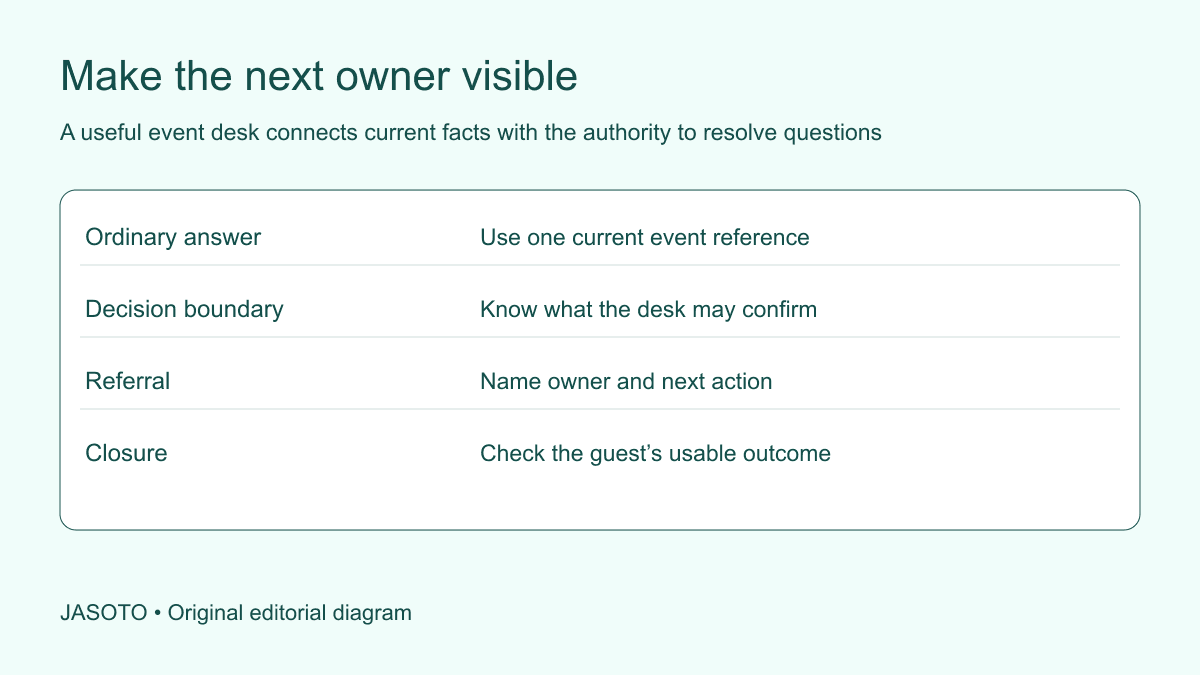
Original JASOTO editorial diagram. Its complete workflow is explained in the article; no actual customer outcome is depicted.
Build an event question desk around the decisions it can make, the information it can confirm and the people it must contact for other answers. Give staff a current event view and a simple way to track an unresolved query through to the next owner. The desk should help a guest act, even when the person receiving the question is not the person authorized to resolve it.
This original guide supports small UK events. The Government Service Manual discusses planning user support and learning from enquiries in a government-service context. The desk workflow below applies a narrow support-planning idea to a live event, with its own roles and constraints. Use the actual event and venue procedures for urgent issues, personal information, access and other decisions beyond a general information volunteer's responsibility.
The practical answer
- Define the desk’s actual help scope.
- Map questions to named decision owners.
- Keep current answers and unresolved queries separate.
- Use repeated enquiries to improve event information.
Define what the desk is there to do
State the desk's purpose in ordinary terms: help guests find the right session, understand the current program and reach the responsible contact for another question. Identify what it does not decide through the actual event arrangement. A general help point should not accidentally become the authority for refunds, food suitability, medical issues or venue safety simply because it is visible and staffed.
Give the desk a name guests understand and a location approved by the venue. Check that people can approach and leave appropriately without creating an obstruction. A clear sign should describe the help available, with another suitable route for needs the desk cannot address. The plan should make the service useful rather than promise every answer immediately. Guests can be helped through a reliable handoff when the question requires someone else.
Map likely questions to actual owners
List the main enquiry types expected from the actual event: session location, late arrival, registration mismatch, lost property or a provider question, for example. Ask who owns the decision or current information for each. Confirm that contact's availability and route. A role title without a usable contact can leave the desk unable to move a query anywhere.
Separate routine information from urgent or sensitive matters. Use the approved event route for the latter and brief staff accordingly. Do not invent a new escalation rule at the desk that conflicts with the venue's arrangements. The organizer should obtain the relevant instruction from the responsible owner. A practical contact map identifies the appropriate next action, while keeping specialist judgement with the person or service qualified and authorized to provide it.
Prepare one current source for ordinary answers
Give desk staff the latest program, room names, arrival instruction and relevant attendee process through the appropriate view. Show when it was updated and who maintains it. Remove or label obsolete active information. A volunteer should not have to choose between a printed running order and a newer message whose status is unclear while a guest waits.
Write short answers to predictable questions, using exact event terms and appropriate links or references. Keep the answer and its owner connected so staff know where to clarify uncertainty. Add the source of a material answer, such as the current program owner’s confirmed update, so a substitute volunteer can distinguish an approved instruction from an informal suggestion recorded during an earlier conversation at the desk. Avoid an extensive script that hides the simple facts people need most. The desk's reference should be easy to scan in the actual environment, including an appropriate fallback if the live tool or connection becomes unavailable. Test the view from the staff member's device before opening.
Explain the boundary between information and permission
Teach staff to distinguish confirming a fact from authorizing an exception. They may be able to state the session time but not admit another participant beyond the approved arrangement. They may identify the supplier contact but not promise a replacement service. Clear wording helps: explain what the current record says, then route the decision to its owner.
For an invented workshop, a guest asks to move into another session. The desk checks the current registration process and contacts the person who owns place decisions. It does not promise a space merely because an empty chair is visible. This preserves a useful welcome while respecting the event's actual capacity and participation arrangements. The guest receives a clear next step instead of an informal assurance another team member may later have to reverse.
Give unresolved queries a small handoff record
Record the question, relevant context, receiving owner and next action where a follow-up is needed. Include only information appropriate to resolving it through the event's process. A broad shared log should not collect unnecessary personal or sensitive detail. For a private issue, use the designated route and record only the minimal operational status required by the people maintaining the desk.
Keep received, referred, answered and closed distinct. A question being forwarded does not establish that the guest received a useful answer. Ask the receiving owner to confirm the appropriate next state. If a guest is waiting onsite, clarify how they will learn the outcome and where they can be reached through an agreed method. The desk should not let a polite referral become an invisible unresolved task after the next person in the queue appears.
Plan the queue and the longer conversation
Identify which questions can be answered briefly and which need a private or extended discussion elsewhere. Use an appropriate venue-approved arrangement so one complex issue does not block every simple direction request. Do not ask a guest to repeat sensitive detail in front of a queue. The desk should connect them with the right contact through a suitable route.
Keep the handoff clear when another person takes over. The guest should know who is responding and what happens next, while the original desk records the status appropriately. A vague instruction to find someone wearing an event badge can create more uncertainty than it resolves. The plan should name the responsible role and usable contact, with actual coverage agreed before the event rather than assumed from the number of staff present.
Brief shift changes before they happen
If desk responsibility moves during the day, reserve a practical handover. Review current program changes, unresolved questions and contact availability. Transfer the current reference view and explain which material is obsolete. A new volunteer should not discover an earlier room move only when a guest points out that their printed program differs from the answer just given.
Record the incoming owner and any query that still needs action. Keep private details handled through the proper route rather than reciting them in an open handover area. The objective is continuity of the next action, not a full retelling of every conversation. A short structured review can preserve the important state while allowing the previous staff member to leave without remaining an unofficial support contact for the rest of the event.
Connect changes to the desk in real time
Name who informs the desk when a session, room or provider arrangement changes. The desk needs the confirmed instruction, relevant effective time and decision owner for questions. A draft proposal should remain clearly pending. Avoid making the help point infer the current plan from several messages in a busy group chat where earlier suggestions look similar to final decisions.
Ask staff to report repeated questions to the event owner. The Government Service Manual discusses learning from support enquiries; for an event, a repeated direction question may identify a missing sign or unclear confirmation. Keep that observation specific and obtain the appropriate correction through the venue or program owner. The desk can improve the information while continuing to help individuals, without assuming every repeated question proves the guest failed to read something.
Test the desk with representative scenarios
Before opening, ask a colleague to pose a routine question, an exception request and an unresolved issue. Check whether the staff member can find the current answer, identify the decision boundary and make a usable handoff. Revise the reference or contact map where the exercise exposes a gap. The test evaluates the setup, not the volunteer's ability to improvise unknown policy.
Find suitable event support through business listings and confirm the actual responsibilities and coverage directly. Give guests the confirmed venue and help route before they plan travel. If information-desk coordination is recurring work, describe it accurately in relevant roles, including ownership of reference updates and unresolved queries. A small team can use simple tools effectively when the role boundaries and current instruction are understood.
Close open queries and preserve useful lessons
At the end of the desk's operating period, review every remaining action and assign it to the appropriate ongoing owner. Tell affected people the confirmed next route where needed. Do not mark a query resolved simply because the event has finished or the desk sign has been removed. Apply the proper arrangements to retaining or disposing of the records.
Review the specific improvement for the next event: a missing owner, an unclear phrase or a change that reached the desk too late. If the process has become too elaborate, restore the essentials: current ordinary answers, decision boundaries and one unresolved-query handoff. A useful question desk makes help dependable through those connections. It gives guests a practical next action and gives the team a reliable way to learn where the event information or responsibility map still needs attention.
Put the guide into practice
- Test routine, exception and referral scenarios.
- Confirm contact coverage and shift handover.
- Update the desk after confirmed changes.
- Transfer remaining actions before closing.
Frequently asked questions
Does the desk need to know every answer?
It needs reliable ordinary information and a usable route to the people who own other decisions. Staff should understand the boundary between confirming a fact and authorizing an exception. A clear handoff can be useful help when the answer belongs elsewhere.
When is a referred question finished?
Use the event’s actual process to confirm that the appropriate answer or next action reached the guest. Forwarding a question is a separate state from resolution. Keep an owner and communication route for queries that remain open.
How should repeated questions be used?
Record the specific pattern and tell the relevant event owner. It may reveal an unclear message, missing sign or another information gap. Correct the underlying issue through the appropriate route without assuming the guest was at fault or claiming a broader outcome without evidence.
Explore JASOTO tools
Discover providers and check support for your specific task.
Explore roles and responsibilities →Consider the practical responsibilities involved when recruiting or joining a team.
Plan work-related travel →Research a journey when joining, training or meeting colleagues in person.
Continue with JASOTO
Compare your next step
Discover UK businesses, compare services and request written quotes before making a decision.