
Websites & Visibility · UK Guide 2026
Write Captions That Separate Examples from Actual Work
JASOTO · Updated 5 November 2026 · 1,541 words
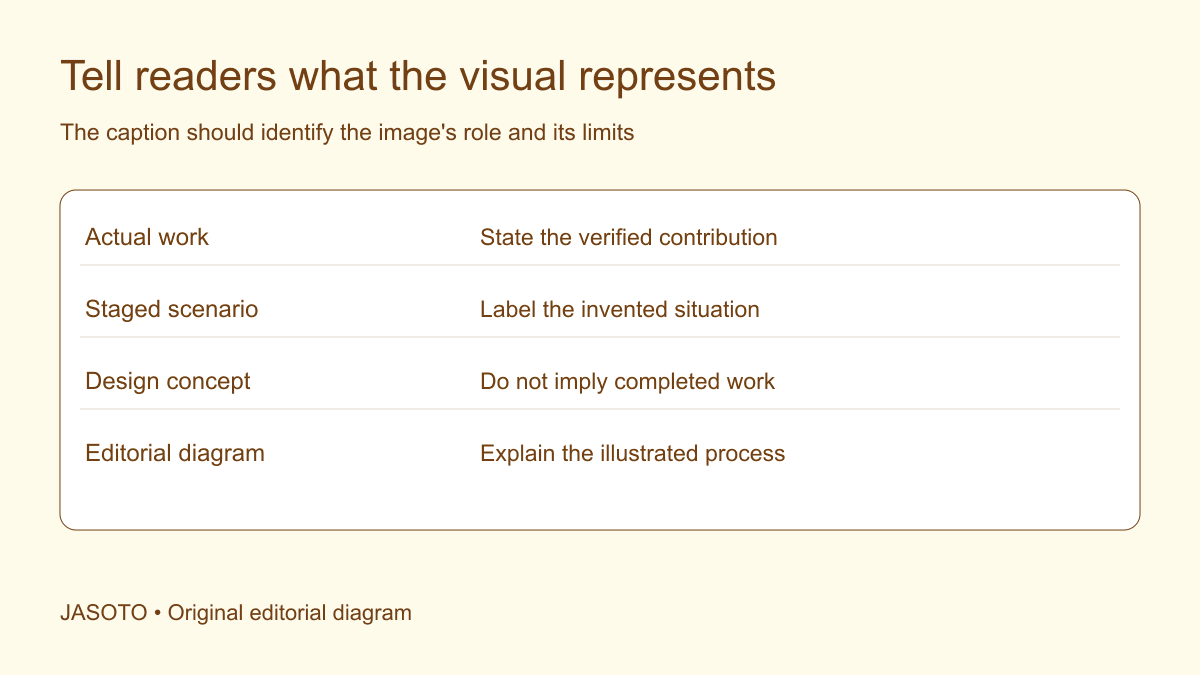
Original JASOTO editorial diagram. Its complete workflow is explained in the article; no actual customer outcome is depicted.
Write a caption by identifying what the image represents, explaining the relevant subject and stating any distinction a reader needs between actual work, an example and a concept. Do not let an illustrative image appear to be evidence of a real customer project. Check the image with its headline and surrounding text, because a technically accurate caption can still sit inside a misleading overall presentation.
This guide focuses on business website captions in the United Kingdom. It offers an editorial method rather than legal advice about advertising, image rights or privacy. Examples below are fictional and should remain labelled as examples. Use the actual image record and appropriate specialist review before publishing material involving regulated claims or unclear permissions.
The practical answer
- Identify the image's origin before deciding what the caption should say.
- State whether it shows actual work, an illustration or a concept.
- Describe relevant scope without adding unsupported outcome claims.
- Check that labels remain visible when images are reused or cropped.
Establish the image's origin before drafting
Ask whether the visual is an actual project photograph, staff image, stock photograph, staged scene, generated illustration, design render or editorial diagram. Verify the answer from the asset record rather than assuming it from appearance. A realistic image can be invented, and an unpolished photograph can still show work outside the business's own contribution.
If the origin is unresolved, hold the publication decision and assign an owner to investigate. Do not choose a vague caption to conceal the uncertainty. An image described as “our work” needs a supported connection to the business and a clear account of what it did. Source information belongs in the working record even when the public caption only needs a concise distinction.
Decide what the image contributes to this page
Identify why the visual appears here. It might show a detail of actual work, explain a process or provide a clearly illustrative setting. That purpose determines what the reader needs to know. A decorative scene should not be positioned as proof of a service outcome merely because the designer needs a large image above a claim.
Ask what a reader could reasonably infer without a caption. They may assume the people are employees, the location is a customer's premises or the result is typical. Record material risks of misunderstanding and address them through the caption and presentation. Do not attempt to describe every theoretical interpretation; focus on those created by the actual image, page and claim.
Caption actual work with a defined contribution
For a verified project image, name the relevant subject and explain the business's documented contribution. Avoid claiming responsibility for everything visible when other providers or the customer supplied part of the work. A caption such as “Storage units installed as part of the agreed office fit-out” is useful only when that accurately reflects the project record.
Include the stage or limitation where it affects interpretation. A photograph taken before final handover should not silently become evidence of the completed result. Likewise, an image of a visible finish does not establish long-term durability, operating savings or customer satisfaction. Those claims require separate support. Keep the caption within what the photograph and accompanying records genuinely show.
Label staged examples as invented situations
A staged scene can illustrate a customer task or workflow when its role is clear. Explain that it is an example rather than an actual customer interaction. Avoid invented customer names, quotations or outcome figures that make the scene appear documentary. A fictional scenario may be helpful without pretending that the business has delivered that particular result.
Consider whether the image style creates an unnecessary implication of reality. A staged photograph beside a detailed case study can look like evidence even with a small label. If the distinction remains difficult, move the example into a clearly separated explanatory section or use a more suitable visual. The best solution may be a different presentation rather than a longer disclaimer attached to the same misleading arrangement.
Keep renders and concepts distinct from completed work
State that a render or concept depicts a proposed or illustrative design. If it belongs to a real project, identify its stage accurately and avoid suggesting that every depicted feature was built. Check whether the public needs to know that a design changed before delivery. Use the approved project record rather than assuming that a final-looking render represents the final physical result.
When showing a concept alongside a completed photograph, label both and explain the comparison. Do not use the concept's ideal lighting or additions to imply a stronger finished outcome than the actual work supports. The caption should help a reader understand the design process and relevant differences. It should not encourage them to treat a visualization as a photograph simply because the image looks convincing.
Describe stock and generated visuals honestly
For stock material, use a clear illustrative label when the context could otherwise imply actual staff, customers or premises. Follow the applicable source terms and credit requirements through the business's process. Do not state that a person is a team member or customer merely because the image suits the page's mood or demographic.
For generated illustrations, accurately describe their illustrative role and avoid implying documentary evidence. A realistic invented image should not fill a missing actual-work record in a case study. If it explains a general activity, the caption can say that plainly. Keep factual claims about the business grounded in independent evidence rather than treating the illustration itself as support for experience, capacity or results.
Use diagrams to explain rather than imply measurement
An editorial diagram may show a proposed sequence, decision structure or checklist. Caption it as an explanation of the method and distinguish it from measured data. If the diagram contains fictional quantities, say so clearly and consider whether numbers are needed at all. A process illustration does not become a proven workflow because it appears in a polished graphic.
Ensure that the article provides the diagram's important information in readable text through the appropriate accessibility approach. A caption can identify its purpose but should not carry every detail of a complex visual. Keep the diagram title, body explanation and caption aligned. Avoid a caption promising a result that the diagram merely suggests as an intended objective.
Check implied claims across the whole presentation
[CAP's before-and-after image advice](https://www.asa.org.uk/advice-online/before-and-after-photos.html) highlights that visual presentation can imply claims. Review the actual communication and seek appropriate advice where needed. The editorial task is broader than adding a label: the visual, headline and sequence should support the same accurate account of what is real and what is illustrative.
Ask a reviewer what they think the image proves after seeing the finished page. Compare that interpretation with the verified record. If they infer a real customer, completed project or measured improvement that does not exist, revise the presentation. Do not defend the layout solely because a qualifying phrase is technically present somewhere below the image.
Work through a fictional website example
Imagine a repair company using a stock workshop photograph above a story about its new intake checklist. The original caption says “Our expert team delivering better repairs.” The image does not show the team and the project has no measured repair outcome. The caption makes two unsupported connections even if the underlying article accurately describes a new document.
A better presentation identifies the photograph as illustrative and places a verified image of the actual checklist where evidence is useful. The body explains the workflow change without claiming improved results that have not been measured. This fictional example shows how choosing a more appropriate visual can reduce the burden on the caption. It does not establish that a stock photograph is unsuitable for every service page.
Preserve captions when images move or crop
Record the approved caption with the image identifier and current placements. Check mobile layouts, social extracts and downloadable versions to see whether the distinction remains visible. A caption embedded in a webpage may disappear when the image is reused in a post. A crop may remove a label originally placed inside the artwork.
Give each reuse an owner and review the new context. Find creative providers using a brief that explains the required factual distinctions. If new actual-work photography is needed, research the visit and obtain the appropriate permissions. Avoid asking a designer to create documentary-looking content when the business needs to collect a real project record instead.
Maintain a correction and review process
Keep source references, approved captions and earlier versions so errors can be traced and corrected. If a caption misidentifies an image, find every affected placement rather than fixing only the page where it was noticed. Distinguish a factual correction from a change in promotional style. Preserve relevant evidence according to the business's document arrangements.
Assign ongoing ownership, considering editorial roles where the workload requires dedicated support. Review captions when services, team relationships or project context change. The useful outcome is a reader who understands the visual's actual role: evidence of defined work, a clearly invented example or an explanatory concept. Claims beyond that role need their own support.
Put the guide into practice
- Verify the image type and supporting record.
- Draft a clear description of what is shown.
- Add the distinction and limitation the reader needs.
- Review the surrounding headline and final layout.
- Record approved captions with published placements.
Frequently asked questions
Is ‘image for illustration’ always enough?
It may be too vague if the surrounding page strongly implies that the business performed the work or achieved the depicted result. Explain the relevant distinction beside the image and reconsider the presentation if it remains misleading. A short label should support an accurate impression rather than excuse a contradictory one.
Does every actual project photograph need a long caption?
No. Use the information needed to identify the subject, the relevant contribution and any material limitation. A concise accurate caption can be sufficient. The working record may contain much more detail about permissions, dates and scope than the reader needs to see on the page.
Can the same caption be reused on another page?
Review it in the new context. A factual description may remain correct while the surrounding headline or layout changes what readers infer. Check whether the image is now being used as evidence of a different service, customer relationship or outcome, and update the caption or choose another asset if needed.
Explore JASOTO tools
Continue with JASOTO
Compare your next step
Discover UK businesses, compare services and request written quotes before making a decision.