
Travel · UK Guide 2026
Build an Itinerary That Shows What Is Unconfirmed
JASOTO · Updated 5 November 2026 · 1,633 words
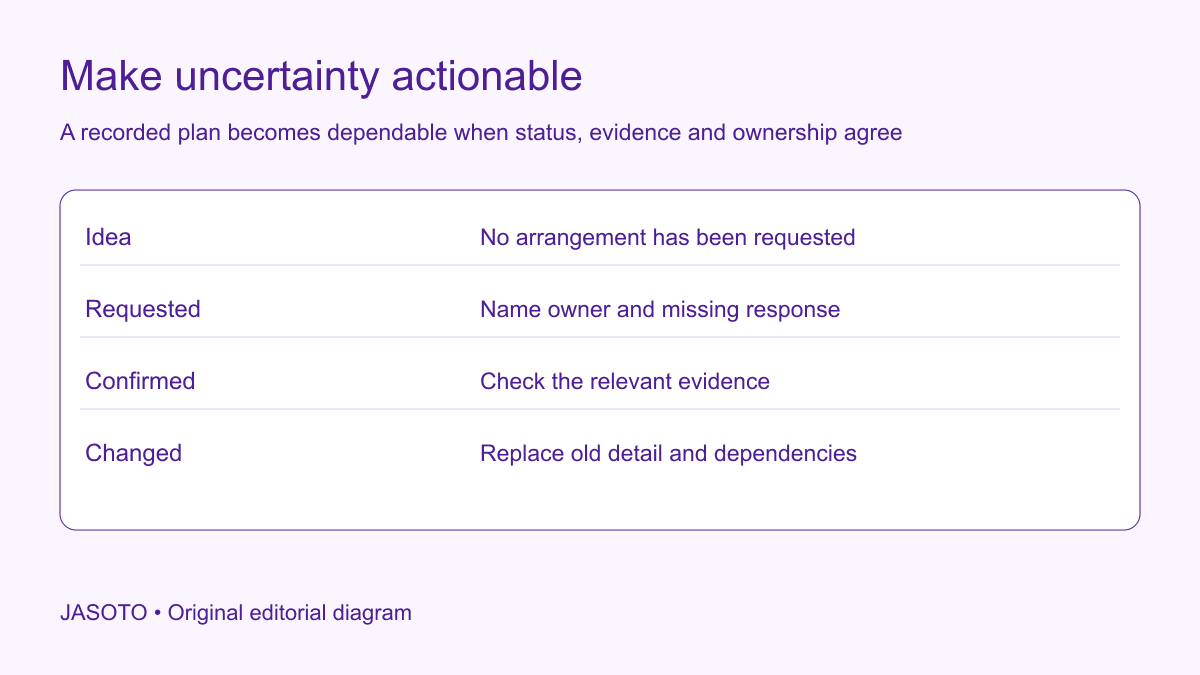
Original JASOTO editorial diagram. Its complete workflow is explained in the article; no actual customer outcome is depicted.
A working itinerary should show what is confirmed, what has been requested and what remains an idea. Give every unresolved arrangement an owner, next action and decision point. Keep the evidence for a booking separate from the act of entering it in a calendar or travel app. A neat itinerary can otherwise make a proposed transfer or hotel option look like a service someone has actually reserved.
This guide offers an original status method for UK business travel planning. TripIt's documentation explains that users can add plans manually and should review their accuracy. That capability is one example of why a recorded plan needs its own evidence check. Use the same distinction in a document, spreadsheet or approved travel system, and confirm actual arrangements with the relevant provider or host.
The practical answer
- Give each arrangement an explicit status.
- Check evidence before marking confirmation.
- Assign pending items an owner and next action.
- Keep one current traveler-facing view.
Define a small set of useful statuses
Choose labels that describe the planning state clearly. For example, idea means no request has been made; requested means someone is awaiting a response; confirmed means appropriate evidence has been checked; changed means an earlier arrangement has been replaced. Add cancelled where relevant. Explain the labels briefly so another traveler interprets them the same way.
Avoid a single percentage-complete score that hides the remaining dependency. A trip described as nearly finished can still lack the only transfer that reaches a remote venue. Status should be attached to each arrangement, not just the overall trip. Keep the distinction between a service being booked and a journey being feasible. A confirmed main transport booking does not establish that its arrival connects with an unconfirmed local leg or that the host expects you at the proposed time.
Record the arrangement before the reference number
For each item, write what it is intended to provide: transport between named places, accommodation for specified dates or an appointment at a confirmed entrance. Include the relevant date and local time context. This gives the reference a meaning. A code alone is difficult to use when several providers and travelers are involved, and it can conceal that the booking covers a different day or destination.
Identify the person or group covered. A transfer confirmed for one traveler should not silently become an arrangement for three colleagues after a copied itinerary is edited. Keep sensitive references in an appropriate place and share only what each recipient needs. The working summary should point to the evidence without exposing unnecessary personal or payment information. Accurate context makes the record usable while preserving the proper boundary around supporting documents.
Link confirmed status to checked evidence
Establish what counts as confirmation for the actual provider or host. It may be a booking record, ticket, written appointment response or another defined source. Check the key details rather than assuming a payment notification or inquiry acknowledgement establishes the whole arrangement. If you are unsure what a message means, ask the provider through the established route.
Record who checked it and when where useful. Do not invent a reference to fill a blank field, or copy one from a different leg because it looks related. For an invented workshop trip, the accommodation is confirmed while the local pickup remains an unanswered request. The itinerary should show both states honestly. A traveler can then see which parts are usable and what still prevents a complete arrival plan, instead of interpreting every scheduled line as an equal commitment.
Give pending items an owner and next action
A pending label without an owner can persist until departure. Name who is responsible for obtaining the answer and describe the next action. “Call the transfer provider to confirm the pickup location and capacity” is more useful than “transport pending”. Add a review point tied to when the decision matters. This lets the coordinator distinguish an ordinary wait from a dependency approaching the point where an alternative is needed.
Separate the provider's response from the business approval needed to proceed. A quote can be available while permission to book remains outstanding. A host can suggest an appointment while the traveler has not accepted it. Use a short note to explain the current state rather than forcing both into a misleading confirmed label. The itinerary should support the decision owner by making the remaining step visible, without allowing the coordinator to assume authority that has not been granted.
Show dependencies between arrangements
Connect the items that rely on each other. A flight or train arrival may determine a pickup; a venue confirmation may determine the accommodation area; a meeting finish may determine the return option. Mark these links in ordinary language so a change triggers the relevant review. You do not need complex scheduling software to identify that a revised arrival time affects the transfer request.
For the workshop example, the pickup depends on the final venue entrance and the number of travelers. If either remains unresolved, the request should say so. Avoid presenting an optimistic assumed time as though it were an agreed provider commitment. A dependency note helps everyone understand why an item is pending and what would resolve it. It also prevents repeated chasing of the wrong person when the actual missing information belongs to the host or traveler.
Keep ideas visible without mixing them into the active route
Maintain optional possibilities in a separate clearly labelled section. A possible dinner venue or later service can be useful research, but it should not appear in the same visual style as a confirmed booking without a status label. Someone reading quickly on a phone may otherwise travel to a place that was only suggested during planning.
When an idea becomes active, move it through the same request and confirmation checks. Do not treat familiarity as evidence. A restaurant used on an earlier trip may have different availability, and a local transfer discussed with a colleague may never have been booked. Keep the appropriate provider or host as the source for the actual arrangement. The itinerary's purpose is to describe the current plan accurately, rather than give every attractive possibility the appearance of having already been settled.
Use tools without letting formatting imply certainty
An app or calendar can make manually entered information look polished. TripIt supports manual plan creation and advises reviewing the details. Whatever tool you use, inspect whether its default display makes a pending item appear booked. Add explicit wording in the appropriate field or keep a separate status summary if necessary. Choose a method that recipients can understand through the actual view they will use.
Test an exported or printed version too. A color-coded status may disappear in a plain-text message or monochrome printout. Use words alongside visual styling for essential distinctions. Check that notes, time zones and current references survive the sharing format. A status method works only if the traveler can see the difference when it matters, including when a live system or data connection is unavailable.
Set a decision point for unresolved essentials
Identify which pending item would make the trip unworkable if it remains unanswered. Agree when the business owner will choose an alternative, change the appointment or stop further commitments. A deadline should connect to the real dependency, such as a provider's response window or the last point for a feasible approved change. Do not invent a generic deadline that ignores actual booking conditions.
Prepare the options before that decision point where practical. Check the current terms and availability rather than assuming a cancellation, replacement or refund will be possible. Keep the cost and authority question with the appropriate owner. The status record can show the decision needed without offering legal or financial conclusions. If no usable alternative exists, record that fact clearly so the decision is based on the actual plan rather than an unspecified hope that something will become available.
Share one current working view
Name an itinerary owner and show the update time. When a confirmed arrangement changes, mark the old one replaced and update dependent items. Tell affected travelers what changed and what remains unconfirmed. Avoid circulating several attachments with almost identical names and no explanation of which should guide the trip. Keep the evidence history where appropriately needed, while the active view remains easy to follow.
Use travel research to identify options, then confirm them with the relevant operators. Services discovered through business listings remain possible suppliers until an actual arrangement is agreed. If travel coordination is part of a recurring position, describe its ownership accurately in relevant jobs. Maintaining the record, checking evidence and approving a booking can be different responsibilities, and the itinerary should help those people coordinate rather than merge their authority into one ambiguous task.
Close the planning loop before departure
Review the essential route with the traveler. Ask them to identify what is confirmed, what action remains and whom to contact if the plan changes. Resolve confusing labels or missing evidence before declaring the itinerary ready. A final review should expose the remaining uncertainty instead of applying a green heading to make the document look complete.
If an assumed booking turns out to be unconfirmed, correct the status, contact the accountable owner and recheck the affected route. Preserve accurate parts of the plan and remove unsupported certainty. After the trip, note which status or handoff caused confusion and simplify the method for next time. The practical result is an itinerary people can trust for what it actually says: confirmed commitments have evidence, pending items have owners and ideas remain clearly identified as possibilities until someone makes and checks the arrangement.
Put the guide into practice
- Define the status labels clearly.
- Link essential items to checked evidence.
- Show dependencies and decision points.
- Test the shared or offline itinerary view.
Frequently asked questions
Does putting a plan in an app confirm the booking?
No. A manually entered plan records information; it does not establish that a provider has accepted a reservation. Check the appropriate booking or appointment evidence and label the status explicitly. Review the details after importing or entering them.
What should a pending entry contain?
State the arrangement needed, the missing answer or approval, the responsible owner and the next action or decision point. This makes the uncertainty actionable. A bare pending label can remain unnoticed even when it affects whether the traveler can reach the venue.
How should optional ideas appear?
Keep them clearly labelled and visually distinct from the active route, with words that survive printing or exporting. Move an idea through the same request and confirmation checks if it becomes part of the plan. Do not let a polished layout make a suggestion look reserved.
Explore JASOTO tools
Discover providers and check support for your specific task.
Explore roles and responsibilities →Consider the practical responsibilities involved when recruiting or joining a team.
Plan work-related travel →Research a journey when joining, training or meeting colleagues in person.
Continue with JASOTO
Compare your next step
Discover UK businesses, compare services and request written quotes before making a decision.