
Jobs & Careers · UK Guide 2026
New Colleague Access Without Sharing Passwords
JASOTO · Updated 5 November 2026 · 1,561 words
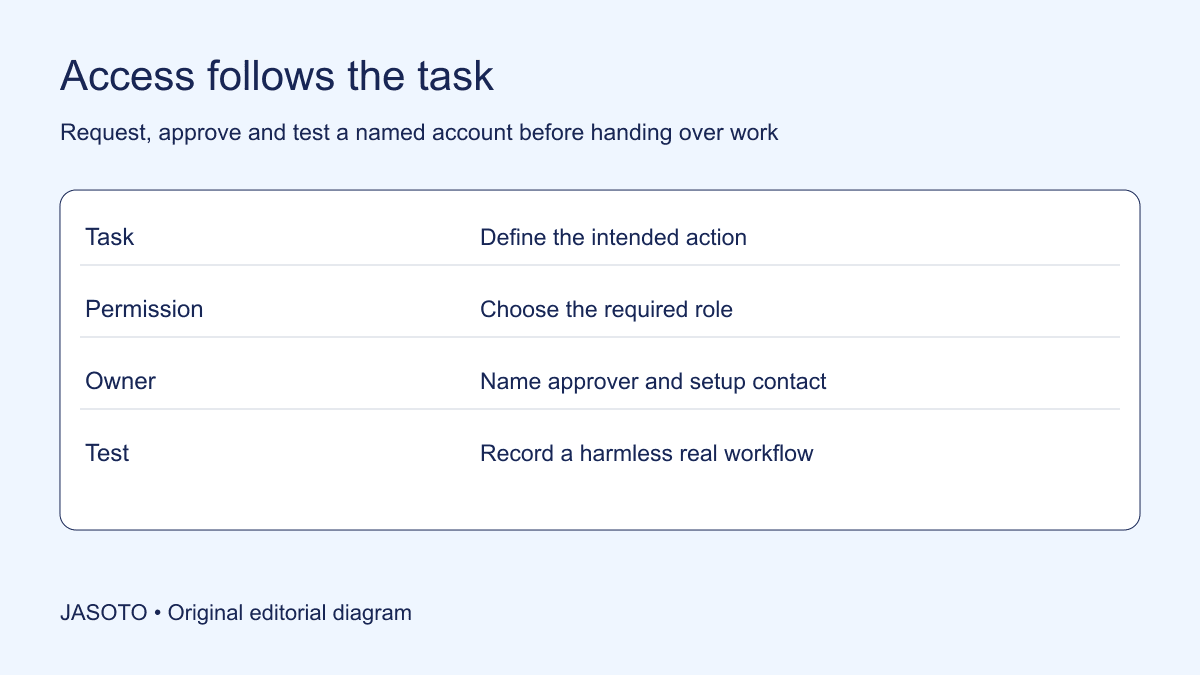
Original JASOTO editorial diagram. Its complete workflow is explained in the article; no actual customer outcome is depicted.
Give a new colleague an account in their own name, approve the permissions needed for their first tasks and test those tasks with them. Do not make a shared password the shortcut between accepting an offer and doing useful work. A named account lets the team distinguish who has access, which actions they can perform and what must change when the role changes.
This guide provides an original coordination method for a small UK business, rather than instructions for every software product. Microsoft documents adding individual users and assigning licences in Microsoft 365. Use the relevant provider's current instructions for configuration; the practical problem addressed here is making the request, approval and handover clear enough that nobody needs to borrow a colleague's identity.
The practical answer
- Map access to a specific first task.
- Use individual identities and supported delegation.
- Keep secrets out of the register.
Start with the first useful task
Ask the manager to describe what the new starter should actually do during their first two days. “Needs everything marketing uses” is too broad. “Read the campaign brief, draft a customer reply and save it for review” identifies three activities that can be mapped to specific folders and tools. Record whether the person needs to read, create, change, approve or publish. Those verbs expose the difference between useful access and unnecessary authority.
For an invented reception role, the first task might be checking an appointment and preparing a confirmation. The starter may need access to an appointment system and a draft message area, but no ability to alter billing settings. Write the intended boundary alongside the task before sending requests. This gives the person setting up accounts a decision to implement, instead of asking them to infer the business's risk tolerance from a job title.
Make one accountable request register
Use a small register with an application name, requested permission, business reason, approver, setup owner and test result. Separate “requested” from “approved” and “working”. A manager's approval does not establish that the invitation was sent, and a sent invitation does not establish that the starter can open the required file. Give unresolved entries a next action and a named owner so a missing permission cannot disappear between inboxes.
Keep secret material outside this register. It should never contain passwords, recovery codes or a screenshot that reveals them. A useful entry says “invitation accepted; draft folder opens; publishing unavailable as intended”. An unsafe entry pastes a temporary password beside the person's email address. Store the register where the appropriate team can maintain it, with access proportionate to the details it contains. A status record should help coordinate work without becoming a second place full of account secrets.
Choose a named account and appropriate role
Check whether the product supports adding users, delegating access or assigning a role before considering a workaround. In Microsoft 365, the administrator's documented process includes creating a user and assigning licences as appropriate. Other products use different terms. Ask the provider how the required task can be performed through an individual identity, and confirm any commercial conditions directly rather than assuming an existing subscription covers another person.
Avoid copying a long-serving colleague's permissions simply because their work looks similar. That account may contain rights from previous projects. Compare each requested capability against the starter's current responsibility. When the product offers several roles, record the selected role and the practical reason. If the available roles are unexpectedly broad, escalate that limitation to the accountable manager. Do not hide a permissions compromise inside an apparently routine setup tick.
Arrange activation without circulating secrets
Confirm which address will receive the invitation and how the starter will recognise a legitimate request. A manager can explain the expected sender and service through an established contact channel. Let the person activate their own account through the provider's process. If the product requires a temporary credential, follow its supported method for initial access and replacement rather than pasting the credential into a shared onboarding document.
Agree how support will work if the activation fails. The helper can ask what screen or error appears without asking the starter to read a password aloud. When screen sharing, pause before secret or recovery information is displayed. In a small team, the person providing welcome support may also be a friend or future supervisor; that familiarity does not make it useful to know someone else's credentials. Keep the assistance focused on the failed step and the authorised recovery route.
Treat authentication and recovery as separate tasks
A successful initial sign-in is only one part of readiness. Check the account's supported security options using current product guidance, including the organisation's requirements for additional authentication. Establish who administers the business service and how the starter can reach support if their usual device becomes unavailable. The aim is a workable recovery arrangement, rather than a hurried choice that leaves access dependent on one colleague's personal phone.
Do not collect recovery material in a general welcome pack. If the business has approved arrangements for recovery codes or administration, follow those arrangements and document only that the setup was completed. Ask a simple operational question: “If you cannot use today's sign-in method tomorrow morning, who do you contact?” The answer should lead to a known support process. It should not be “ask Sam for their login”, which merely recreates the original password-sharing problem under pressure.
Test a harmless version of the real workflow
Use a sample record or an agreed low-impact task to verify the requested access. Have the new colleague open the relevant workspace, locate the current instructions and prepare a draft. The person should use their own account while a helper observes the outcome. Record the result in ordinary language, such as “can draft a reply but cannot send it”. That describes the working boundary more clearly than a screenshot of a permissions menu alone.
Check a restriction as well as a permission where it is safe to do so. For example, confirm that the starter can find the publishing request route while the actual publishing control remains with the approver. Do not test by altering live customer information or attempting actions outside the person's authority. If a test fails, capture the exact application and step. “Everything broken” produces a much slower repair conversation than “draft folder opens, but the template cannot be copied”.
Provide a plan for systems that cannot delegate cleanly
Sometimes an older service appears to support only one business login. Stop and ask the supplier what supported options exist: additional users, delegated administration, a different plan or an alternative workflow. Describe the task you need to complete rather than merely asking whether password sharing is allowed. A provider may support a safer route under terminology the team has not previously used.
If the limitation cannot be resolved before the start date, change the first task. An authorised existing user might demonstrate the system while the starter works on a separate sample, or the starter might prepare information for an authorised colleague to enter. Record the temporary arrangement, its owner and the review date. Do not label an unresolved account-design problem as completed onboarding. If specialist help is needed, find business support providers and confirm their experience with the exact product before granting administrative access.
Keep physical and digital readiness connected
A named account will not help if the invitation arrives before the employee has their work device, or if their first session takes place somewhere they cannot use the approved sign-in method. Coordinate account activation with equipment delivery and the welcome schedule. For an in-person induction, research the journey only after confirming the location and arrival contact. For a remote session, provide a contact route that works before the new business account does.
The manager should decide who handles setup questions and who decides business permissions. These can be different people. A technician can implement an approved role without becoming responsible for deciding whether a starter may approve refunds. When recruiting someone to own ongoing administration, make that responsibility explicit in the role description and explore relevant jobs. Clear ownership matters even when the same individual temporarily performs several functions.
Review access after the first real work
Set a short review after the starter has completed several representative tasks. Ask which permission was missing, which area they unexpectedly reached and which invitation remains unused. Remove or correct permissions through the product's approved administration process. Do not automatically broaden access in response to every friction point; a missing instruction or incorrectly linked folder can look like a permissions failure.
Maintain a change record that identifies what was adjusted, why and who approved it. For a temporary project, set an end point for the additional permission. This makes rollback concrete: return the account to its earlier agreed role when the work ends, rather than leaving the added capability indefinitely. A new starter's access is ready when they can perform their intended work, know where to seek help and have no need to impersonate a colleague to get through the day.
Put the guide into practice
- List the first two days of actual tasks.
- Name the business approver.
- Test the account with sample information.
- Review temporary permissions.
Frequently asked questions
What if access is needed before the first day?
Agree the business reason and activation timing with the responsible manager. Check that the person has the correct contact route and equipment before sending invitations. Early access should still use their own approved identity, and the register should distinguish preparation from permission to begin work.
Can a colleague let the starter use their signed-in screen?
A supervised demonstration is different from handing over an authenticated session for independent work. Keep the authorised user in control during demonstrations and use sample information where appropriate. For the starter to perform their own work, arrange an approved individual access route and record the permissions.
What if nobody owns administration?
Name an accountable business owner for each important service and establish the supported administrative recovery route. Ask the supplier or a suitable specialist for help where necessary. Avoid solving the gap by letting everyone retain the same password; that leaves the next joiner and leaver with the same unresolved problem.
Explore JASOTO tools
Discover providers and check support for your specific task.
Explore roles and responsibilities →Consider the practical responsibilities involved when recruiting or joining a team.
Plan work-related travel →Research a journey when joining, training or meeting colleagues in person.
Continue with JASOTO
Compare your next step
Discover UK businesses, compare services and request written quotes before making a decision.