
Business Growth · UK Guide 2026
Plan Registration for a Short Community Workshop
JASOTO · Updated 5 November 2026 · 1,643 words
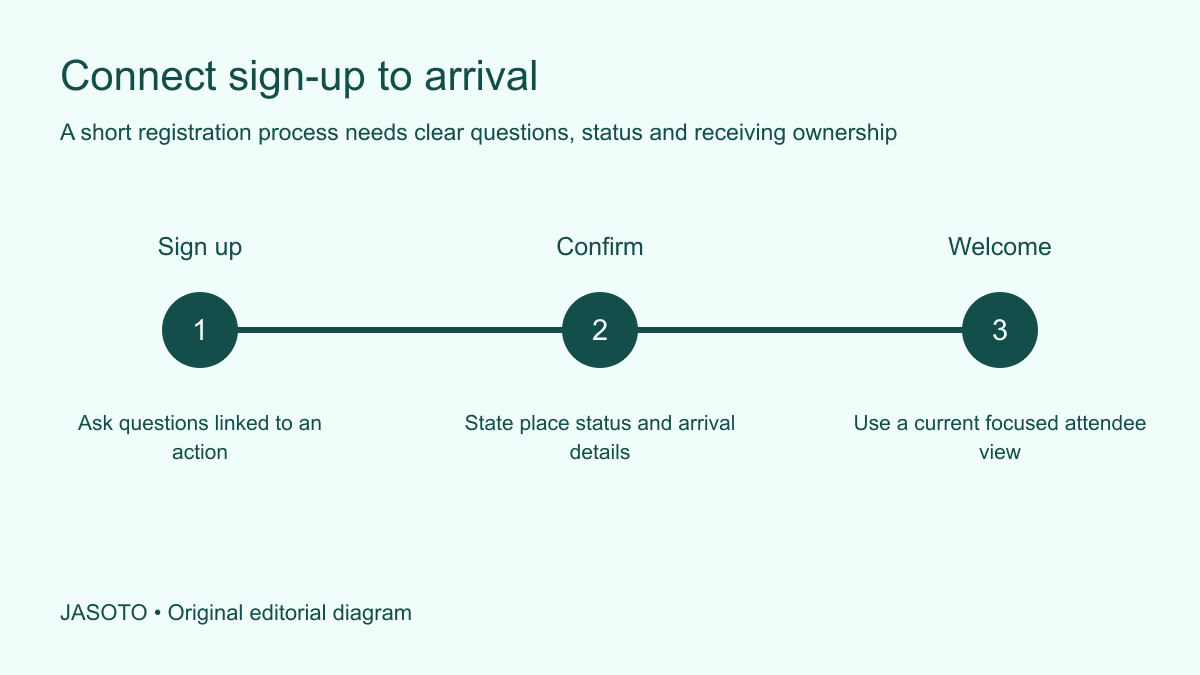
Original JASOTO editorial diagram. Its complete workflow is explained in the article; no actual customer outcome is depicted.
Plan registration for a short community workshop by deciding what the organizer needs to know before the session and what the attendee needs to know before arriving. Connect the sign-up, confirmation and arrival check into one small process. A completed form should produce a clear next step for the person and a usable record for the team, rather than a growing list of answers nobody reviews.
This guide offers an original method for UK community organizers. Microsoft's Forms guidance includes previewing a form and submitting test answers, a useful example of checking the attendee route before use. Choose a suitable approved tool and follow the organization's privacy and record arrangements. The question set and arrival workflow below focus on practical coordination, without treating a software feature as proof that an event or data-handling process is ready.
The practical answer
- Give every question a practical purpose.
- Make submission and place status explicit.
- Test the full attendee and organizer route.
- Give arrival staff a focused current record.
Define what registration needs to accomplish
Write the workshop's basic requirement: who it is for, when and where it takes place, how participation is arranged and what attendees should expect to do. Confirm the actual room and activity capacity through the responsible venue process. Do not equate a form's response count with a suitable attendance limit. The practical arrangement should determine what registration must control.
Identify the organizer who owns sign-up decisions and the person who manages arrival. They may be the same volunteer in a small event, but the responsibilities should still be clear. Someone needs to review questions before the session, while someone needs a current usable list at the door. A platform can collect responses automatically without assigning either task. Registration works when the information reaches the person who can act on it.
Ask only questions linked to a real action
For every proposed field, write what the team will do with the answer. A name may support the arrival list, a contact route may support confirmation and a session choice may allocate the appropriate workshop. Remove questions with no useful action attached, or move them to a separate appropriate process if they serve another purpose. A short workshop should not require an extensive biography merely because the form tool offers space for it.
Keep optional background questions clearly optional where appropriate and explain their purpose. If the organizer needs to discuss an individual requirement, provide a suitable private contact route. Avoid inviting sensitive detail into a general free-text box that every volunteer can later read. Follow the organization's actual arrangements and seek appropriate guidance for uncertain data questions. The practical aim is a form people can answer with confidence and a record the team can use without collecting unnecessary material.
Use questions attendees can interpret
Write in the language a new participant is likely to understand. Replace internal session codes with clear names and describe what a choice means. If you ask which session someone wants, show the actual date and time. A question can be grammatically simple while still impossible to answer because the reader has never seen the organizer's shorthand or planning document.
For an invented repair-skills workshop, the form asks which of two introductory sessions the person wants and provides a short description of the activity. It does not ask participants to diagnose a technical problem before they have attended. The example illustrates matching the question to what the attendee can reasonably know. Use the actual workshop's needs and appropriate safety arrangements, with any specialist intake question reviewed by the responsible person rather than copied from a generic event template.
Separate sign-up from confirmation
Decide what a form submission means. It may be a confirmed place, a request awaiting review or an expression of interest. State the actual status clearly in the form and response. Do not display a celebratory completion message that implies attendance is guaranteed when the organizer still needs to allocate places. The attendee should understand whether to make arrangements now or wait for another decision.
Give the team matching status labels. Submitted, confirmed, waiting and cancelled can describe useful states when the process actually uses them. Explain who changes each status and how the attendee learns the result. A tidy list becomes misleading if one volunteer assumes every response is a confirmed place while another is still reviewing capacity. Keep the status attached to the person or place through the proper record, rather than relying on memory of a private message.
Design a confirmation people can act on
Include the workshop name, confirmed session, full destination, arrival instruction, expected duration and relevant preparation. Tell people what to bring only when it is genuinely needed and appropriate. Provide a contact for questions and a clear way to say they can no longer attend. The confirmation should carry a participant from sign-up to a feasible arrival, without requiring them to search through the original promotional post.
Distinguish required preparation from optional suggestions. If the activity has a specific participation requirement, explain it through the responsible process before the event rather than surprising people at the door. Keep personal arrangements in the appropriate private channel. A general confirmation can be concise while still connecting the attendee with a person who can discuss a relevant need. The important point is that the promised contact is actually monitored by someone with a clear responsibility.
Plan changes and waiting places deliberately
If capacity is reached, decide how the organizer handles further interest and communicates it. Do not promise a waiting-list place will become available. State the actual process and how someone will be contacted if a confirmed space opens. Keep an offer, acceptance and updated attendance list connected so a released place does not accidentally remain assigned to two people.
Ask confirmed attendees to use the agreed route for cancellations or corrections. Name who maintains the list and how late changes reach the arrival team. A volunteer at the door should not have to interpret several private inboxes to decide who is expected. Keep any deadline tied to the actual event preparation. Avoid imposing an elaborate change process that is harder for people to use than a short clear message to the responsible organizer.
Test the complete attendee route
Preview the form in the relevant formats and submit appropriate test responses through the tool's supported method. Microsoft documents preview and test submission for Forms; follow the current instructions for the tool you actually use. Check the question wording, required fields, completion message and the record received by the organizer. A form that looks correct in edit mode may still fail to produce the intended next action.
Ask someone unfamiliar with the workshop to complete a suitable test and explain what they believe happens next. Can they identify the session, place status and arrival instruction? Record the exact ambiguity and revise it. Keep test data separate from real registrations or label it through the appropriate process so it does not consume a place. A successful technical submission is one check; understanding the confirmation is another useful part of the rehearsal.
Prepare a small usable arrival record
Give the arrival team the current information needed to welcome participants and identify their session. Keep unrelated answers out of that view. A volunteer checking names generally does not need every background response collected elsewhere. Confirm who can resolve a mismatch or an unexpected attendee, using the actual capacity and organizer process rather than improvised promises at the desk.
Provide an appropriate fallback if the live tool is unavailable. A protected offline or printed view may help, depending on the organization's arrangements and information sensitivity. Test that it is current and legible. Keep personal details out of public view and follow the proper process for handling the record after the event. The fallback should make a short arrival check workable without turning the desk into a place where every attendee can inspect the full participant list.
Connect registration to the workshop team
Pass practical information to the people who need it: the facilitator, venue contact or other responsible owner. Share the relevant action and count rather than forwarding every response indiscriminately. If a question reveals an arrangement that needs confirmation, name who will resolve it before the session. The form should not become an inbox where a participant's request is received but nobody acknowledges or acts on it.
Use business listings to discover potential venue or event support and verify suitability directly. Confirm the session location and receiving contact before participants research travel. If coordinating registration is a continuing responsibility, describe it accurately in relevant roles, including who owns place decisions and who maintains the arrival record. Simple tools can support a useful process when responsibilities are explicit and the attendee's next step is clear.
Review after the session and simplify
Compare registration, confirmation and actual attendance through the organization's appropriate record. Use the facts to understand issues such as a confusing session label or an unclear cancellation route. Avoid treating registrations as attendance or attendance as proof that everyone benefited. If feedback is gathered, design it for the actual question you want to answer rather than using the registration form as an indefinite collection point.
Apply the proper retention and disposal arrangements to participant information and close outdated sign-up routes. If the process was too complex, restore the essential questions, clear status and current arrival instruction. Keep the useful lesson for the next workshop without copying unnecessary personal responses into a reusable template. Effective registration gives the participant an understandable commitment and gives the team just enough current information to prepare, welcome people and resolve the remaining practical questions.
Put the guide into practice
- Confirm capacity and decision ownership.
- Write clear session and confirmation details.
- Test with an unfamiliar participant.
- Close old forms and handle records appropriately.
Frequently asked questions
Does submitting a registration form always confirm a place?
State what submission means in your actual process. It may confirm attendance, request a place or record interest pending review. Make the form response and organizer record use the same status so participants know whether to make arrangements or await another message.
How many questions should the form ask?
Ask the questions connected to real preparation or attendance actions. There is no useful universal number. Remove fields nobody will use, explain optional questions and provide an appropriate private route for individual arrangements that should not appear in a general response list.
What should the arrival team receive?
Provide a current view with the information needed to welcome participants and identify the correct session, plus a decision contact for mismatches. Keep unrelated background responses out of that view and prepare an appropriate tested fallback if the live tool is unavailable.
Explore JASOTO tools
Discover providers and check support for your specific task.
Explore roles and responsibilities →Consider the practical responsibilities involved when recruiting or joining a team.
Plan work-related travel →Research a journey when joining, training or meeting colleagues in person.
Continue with JASOTO
Compare your next step
Discover UK businesses, compare services and request written quotes before making a decision.