
Jobs & Careers · UK Guide 2026
Build a Searchable Glossary for a New Role
JASOTO · Updated 5 November 2026 · 1,663 words
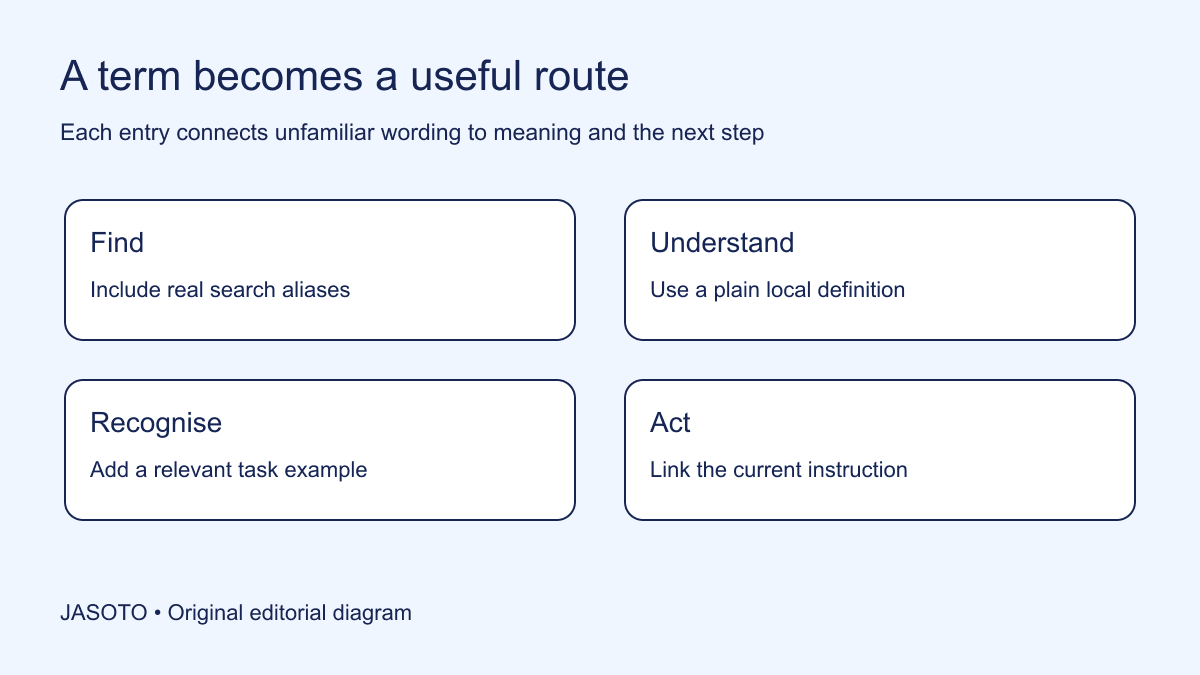
Original JASOTO editorial diagram. Its complete workflow is explained in the article; no actual customer outcome is depicted.
Build a new-role glossary from the words a colleague actually encounters while doing the job. Give each term a plain explanation, a relevant example and a link to the current instruction or owner. Include the alternative words people search for, so someone who does not yet know the official term can still find the answer. A useful glossary is a route into work, rather than an alphabetical display of how much jargon a team knows.
This guide offers an original method for UK small teams supporting someone in an unfamiliar role. GOV.UK's clear-language guidance says specialist terms should be explained when needed and encourages using the audience's words. Its rules apply to government publishing; the glossary structure below is an editorial recommendation for an internal team. The aim is to help a colleague identify the right concept without making a glossary a substitute for clear everyday communication.
The practical answer
- Collect terms from actual task questions.
- Define local meaning in plain language.
- Make aliases searchable.
- Link each term to current work guidance.
Collect terms at the moment they cause friction
Ask the starter to note words they cannot interpret in a task, meeting or message. Include the phrase as it appeared and enough context to understand the question. “What does close mean in the weekly tracker?” is more useful than collecting every acronym from an organisation chart. The same ordinary word can have several meanings, so context helps the owner define the relevant one.
Use questions from more than one person where possible. A manager may overlook familiar shorthand because it has become invisible to them. The starter's search words reveal a different perspective. Keep examples free of unnecessary customer or personal details. If a sensitive message contains an unfamiliar term, record the term and general task without copying the whole message into the shared glossary. Vocabulary collection should not become an accidental archive of private conversations.
Define the glossary's boundary
Decide which role and tasks the first version will cover. A glossary for a booking coordinator might include appointment statuses, venue terms and common handoff phrases. It need not define every term used in finance, technology and employment policy. A focused starting point is easier to maintain and more likely to contain accurate explanations of words the person needs now.
Identify related sources that already exist. A product manual may define technical language, while an internal policy owns employment terminology. Link to those sources where appropriate instead of rewriting specialist definitions without authority. State that the glossary explains local usage and points to the relevant source. If a term has a formal legal or technical meaning, ask the responsible expert to approve the explanation and avoid presenting a casual local interpretation as a definitive external definition.
Use a consistent entry structure
Give each entry the term, plain meaning, context, example, related words, instruction link and owner. Not every entry needs a long paragraph. “Awaiting customer: we need information from the customer before the booking can move forward” is enough to orient the reader if the entry then points to the actual follow-up process. Keep the explanation distinct from the steps required to perform the whole task.
Add a date when the entry is checked or changed. If the underlying process moves, the owner should update the explanation and link. A status definition can affect what colleagues do next, so it should not remain an unreviewed opinion from whoever first typed it. The structure should be simple enough to maintain in a shared document or approved knowledge tool. Choose the platform the team can reliably access and search rather than buying a new system before testing the content.
Explain the term without using another unknown term
Read the definition from a new starter's perspective. “A handoff is an interdepartmental workflow transition” replaces one unfamiliar concept with several others. “A handoff passes the task and the information needed for the next step to another person” is more usable. The explanation should identify what the term helps someone understand or decide in this role.
Use a concrete example beside the definition. In an invented service team, “provisional” might describe a time suggested to a customer but not yet confirmed. The example could show the difference between suggesting Tuesday and receiving the customer's acceptance. Ask the process owner to confirm that this is the team's actual use. Do not invent a convenient definition that conflicts with the software or policy simply because it reads smoothly in the glossary.
Add aliases that reflect real searches
List common abbreviations, older names, spelling variants and ordinary descriptions that people use to find the term. If colleagues call the appointment record the “job card”, include that phrase even if it is no longer the preferred label. Point it to the current term and explain the relationship. A glossary that accepts only official vocabulary requires the reader to know the answer before they can search for it.
Test the search mechanism with those aliases. Some tools search body text differently from headings or tables. Do not assume that an alias is discoverable merely because it is visible somewhere in the document. Ask a new colleague to search using their natural phrase and note the result. If the platform cannot support useful searching, add a clear index or change the format before expanding the glossary into a large resource people cannot navigate.
Distinguish terms that look similar
Pay particular attention to words that differ by a small label but lead to different actions. “Booked”, “confirmed” and “completed” may describe separate states in a team's process. Explain the difference and link to the source that determines the status. A comparison can prevent someone from treating a tentative arrangement as a commitment simply because two phrases sound positive.
Where a term is ambiguous across departments, name the context in the entry title. “Close: sales record” and “Close: service request” may need distinct explanations. Do not force the business into one universal definition if the workflows legitimately differ. Instead, make the distinction visible and tell the reader which process they are in. The glossary should reduce accidental interpretation, while the accountable owners decide whether confusing terminology should eventually be changed in the underlying tools.
Link words to the task they support
Add a direct route to the relevant instruction, sample or decision owner. A definition tells the starter what a term means; the linked source tells them what to do. Keep that separation clear. If the glossary entry becomes a complete process manual, it can drift out of alignment with the actual instruction and leave the team maintaining the same steps in two places.
Test links with ordinary role access, including the new colleague's account where appropriate. A glossary entry that points to a restricted folder can appear complete to its editor while failing for the person it is meant to help. Record access problems separately and route them to the proper owner. Do not fix the inconvenience by copying confidential material into a wider shared glossary or by asking the starter to use another colleague's account.
Run a practical find-and-explain test
Choose several words from a representative task and ask the starter to find their meanings without coaching the search. Then ask what they would do next using the linked source. The aim is to see whether the glossary enables useful orientation. If someone finds the definition but cannot distinguish the next action, the entry may need an example or a more precise link.
Use the test to improve the resource, rather than score the employee's memory. Note the phrase they searched, the entry they found and where uncertainty remained. An invented example might reveal that the starter searched “customer has not replied” while the glossary only listed “pending response”. Add the alias and clarify the context. That is a specific content improvement supported by observed difficulty, without claiming that a short usability check proves a wider productivity gain.
Maintain ownership and retire obsolete wording
Give each group of terms an accountable subject owner and name someone who coordinates updates. The coordinator can check broken links and missing fields without becoming responsible for every specialist definition. Include glossary review in the process for changing a status, template or tool. A small wording change in the system may require updates to aliases, examples and instructions at the same time.
Retain older terms as clearly labelled redirects where people may still encounter them, rather than deleting every trace immediately. Explain which current term replaces them and when the change matters. Remove inaccurate advice through the normal review route and keep a version history that permits correction. If a revised definition creates confusion, restore the previous approved wording while the owner resolves the discrepancy. A searchable glossary needs an explicit rollback path because words influence decisions.
Use the glossary to improve communication
Review frequently searched or repeatedly questioned terms and ask whether the surrounding messages could be clearer. A glossary is useful support, but it should not justify unnecessary jargon in every email. Replace avoidable shorthand in onboarding instructions and keep essential specialist terms explained in context. If an entry is constantly needed for an ordinary phrase, the underlying process label may deserve attention from its owner.
When recruiting or exploring roles, describe responsibilities in language applicants can understand before they have access to internal vocabulary. If a specialist helps review content, find appropriate business providers and give them a focused brief. For a glossary review at another site, confirm the host and relevant materials before arranging travel. The completed resource should let a new colleague search with the words they know, understand the local meaning and reach the current next step without relying on private knowledge.
Put the guide into practice
- Choose the initial role and task scope.
- Assign definition owners.
- Test natural searches with a new colleague.
- Review entries when the process changes.
Frequently asked questions
How many terms should a new-role glossary contain?
Start with terms that arise in the first representative tasks and questions. There is no useful universal target. A short accurate glossary with examples and working links is preferable to a comprehensive-looking list whose definitions are unreviewed or unrelated to the role.
Should acronyms always be removed?
Remove unnecessary shorthand from ordinary communication, but explain acronyms people genuinely need to recognise in systems, documents or specialist work. Include the expanded form, local context and useful search aliases. Do not assume that expanding the letters alone explains what the term means.
Can a glossary replace the process manual?
No. Use it to explain concepts and link to the current instructions or decision owner. Copying full procedures into definitions creates duplicate material that can drift apart. When an entry needs many steps, improve or create the underlying instruction and keep the glossary as a clear route to it.
Explore JASOTO tools
Discover providers and check support for your specific task.
Explore roles and responsibilities →Consider the practical responsibilities involved when recruiting or joining a team.
Plan work-related travel →Research a journey when joining, training or meeting colleagues in person.
Continue with JASOTO
Compare your next step
Discover UK businesses, compare services and request written quotes before making a decision.