
Business Growth · UK Guide 2026
Name Shared Files So New Colleagues Can Find Them
JASOTO · Updated November 5, 2026 · 1,607 words
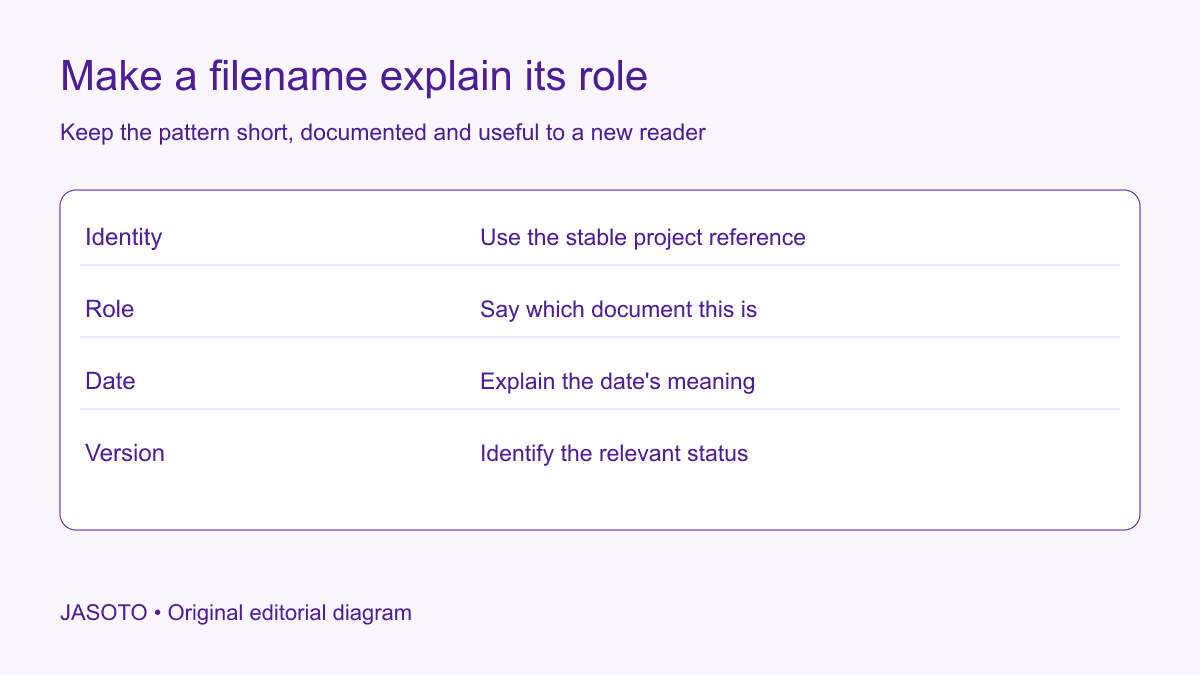
Original JASOTO editorial diagram. Its complete workflow is explained in the article; no actual customer outcome is depicted.
Name shared files by giving a new colleague enough information to identify the project or subject, document role and relevant version without relying on office memory. Use a short consistent pattern and explain it. Test whether someone can find the right record for a real task before renaming a whole library or declaring the filing system organised.
This guide is an original retrieval-focused method for small businesses in the United States. The example uses an invented design agency with project briefs, drafts and customer approvals. File storage, permissions and retention still need the business's appropriate systems and responsibilities. A good name helps someone locate a record; it does not by itself establish approval, authenticity or access rights.
The practical answer
- Name files for the people who need to retrieve them.
- Keep stable identity separate from changing descriptions.
- Make document role and current status understandable.
- Test retrieval before renaming a whole shared library.
Begin with the questions people ask when searching
Collect common retrieval tasks: find the current brief, identify the approved artwork or locate the supplier's quote for a named project. Ask a colleague unfamiliar with the folder how they would search. Their terms may differ from the abbreviations used by long-serving staff. Record the specific confusion rather than assuming every problem can be solved by adding more words to filenames.
Separate naming problems from access and process problems. If the approved document is stored in a private account, a clearer name will not make it available appropriately. If nobody knows which draft was approved, renaming every file cannot establish the missing decision. Identify the actual issue and assign it to the responsible person before using a naming project to conceal a deeper gap.
Choose a stable identity component
Use the business's actual project, case or product reference where it supports retrieval. Keep the relationship with a readable subject in an appropriate index or system. A customer name or marketing title can change, while a stable reference continues to connect the records. Avoid inventing a parallel identifier that nobody uses elsewhere and cannot reconcile with existing work.
Make the identity understandable enough for the intended team. A string of unexplained digits may be technically unique but hard to use without a directory. Keep a short project register or suitable search route. The goal is a reliable connection between the file and the business matter, not a filename that tries to contain every detail about the customer or job.
Describe the document's role
Use consistent terms such as brief, quote, draft, approval record or handover where they accurately describe the contents. Avoid vague labels such as document or new version when the role matters. A colleague should distinguish a supplier proposal from an accepted order without opening several files that look identical in a folder view.
[Massachusetts Archives' file-organisation guidance](https://www.sec.state.ma.us/divisions/archives/records-management/file-best-practices.htm) discusses documented, implementable naming practices in its records-management context. This original business method uses that limited principle: choose terms the intended users can apply consistently. Do not copy an archival scheme blindly if it creates labels the small team cannot maintain or does not need for its actual work.
Define the meaning of dates
If a date belongs in the name, state which event it represents. A meeting date, approval date and export date can identify different things. Choose an unambiguous pattern appropriate to the systems and users, and document it. Do not let each employee decide whether the number means creation, issue or last edit, because chronological sorting will then appear reliable while comparing different events.
Preserve relevant dates in the record or metadata where needed. Renaming an old file with today's date can make its history harder to understand if the date is read as the document's issue date. Keep corrections traceable and ask the responsible records owner about consequential cases. The filename should support interpretation rather than overwrite a record's context with a convenient new label.
Make version and status readable
Distinguish a working draft from the current approved record using the actual business process. Avoid labels such as final-final-latest that accumulate when people cannot identify the authoritative file. Define how the current version is selected and where approval evidence is held. A filename saying approved should not be used merely because the author likes the document or sent it to a manager.
Check the document system's existing version features before creating a competing manual sequence. Some workflows rely on stable links and controlled revisions. Ask the responsible administrator how names and status should work together. The best pattern for a small shared folder may differ from a managed document library, and a generic naming guide cannot establish every platform's behaviour.
Keep private information out of unnecessary places
Think about where filenames appear: email attachments, recent-file lists, shared links or exported indexes. A filename can disclose information even when the document itself has restricted access. Use the business's appropriate privacy and security arrangements when choosing customer or staff identifiers. Avoid embedding sensitive personal details merely because they help the author recognise the case.
Keep the readable subject proportionate to the retrieval purpose. A project reference plus a controlled index may be more suitable than a long description of a private customer issue. Ask the responsible person when a record needs particular handling. A naming project should improve access for authorised users without expanding disclosure to everyone who can see a folder listing or attachment name.
Document a pattern with examples and exceptions
Write a short naming note that explains each component and provides representative fictional examples. An invented pattern might combine project reference, document role and version marker. Include a dated record only where the date has a defined purpose. Keep the example clearly editorial rather than presenting it as a required universal standard for every business file.
Explain how staff should handle an item that does not fit the common pattern. A clear owner or correction route is better than forcing every unusual document into an inaccurate category. Review new terms before adding them to the shared convention. Otherwise the guide can gradually accumulate several synonyms for the same role and recreate the confusion it was meant to solve.
Pilot the pattern on a representative set
Include one retrieval task that starts from an unfamiliar reference. A new colleague may have a customer email naming the subject but not the internal project code. Check whether the approved index or search route connects those terms appropriately. Do not solve the problem by placing excessive personal information into every filename. The test can reveal a missing directory relationship rather than a bad name. Record which part of the retrieval pathway needs correction so the final convention stays short while the overall information system remains useful.
Choose a small group containing different document roles and a meaningful version history. Preserve the old-to-new mapping and an appropriate rollback route. Check permissions, links and connected workflows with the responsible technical person before broad changes. Do not assume that renaming a file affects only its visible label in every system.
Ask ordinary users to complete the retrieval tasks identified at the start. Can they find the current brief and distinguish it from a draft? Record the actual stumbling points and revise the relevant component. Avoid judging the pilot only by whether the folder looks tidier. A successful pattern helps people locate and interpret the right record under the conditions in which they work.
Worked example: a design agency's project files
Imagine an agency with files called client-new, final-design and final-design-updated across several folders. A new colleague cannot identify the current approved brief. The team first resolves the actual approval record, then pilots names using the stable project reference, document role and suitable status. A concise index links the current record and explains where historical drafts remain appropriately stored.
The colleague can now distinguish the relevant roles without having attended the original project. This invented example claims no measured time saving or compliance result. It shows why establishing the source of truth precedes renaming, and why a naming pattern should be tested through a retrieval task rather than approved as a purely visual cleanup.
Handle transition without creating duplicate authority
Plan how staff will use the new pattern while older records remain. A documented transition can distinguish new working files, migrated records and historical material left unchanged. Do not leave two current-looking copies with different names and no explanation of which is authoritative. Preserve important references and update the relevant index through the actual controlled process.
Tell affected colleagues what changed and where to ask questions. A folder renamed without communication can temporarily make retrieval worse even if the new pattern is sensible. Keep the change proportionate and review meaningful problems. Avoid imposing a large migration on unrelated records merely because the pilot worked in one project type with different users and dependencies.
Maintain the convention through ordinary work
Assign ownership for the naming note and review recurring exceptions. If new colleagues repeatedly misunderstand a term, clarify it. If staff regularly bypass the pattern because it is too long, investigate which components actually support decisions. Keep earlier versions of the guide and appropriate change records so an unhelpful revision can be reversed.
Use JASOTO businesses to discover document-management support and verify relevant capability directly. If shared records need ongoing administration, explore information support roles within a staffing review. For a confirmed records review elsewhere, research travel after access is agreed. Useful file names connect a new reader to the right business record without depending on private memory or invented approval status.
Put the guide into practice
- Identify common retrieval tasks and current confusion.
- Choose a short documented pattern compatible with your systems.
- Pilot names without breaking important links.
- Assign maintenance and a correction route.
Frequently asked questions
Should every filename contain a date?
Use a date when it helps identify the record, and define which date it represents. Creation, approval and service dates are different. Some records need another stable reference more than a date. Choose a consistent purpose rather than adding an unexplained date to every name.
Does renaming a file make it the approved version?
Approval needs the actual business process and evidence. A readable status can help retrieval, but a filename alone should not invent authority. Keep the current authoritative version and approval record clear in the system used for the work.
Should we rename the whole archive immediately?
Pilot a small representative set first and check references, permissions and linked processes. A broad rename can disrupt existing links or workflows. Preserve a mapping and rollback approach appropriate to the actual systems, and obtain technical support where needed.
Explore JASOTO tools
Discuss the actual retrieval problems and systems with suitable providers.
Explore information administration roles →Consider support where maintaining shared records becomes ongoing work.
Research a confirmed records review visit →Plan travel if an agreed review requires access to another location.
Continue with JASOTO
Compare your next step
Discover UK businesses, compare services and request written quotes before making a decision.