
Building & Home Improvements · UK Guide 2026
Small Refurbishment Decision Log: Keep Changes Clear
JASOTO · Updated 5 November 2026 · 1,521 words
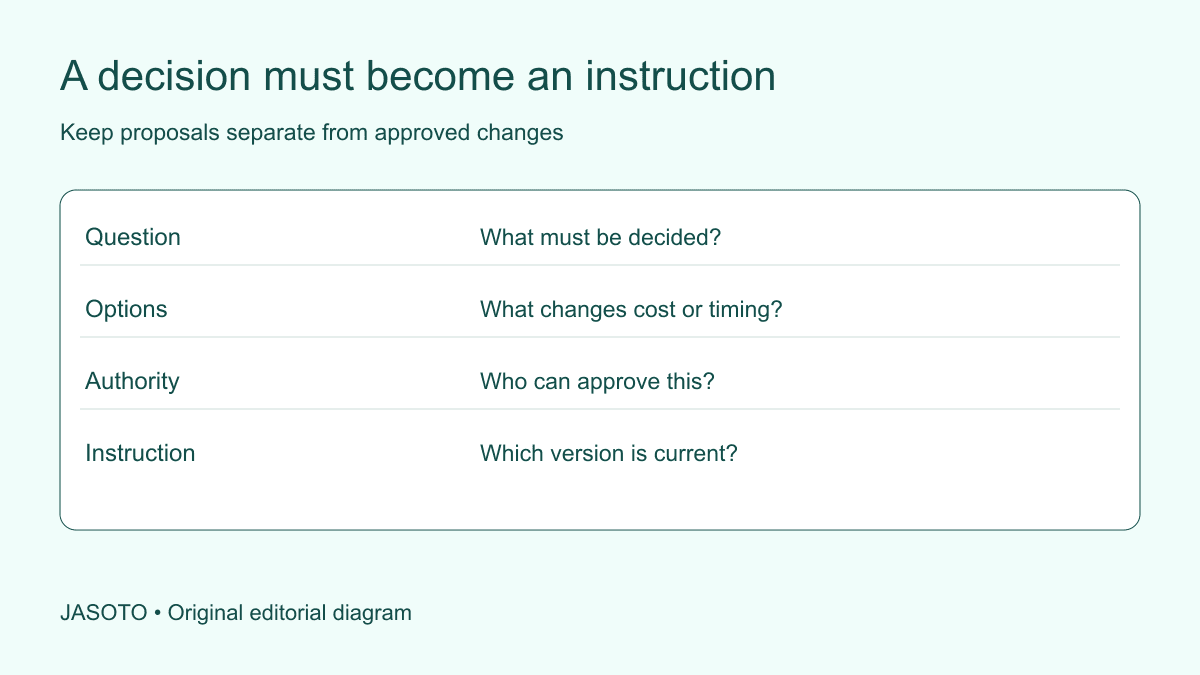
Original JASOTO editorial diagram. Its complete workflow is explained in the article; no actual customer outcome is depicted.
A refurbishment decision log should record what was decided, who had authority to decide it, which information supported the choice and what instruction now applies. Keep proposed changes separate from approved work. Link the log to the relevant drawings, specification and formal change records rather than trying to replace them with a spreadsheet.
This guide offers an administrative method for a small UK refurbishment, using an invented reception-area example. It does not provide construction design, safety or contract advice. HSE's contractor guidance covers important responsibilities around using contractors; a decision log is only a communication aid alongside the proper arrangements. Its purpose is to stop an unresolved idea or outdated choice being mistaken for the current instruction.
The practical answer
- Record the decision and its authority, not just a conversation summary.
- Keep proposed changes separate from approved instructions.
- Link choices to the specification version and unresolved dependencies.
- Use the log alongside proper contracts, drawings and safety arrangements.
Identify the decisions that actually affect the work
Begin with choices that change the specification, sequence, budget, access or intended use. A conversation about paint samples may become a decision when a colour is approved for ordering. A discussion about moving a counter may remain a proposal until its practical consequences are assessed. Give each decision a short reference and title so messages and documents can point to it without reproducing the entire history.
Avoid treating the log as a transcript of every conversation. People need to find the current position, not read a diary before answering a simple question. Keep background notes elsewhere and link them when they explain an important constraint. If several decisions depend on each other, identify the dependency. Approving a finish may be premature if the underlying material has not been agreed or a technical adviser still needs to confirm suitability.
Give each decision the right approving person
List who can approve the relevant category of choice and who needs to advise first. The person controlling the budget may not be the person able to approve a technical detail or a change to rented premises. Ask the project participants to clarify authority before urgent decisions arise. A contractor should not have to guess whether an enthusiastic comment from a staff member is permission to alter the work.
Record approval through the actual agreed process. Being copied into an email, attending a meeting or viewing a sample is not automatically an approval. Where a contract requires a formal variation or another record, use it and link the log to the outcome. The log should make authority visible, not invent it. If the authorised person is unavailable, use the project's escalation arrangement rather than allowing silence to become an assumed instruction.
Describe the question and the options precisely
State what needs deciding in terms someone outside the discussion can understand. “Choose counter finish” may be insufficient if two counters exist. Name the location, item and relevant specification reference. Explain the options using the supplier's actual product references where appropriate, and label samples consistently. A photograph of a sample can support the record but may not represent colour or texture accurately enough to act as the sole specification.
For each option, record the consequences that have actually been confirmed. These might concern availability, maintenance, compatibility or the sequence of work. Mark unknowns as questions with owners. Do not fill empty cells with optimistic assumptions to make an option look complete. A useful decision record can say that a preferred choice is waiting for a lead-time answer; it should not conceal that uncertainty simply because the group would like to order immediately.
Separate the decision date from the date it is needed
Record when the choice must be resolved to avoid affecting a known dependency, and identify who supplied that timing information. A desired date and a confirmed ordering deadline are different. If the contractor says a particular selection is needed before the next stage, keep that statement connected to the relevant sequence rather than turning every outstanding choice into a generic urgent item.
Review upcoming decisions together. Several small choices may compete for the same person's attention or require the same adviser. Prioritise based on the actual dependencies and explain any consequences of delay. Do not create an artificial deadline as a way to pressure approval without the necessary information. A decision made quickly on an incomplete brief can produce more disruption than a short, explicitly managed pause to clarify cost, suitability or permission.
Record cost and timing consequences before approval
When a proposed change affects the agreed scope, ask the relevant provider to identify the price and programme implications through the proper process. Keep the original scope reference and the proposed alteration visible together. A request that sounds small in conversation may require different materials, extra visits or work to be redone. Let the qualified parties explain the consequences rather than estimating them from the apparent size of the change.
Do not treat the decision log as an invoice approval system unless that responsibility has been expressly defined. It can show that an option was selected, but payment and contractual records may need separate controls. If the consequences remain unconfirmed, label the choice as pending rather than approved. This distinction is especially important when staff say what they prefer while expecting the contractor to return later with a quotation that nobody has yet accepted.
Keep current and superseded instructions distinct
Use clear states such as proposed, awaiting information, approved, issued and superseded if they fit the project. Define them in plain language. An approved choice still needs to reach the people implementing it; an issued instruction needs the correct supporting document version. Put the final decision near the top of the entry so users do not have to interpret a long message thread to identify what applies today.
When a choice changes, preserve the earlier record and link the replacement. Mark outdated drawings or specifications through the project's proper document process. Do not merely edit a shared cell and assume everyone will notice. Ask the recipient to confirm the instruction has been understood where appropriate. The important distinction is between updating a record and communicating a change to somebody who may already have ordered materials or begun work against the earlier version.
Worked example: changing a reception counter finish
Imagine a small office refurbishing reception. A manager prefers a different counter finish after seeing a sample. This invented scenario illustrates the record structure, not a product recommendation. The coordinator opens a decision entry, identifies the counter and notes that the preference has not been approved. The contractor is asked about availability and any effect on the agreed scope and sequence.
The budget owner reviews the response, while the relevant adviser checks the questions within their responsibility. The agreed choice is recorded with the product reference and formal change document where required. The current instruction is then issued to the contractor and the previous sample selection is marked superseded. The log has helped prevent a preference from being mistaken for permission, and made the approved result retrievable when a colleague later asks which finish was ordered.
Connect decisions to site visits and handovers
Before a site visit, list the questions that require being there and the people needed to answer them. JASOTO travel can help research a journey after the appointment is confirmed. A visit should not end with several private interpretations of the same discussion. Record decisions and open questions promptly, then circulate the current instruction through the agreed project channel rather than relying on participants remembering it identically.
If coordination passes to another colleague, include outstanding decisions, approaching dependencies and the approval map. Do not hand over only a folder of drawings with no explanation of what remains undecided. JASOTO jobs may help explore a continuing coordination role where the workload warrants one. A coordinator can maintain the record and chase decisions without taking over technical, contractual or safety responsibilities for which someone else is appointed.
Review the log when the project changes
At an agreed project review, check that open questions still matter and that owners know what they need to provide. Close entries that have been resolved, but retain the path to the instruction or document that records the result. Look for recurring reasons for delay: missing information, unclear authority or choices being introduced after related work has begun. Those observations can improve the next brief without blaming people based on an incomplete history.
A compact entry can use these fields: decision reference, question, affected item, options, required information, decision owner, needed-by date, approval record and issued instruction. Keep links beside the field they support. This gives a new colleague a practical way into the record without requiring them to interpret your entire project archive.
If outside help is needed, find relevant businesses on JASOTO and describe the scope and support required. Confirm suitability directly. The useful end state is a record that a new participant can understand: what is agreed, what is still proposed and who can decide the remaining questions. A small refurbishment does not become easier merely by producing more paperwork; it becomes easier when important decisions stop depending on hidden conversations.
Put the guide into practice
- Give each decision a stable reference and owner.
- State the options, constraints and agreed outcome.
- Confirm cost and timing consequences before authorising a change.
- Make the current instruction accessible to the people doing the work.
Frequently asked questions
Does a decision log replace a contract variation?
No. Use the change and approval process required by the actual contract and obtain appropriate advice when needed. The log can link to formal records and make the current position easier to find.
Should every site conversation become an entry?
Record conversations that create, change or resolve a decision affecting the work. Routine discussion without a decision may belong in notes. Keep the log focused enough that people can locate current instructions.
Who should approve choices?
Name the person with authority for that part of the project. Financial, design, property and technical decisions may have different owners. Do not assume that someone copied into a message has approved the work.
Explore JASOTO tools
Continue with JASOTO
Compare your next step
Discover UK businesses, compare services and request written quotes before making a decision.