
Business Growth · UK Guide 2026
Plan a Supplier Demo Around Your Actual Work
JASOTO · Updated November 5, 2026 · 1,637 words
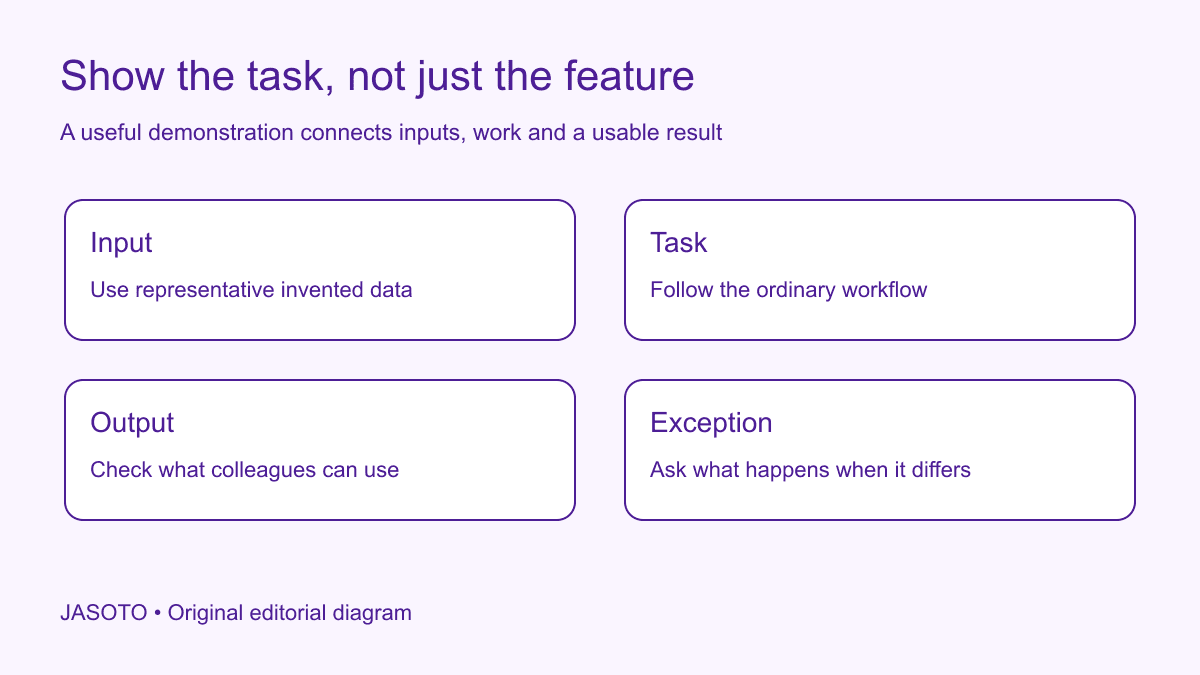
Original JASOTO editorial diagram. Its complete workflow is explained in the article; no actual customer outcome is depicted.
Plan a supplier demonstration by giving the provider one realistic task, representative inputs and a clear description of the output your business needs. Ask to see the normal sequence and one meaningful exception. Record what you actually observe separately from claims about later configuration. A polished tour can be informative, but it should answer the purchasing question you brought to the meeting.
For a small business in the United States, this approach is useful when evaluating software, equipment interfaces or a managed service. The examples below use an invented office ordering workflow. They are original evaluation tools, not measured customer results or technical certification. A demonstration supports a decision about a defined use; it does not establish every contractual, privacy or operational requirement for the eventual purchase.
The practical answer
- Ask the supplier to demonstrate a real decision-making task.
- Prepare representative invented inputs instead of live customer records.
- Record what was observed separately from what was promised.
- Leave unresolved questions visible before choosing a supplier.
Pick the decision the demonstration must support
Write the decision in ordinary language before listing features. For example: “Can our office coordinator turn an approved request into an order record that accounts can understand?” This is more specific than asking whether a system has purchasing functionality. It identifies the user, starting point and useful outcome. Ask colleagues affected by the task what information they need from the result.
Keep the first demonstration narrow enough to follow. Trying to evaluate every department in one session encourages a rapid tour with little evidence about any complete workflow. Identify additional questions in a separate list and explain which are essential before a purchase. A narrow session is not permission to ignore important requirements; it is a way to make the first observation interpretable rather than superficially comprehensive.
Describe the ordinary task without designing the solution
Explain the current task, its inputs and the result required. Avoid telling the supplier which buttons to use or assuming that its product must copy your existing screen layout. A different workflow may satisfy the business need more clearly. Give the provider enough context to show its approach while retaining the actual outcome against which you will evaluate it.
Include meaningful constraints, such as a second person approving the request or accounts needing a reference that follows the order. Label preferences separately from requirements. If a familiar color scheme is optional but an identifiable approval record is essential, say so. This helps the supplier prepare and prevents observers from evaluating personal preferences as though they were equally consequential operational requirements.
Prepare invented inputs that still test the work
Create a small set of fictional requests with realistic variations. An ordinary order might include several items, an internal reference and a requested delivery date. An exception might contain a missing reference that should trigger a question. Keep the data internally consistent so the demonstration tests the workflow rather than forcing the presenter to repair accidental contradictions in your example.
Use the business's proper privacy and security arrangements for any shared material. [NIST's small-business resources](https://www.nist.gov/itl/smallbusinesscyber/guidance-topic/securing-data-devices) cover protecting business information and devices; the practical preparation here is to avoid assuming that live customer records are needed for realism. Remove sensitive information from screenshots too. A fictional example can show the shape of the work without exposing unrelated people or confidential commercial details.
Agree what the supplier will show
Send the task brief before the meeting and ask the supplier to confirm the scope. Identify whether the session uses a standard demonstration environment, a configured trial or a presentation. Each can be useful, but they provide different evidence. A prepared slide showing a possible output is not the same observation as seeing the task completed in the available product.
Ask which parts will require setup, additional services or a different subscription. Record those conditions rather than treating them as objections to hide until after purchase. If a feature is planned but unavailable, mark it as a future claim, not a demonstrated capability. A clear boundary helps both parties avoid spending the meeting defending expectations that were never shared in the first place.
Give observers specific questions
Ask each observer to follow one aspect of the task: input quality, approval, output usability or exception handling. Someone who performs the task should attend where practical, alongside the purchasing decision maker. A manager can evaluate commercial fit while a regular user notices that the proposed output omits a reference needed every afternoon. Neither perspective replaces the other.
Use a simple note structure: observed, explained, unresolved and follow-up. Avoid asking observers to produce an overall score before they have seen the full task. A number without a supporting explanation can make a preference look like evidence. Encourage factual notes such as “approval identity visible in the record” rather than “good audit trail” when the broader claim has not been established.
Follow the task from input to usable output
Watch the normal sequence rather than jumping from an attractive screen to the final result. Ask where information is entered, who acts next and what the receiving colleague sees. If a step happens outside the product, include that fact in the record. A workflow involving an emailed spreadsheet may still be acceptable, but it should not disappear from the assessment because it occurs outside the demonstrated interface.
Ask to inspect the output in the form the business would actually use. A report preview, downloaded file and notification may carry different information. Do not assume a visible screen can be exported with the same detail. If the demonstration cannot show an output, record the question and ask for appropriate evidence later. Keep the purchasing decision open where that output is essential.
Include one exception with a purpose
Choose an exception that genuinely affects the task, such as an incomplete request, a rejected approval or a duplicate reference. Explain why it matters. Do not turn the session into a surprise contest designed to make the presenter fail. Sending the exception in advance can produce a better conversation about the provider's intended handling and the setup needed to support it.
Observe how the exception becomes a next action. Who knows something is wrong, what information do they receive and how does the task resume? Avoid assuming that an error message alone solves the operational problem. A technically accurate warning may still leave an ordinary colleague unsure whom to contact. Record the actual pathway shown and any reliance on training or manual coordination.
Worked example: an office purchasing request
Imagine a business evaluating a tool for internal supply requests. Its invented example includes a requester, an approver and an accounts colleague. The supplier demonstrates a complete ordinary request, then shows what happens when the approver returns it for a missing reference. Observers track whether the amended request remains connected to the original history and whether accounts can understand the resulting order record.
One output cannot be demonstrated in the available environment, so the buyer records a follow-up question rather than assuming success or failure. The supplier explains what setup would be required. This example claims no productivity improvement or product endorsement. It illustrates how a task-based session can produce a concrete evidence list that both parties understand before commercial and implementation decisions continue.
Compare suppliers using the same task boundaries
Give competing providers equivalent information and reasonable preparation. Record meaningful differences in the demonstrated approach, including work outside the tool and support required. Do not force every provider into identical presentation steps if their workflows differ, but keep the required result constant. The comparison should reveal how each option serves the business task rather than how closely it imitates your first demonstration.
Separate capability evidence from price and implementation assumptions, then consider them together in the purchasing decision. A shown feature might depend on a configuration service that one quote includes and another excludes. Ask for the actual commercial scope. Avoid converting an appealing demonstration into a claim of better value without the terms and effort needed to obtain the demonstrated result.
Close with evidence and unresolved questions
Before deciding, ask a colleague who missed the session to read the notes and describe the result. Can they tell whether the supplier completed the task, described a possible configuration or promised a future capability? If those categories blur, revise the recap while the participants can still clarify it. This tests the quality of the record rather than the product. It also helps prevent a cautious observation from becoming an enthusiastic recommendation as it passes through several internal conversations.
Keep a record of any change to your own requirements prompted by the session. A demonstration may reveal that an assumed step is unnecessary or that an overlooked output is essential. Explain the reason and share the revised brief consistently if other suppliers remain under consideration. Do not quietly change the criteria only for the option you prefer. A fair comparison depends on understanding which business requirement is current and why it changed.
Send a short factual recap: what was shown, what was explained, what remains unverified and who will answer each question. Invite correction of misunderstandings. Keep any recording or screenshots only through an appropriate agreed process. Save the task brief with the recap so a later colleague can see the conditions under which the observations were made rather than reading an isolated endorsement.
Use JASOTO businesses to discover potential suppliers and discuss a relevant demonstration directly. If tool evaluation and workflow ownership become ongoing work, explore operations roles within a staffing review. For an agreed in-person session, research travel after confirming the location. The useful outcome is a better-supported next decision, including an honest list of questions that the demonstration did not answer.
Put the guide into practice
- Define the task, input and useful output.
- Agree the demonstration scope and environment.
- Prepare observers and evidence questions.
- Record limitations and the next purchasing decision.
Frequently asked questions
Should a demo use our actual customer data?
Prefer representative invented information unless an appropriate person has approved another arrangement with suitable safeguards. A realistic workflow does not require exposing live customer records. Ask what information the supplier needs and use the business's proper privacy and security process.
What if the supplier cannot demonstrate our exact workflow?
Record which parts were shown, which were described and which remain unverified. Ask whether a suitable follow-up is possible. Do not treat an adjacent feature as proof that the complete task works, but do not assume an honest limitation automatically makes the provider unsuitable.
Is a successful demo enough to place an order?
It is evidence about the demonstrated task in that environment. A purchase may still depend on terms, implementation, support, security, compatibility and cost. Link the demonstration result to those open decisions rather than treating it as a complete assessment of the supplier.
Explore JASOTO tools
Discuss the actual workflow and demonstration scope with potential suppliers.
Explore operations roles →Consider support when evaluating tools and maintaining workflows becomes continuing work.
Research a demonstration journey →Plan travel after the supplier confirms the appointment and location.
Continue with JASOTO
Compare your next step
Discover UK businesses, compare services and request written quotes before making a decision.