
Travel · UK Guide 2026
Travel Itinerary Template for Separate Booking References
JASOTO · Updated November 5, 2026 · 1,520 words
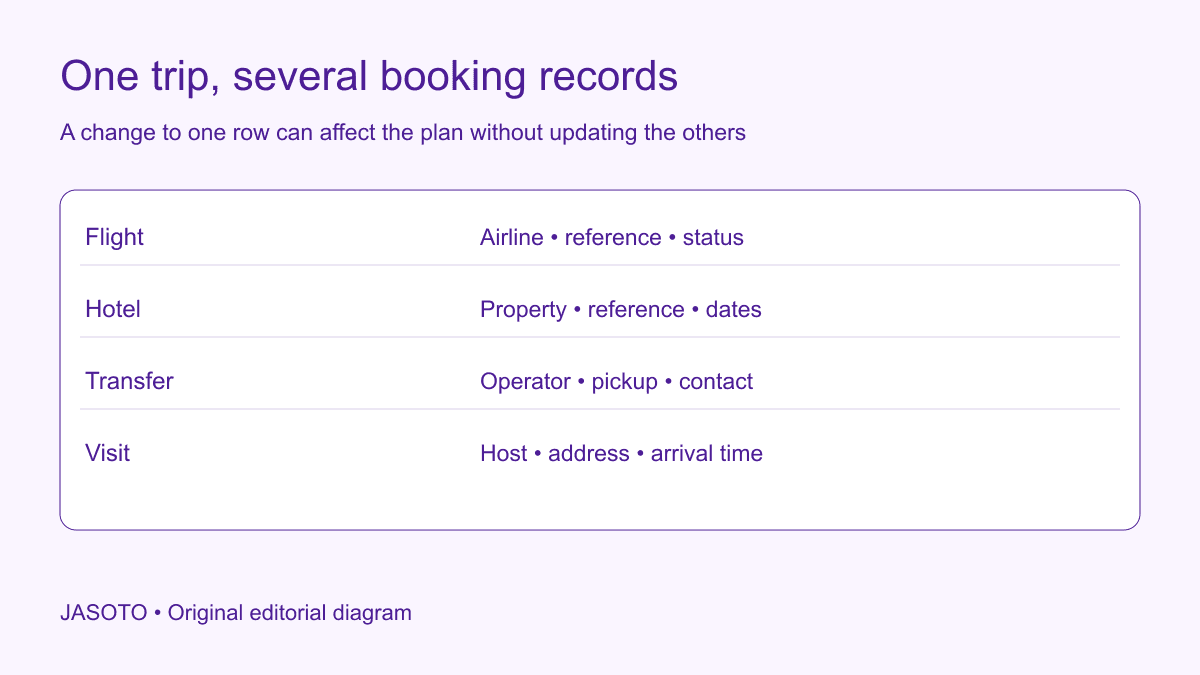
Original JASOTO editorial diagram. Its complete workflow is explained in the article; no actual customer outcome is depicted.
Build one itinerary in journey order, but keep the provider, booking reference, confirmation status and change contact separate for every item. That gives a traveler a readable plan without implying that all the bookings are managed together. When a flight, hotel or meeting changes, review the whole journey and contact the parties whose arrangements need updating.
This guide uses US English and an invented business-trip example. The itinerary method is an editorial tool for organizing confirmed information, not a statement about passenger rights or package-travel protection. Provider conditions and travel requirements vary. Research options through JASOTO travel, then verify the actual booking and required documents with the relevant provider or authority.
The practical answer
- Keep the trip sequence together while preserving each booking's identity.
- Record local dates, locations, status and the party who handles changes.
- Distinguish a booking confirmation from a travel document.
- Prepare a controlled offline copy without exposing unnecessary personal data.
Separate the trip from its individual bookings
Give the overall trip a simple internal name, then create a record for each flight, rail journey, accommodation booking, transfer and appointment. A trip name is useful for colleagues, but it is not necessarily recognised by a provider. Keep the actual reference exactly as supplied and label what it belongs to. A hotel confirmation number and an agency reference may both exist for the same stay, with different uses.
Record who sold or arranged the booking as well as who delivers the service. If changes must be requested through an agent, the traveler needs that contact instead of guessing which organisation can act. Do not assume an airline, hotel or transfer operator can change another provider's reservation. A single spreadsheet can bring information together, but it does not merge contracts or create coordination that has not been agreed with the parties involved.
Put dates and local times in a clear sequence
For each leg, record the local departure or check-in date, time where applicable and location. Include the arrival date separately when a journey crosses midnight or time zones. W3C's date-format guidance highlights ambiguity in numeric dates. A month name and four-digit year help a human reader distinguish, for example, an April appointment from a May one without relying on a local numbering convention.
Keep the provider's original confirmation available rather than replacing it with your own calculation. If you add a planning time, label it as such. “Leave office by” is different from a scheduled departure, and “expected hotel arrival” is different from an agreed check-in arrangement. Mixing those categories can make an itinerary look more certain than it is. When an international trip spans several time zones, give the relevant zone explicitly instead of relying only on a calendar application's display.
Record places precisely enough to act
Use the actual station, airport, terminal or property named in the booking. A city can have several arrival points, and a hotel brand can have multiple locations. Add the destination address and the host contact for a business visit. If a map link is useful, keep readable text beside it so the plan remains understandable when the traveler cannot open the link.
Check how the traveler gets from each arrival point to the next stop. A flight arriving in the right city does not establish that a meeting across the region is reachable at the planned time. Avoid publishing a supposedly safe connection buffer without knowing the route, assistance requirements and provider arrangements. Instead, record the dependency and verify the actual journey. If the venue gives special entrance instructions, place them with the appointment rather than leaving them in an unrelated email thread.
Make confirmation status impossible to overlook
Use distinct labels for proposed, held, confirmed, changed and cancelled if those states match your booking process. Define them so colleagues do not interpret a price search as a reservation. A plan can contain useful provisional information, but it should not look ready for travel while essential bookings remain unresolved. Give each unresolved item an owner and the next action needed to confirm it.
After a change, preserve enough history to explain which version is current. Remove obsolete instructions from the traveler's active view or mark them unmistakably as replaced. A folder containing three similarly named hotel confirmations is not a usable handover if nobody identifies the valid one. Keep cancellation acknowledgements where appropriate, but do not place them in the same visual sequence as active bookings without a clear status. The traveler should not need to reconstruct the history at a reception desk.
Store the change route alongside each reference
For each confirmed booking, record the support contact, how changes are requested and where the applicable conditions can be found. Summarize only what has been verified and keep the original terms accessible. A general note saying “flexible” may hide important differences between changing a date, cancelling and receiving a refund. Ask the provider to clarify uncertainty before making a decision that depends on it.
Set a simple change-review rule: when one essential element moves, check every dependent element. That includes onward transport, accommodation, appointment timing and equipment delivery where relevant. Do not send an instruction to one provider and assume the rest of the itinerary has updated. If someone manages the trip for you, confirm the scope of their responsibility. This is a coordination method, not a universal statement about what any particular fare or booking arrangement permits.
Keep travel requirements outside the invented template
An itinerary can remind the traveler to check documents, but it should not invent passport validity, visa or entry rules. For US citizens traveling internationally, the US Department of State's traveler checklist is an official starting point. Use the relevant destination and authority information for the actual traveler, itinerary and date. Other nationalities may need different sources; a US-focused checklist is not proof of eligibility for everyone on a team.
Record that the check has an owner without distributing identity documents in the general itinerary. A meeting host usually does not need passport numbers or a copy of the traveler's entire booking history. Consider which confirmations expose access to a reservation and share them appropriately. Keep any required sensitive material through the organisation's approved process. The aim is for people to have what they need at the point of use, rather than making every document available to every contact on the trip.
Worked example: a changed arrival and an unchanged transfer
Imagine a traveler attending a supplier demonstration. The flight, hotel and airport transfer were booked separately. The flight is moved to a later arrival, but the transfer confirmation still shows the earlier pickup. This is an invented coordination example, with no claim about the rights or charges applying to a real booking. The itinerary makes the mismatch visible because the flight and transfer have distinct rows and confirmation dates.
The trip owner contacts the transfer provider through its recorded route, checks the hotel arrival arrangements and tells the demonstration host about the revised plan. Each response is saved with the relevant booking. If one element cannot change, the owner discusses alternatives instead of editing the itinerary to imply a confirmed solution. The useful result is an honest current plan: confirmed arrangements stay distinct from the actions still waiting for an answer.
Prepare a usable offline and on-the-day view
Create a compact version containing the next journey, required reference, destination and support contacts. Keep an appropriate offline copy available through the traveler's approved method, and check that it is current before departure. An offline copy of last week's plan can be more misleading than no summary if the traveler assumes it includes a recent change. Date or version the document clearly.
The on-the-day view should prioritise action over administration. A traveler looking for a transfer contact should not have to read the purchasing rationale for the hotel. Keep detailed financial records separately where that helps. Confirm who can assist from the office and what happens outside normal working hours. Do not promise round-the-clock support unless it actually exists. A clear boundary helps the traveler know which provider or colleague can respond when a problem occurs.
Include a last-checked field beside the active itinerary and identify who maintains it. After receiving a provider update, check the relevant row against that message before distributing a replacement. This makes the document's freshness visible without claiming that future schedules cannot change.
Review the itinerary after the trip
Ask which information was missing when it mattered: the correct entrance, support route, current reference or explanation of a provisional item. Update the structure using those observations. Avoid collecting a large amount of new information merely because one traveler wanted a more convenient layout. The next version should be easier to use, not simply longer.
Use JASOTO businesses to research relevant providers or visit destinations and confirm details directly. If coordination has become a continuing role, explore relevant jobs. A reliable itinerary is maintained by a person with a defined responsibility and checked against provider confirmations. Its value is not that it fits every booking onto one page; it is that a traveler can distinguish what is booked, what changed, what remains open and whom to contact next.
Put the guide into practice
- Identify the provider and reference for each journey or stay.
- Mark unconfirmed items and booking dependencies visibly.
- Recheck the itinerary after a change to any leg.
- Give travelers the appropriate confirmation and support route.
Frequently asked questions
Is an itinerary the same as a ticket?
No. It is an organizing record. Keep the documents, passes or confirmations required by each provider and check their instructions. An internal trip summary does not replace an entry document or a provider's travel requirements.
Does changing a flight automatically change a hotel?
Do not assume that it does. Identify how the bookings were purchased and contact the relevant parties. Separate providers may need separate instructions, while a package or managed booking may have a different arrangement.
Should everyone receive the same itinerary?
Share the information each person needs. A traveler may need detailed confirmations, while a meeting host only needs the relevant arrival plan. Avoid distributing passport details, payment information or booking access unnecessarily.
Explore JASOTO tools
Research journey and accommodation options, then confirm details with providers.
Research businesses for your visit →Check the destination business and contact details directly.
Explore travel coordination roles →Consider staffing if arranging business travel is a continuing responsibility.
Continue with JASOTO
Compare your next step
Discover UK businesses, compare services and request written quotes before making a decision.