
Websites & Visibility · UK Guide 2026
Organise a Website Image Library with Useful Usage Notes
JASOTO · Updated 5 November 2026 · 1,572 words
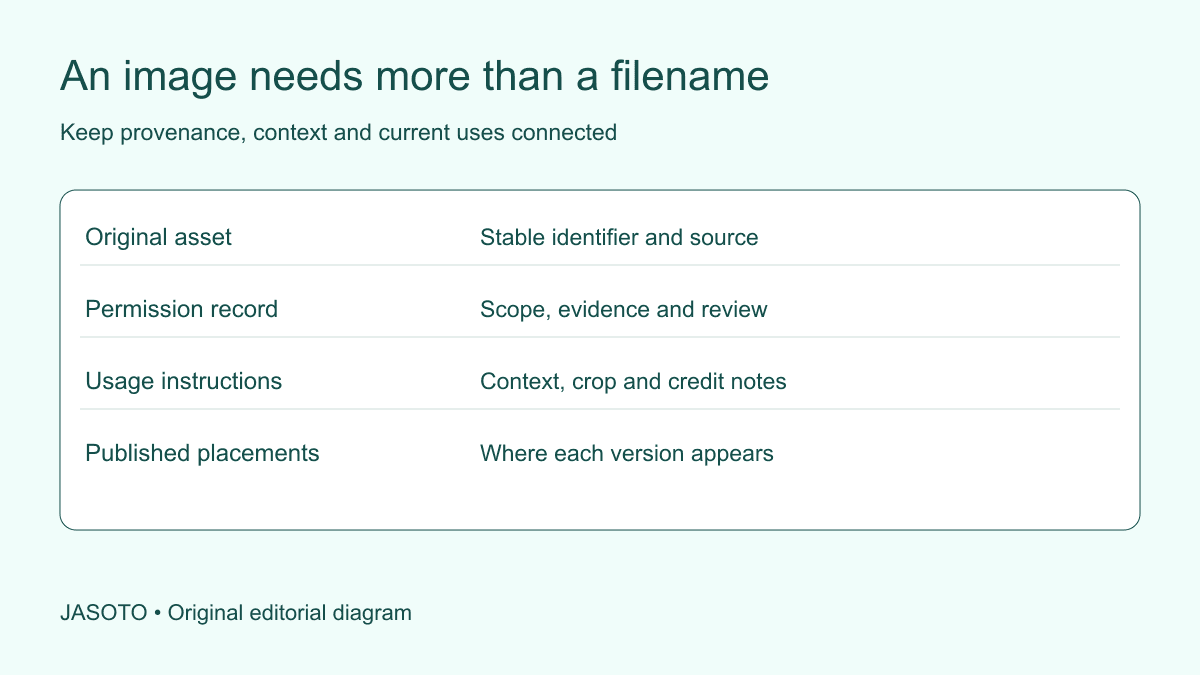
Original JASOTO editorial diagram. Its complete workflow is explained in the article; no actual customer outcome is depicted.
Organise a website image library by giving each asset a stable identifier and a record of its source, permissions, context, approved versions and published uses. Keep the original file separate from page-specific crops. Add usage notes that help another editor understand what the image depicts and how it may be used, rather than relying on filenames or the memory of the person who first uploaded it.
This guide offers a practical editorial system for a small UK business. It is not legal advice on copyright or a complete accessibility specification. The sample records are fictional. Use appropriate advice for unclear rights and specialist checks for technical delivery, while making the information those reviewers need easy to locate.
The practical answer
- Give each image a stable record separate from its filenames and crops.
- Keep source, permission and context notes linked to the asset.
- Record where images are published and which versions are approved.
- Test whether a new editor can choose and use an image correctly.
Inventory what already exists before reorganising
List the locations holding images: website uploads, shared folders, supplier downloads, project records and approved design files. Identify originals, derivatives and files whose origin is unknown. Do not start by deleting apparent duplicates or renaming everything in the live website directory. A file that looks redundant may still support a published page or preserve an important original.
Create a provisional index and note current uncertainty. For each file, record where it came from and whether it appears on the website. Keep the initial task read-only where practical until dependencies are understood. The aim is to build a trustworthy map of the library before changing its structure, not to produce a tidy folder at the cost of broken pages or lost evidence.
Choose a stable identifier for the asset
Assign a short identifier that remains the same across crops and resized versions. Keep a readable description alongside it. For example, “IMG041: actual workshop reception, approved project photograph” is more useful than a chain of files called “final-new-two.” The identifier connects the asset record to its derivatives without making the filename carry every legal and editorial detail.
Record derivative relationships explicitly. A square crop, a banner crop and a compressed export can all refer to the same original. They may still need separate placement notes if a crop changes meaning or removes context. Avoid treating every export as a new independent asset with its own disconnected permission record. The relationship should be discoverable by someone who did not prepare the files.
Keep source and rights evidence together
Record the creator or supplier, acquisition date, relevant agreement reference and any applicable use conditions. Keep the actual permission or licence accessible through the business's controlled record system. A thumbnail marked “approved” is not enough if the next editor cannot discover what was approved, for which channels and under what conditions.
[The UK Intellectual Property Office's image guidance](https://www.gov.uk/government/publications/copyright-notice-digital-images-photographs-and-the-internet/copyright-notice-digital-images-photographs-and-the-internet) explains that online image use can depend on copyright and permission. Refer unclear rights to appropriate advice rather than treating this inventory as a legal determination. Operationally, the library should preserve the source and terms so the responsible reviewer can make an informed decision before reuse.
Record what the image actually represents
Classify the asset as actual work, staff portrait, stock photograph, staged example, generated illustration, render or diagram as appropriate. Add the project reference or subject context needed to use it honestly. An attractive office image should not drift into a customer case study and become an apparent record of work the business never performed.
Include material limitations. A photograph may show one phase of a project, an old location or a service no longer offered. Record that without turning the index into an unnecessary narrative. The usage note should answer practical questions: what is this, what does it support, and what would be misleading? This protects factual context as well as helping editors find relevant material.
Separate publication status from file quality
Use distinct fields for technical suitability and permission status. A high-resolution file may be uncleared for use, while an approved file may be too small for a banner. Define plain states such as review needed, approved for stated uses, restricted and retired. Avoid a single green label that conceals why an asset is or is not suitable.
Assign owners for unresolved issues. A missing source reference needs a different action from an unsuitable crop or an outdated caption. Do not let uncertainty disappear when somebody exports a cleaner version. Derivatives should inherit relevant restrictions until a responsible review changes them, and the record should explain what decision was made rather than merely updating the color of a status cell.
Add practical crop and placement notes
Identify what must remain visible and what must not be implied by a crop. A tool, sign or part of the project may be essential to the image's meaning. A crop that removes an illustrative label or isolates a stock figure can change how readers interpret the scene. Keep the note concrete enough to guide an editor preparing a new page layout.
Store useful design information such as orientation, available dimensions and focal area, but do not confuse those fields with publication permission. If a layout needs a substantially different image, select another asset rather than stretching or altering the original into a misleading representation. Ask the technical owner to handle optimization and delivery requirements through the site's actual publishing workflow.
Treat alternative text as a placement decision
Store a factual description of the image's content as a starting point. Then review its purpose on each page before deciding the alternative text. A photograph can be informative in one context and decorative in another, while an image inside a link may need to communicate the link's function. Do not assume the library's general description is correct for every use.
[W3C's alt decision tree](https://www.w3.org/WAI/tutorials/images/decision-tree/) distinguishes image purpose and context when choosing text alternatives. Use that resource with the site's accessibility review. The asset record can preserve a suggested description and placement notes, while the page editor remains responsible for checking what information or function needs to be available in that particular use.
Track where each version is published
Maintain a placement list with page address, derivative used, caption, credit and relevant review owner. Include active campaigns or downloadable material where the library supplies them. This makes a correction or withdrawal manageable. Without it, a team may replace an image on the home page while leaving the same disputed asset in several older service pages.
Keep the record proportionate. A small site may use a simple table, while a larger library may need managed tooling. The essential relationship is asset to version to placement. Test whether you can answer “Where is IMG041 currently used?” without relying on a particular colleague's memory. If not, improve the record before adding more classification fields that do not help a real task.
Work through a fictional asset record
Imagine a business receives approved photographs from an office refurbishment. One image shows an actual completed meeting room; another is a design render prepared before work. The library assigns each a separate identifier and clear type. Both link to their source and use terms. The render's note states that it must remain labelled as a concept and must not replace the completed-work photograph in a case study.
When an editor prepares a service page, they select the actual photograph and record the crop and placement. A later editor can understand the choice and the distinction without reopening the entire project correspondence. This scenario is an editorial example. It shows how context notes prevent a predictable misuse; it does not establish a measured reduction in errors or a particular software requirement.
Make intake and withdrawal part of the workflow
For new assets, decide who records the source, checks relevant conditions and assigns the identifier before publication. Give suppliers a clear brief about the information needed with delivery. Find creative and website providers once the requirement is defined. If new project images require a visit, research the journey and arrange permission through the responsible contact.
For withdrawn assets, identify current uses, replacement decisions and the person verifying removal. Keep the historical record appropriately rather than deleting the evidence of why the file was used. Follow the business's retention and rights process. An asset marked retired should not remain casually available in the approved selection folder where another editor may unknowingly publish it again.
Test the library with a new editor
Give a colleague a realistic task: choose an approved actual-work image for a service page and explain its permitted use, caption context and source. Then ask them to locate all current uses of a different asset. Record where the index fails. A system that only its creator can navigate is not yet a dependable shared library.
Assign continuing ownership and a review point for restrictions or outdated subjects. Explore content management roles if the workload requires dedicated capacity. Preserve the earlier structure and make file moves through a controlled, reversible process with the technical team. The useful outcome is not a perfectly categorized archive; it is a library where editors can select suitable images, preserve accurate context and carry out corrections without guessing.
Put the guide into practice
- Inventory existing originals and published versions.
- Assign identifiers and source references.
- Record rights, context and practical crop limits.
- Track current placements and withdrawal actions.
- Review unknown or expired permissions before reuse.
Frequently asked questions
Do we need specialist asset software immediately?
Not necessarily. A structured folder and a maintained index can work for a small library if editors can find the originals, permissions and usage notes. Choose software after identifying the actual volume, access and search needs. A new tool will not resolve missing provenance or unclear publication responsibility by itself.
Should alt text be stored once for every image?
Store a factual description and any useful draft, but review the alternative text in each page context. The same image may communicate different information or serve a different function in another placement. Do not blindly reuse one sentence across every context or treat a descriptive filename as the completed accessibility decision.
What should happen to images with unknown rights?
Mark them as unresolved and prevent casual reuse while the responsible person investigates. Keep the source record and relevant evidence. Do not infer permission from the file already being on the website, the absence of a watermark or the fact that a former colleague supplied it. Use appropriate advice where the position is unclear.
Explore JASOTO tools
Continue with JASOTO
Compare your next step
Discover UK businesses, compare services and request written quotes before making a decision.