
Jobs & Careers · UK Guide 2026
Build a Work Sample Index for Several Job Applications
JASOTO · Updated November 5, 2026 · 1,642 words
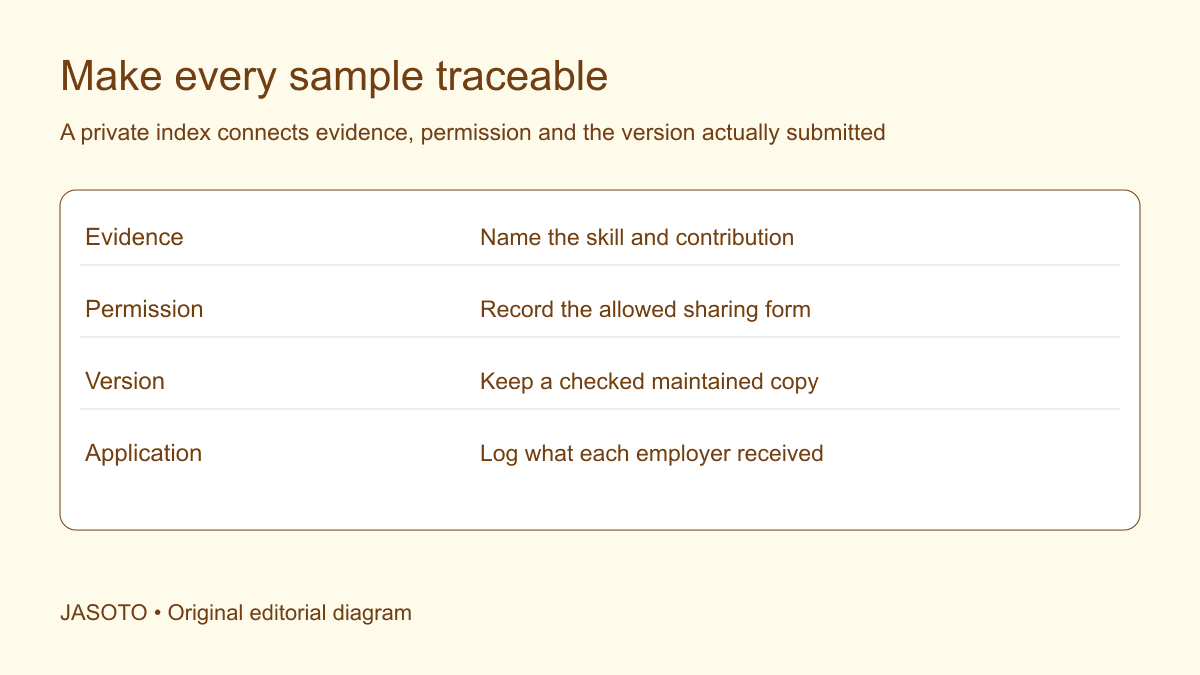
Original JASOTO editorial diagram. Its complete workflow is explained in the article; no actual customer outcome is depicted.
Build a private work sample index with one entry for each useful example, showing the skill it demonstrates, your contribution, sharing permission and the exact version available. Then create a small application-specific selection from that index. This lets you tailor evidence without rewriting the facts or losing track of what each employer received. Keep the private index separate from anything you send to a recruiter.
This original guide is for US applicants managing samples across several applications. Harvard's resume guidance recommends tailoring material to the position and using factual, specific language. GitHub documents pinning repositories and gists as one way to highlight work publicly. The index structure below is a separate editorial organizing method that can cover documents, designs, presentations or permitted code samples, regardless of the platform used to display them.
The practical answer
- Index skills and contributions precisely.
- Track permission separately from file availability.
- Select evidence for each actual posting.
- Record submitted versions and test access.
Inventory the evidence before selecting a platform
List the samples you already have and identify their actual form. A sample might be a permitted writing extract, an independent spreadsheet exercise, a published design or a code project. Record where the maintained version lives and whether it still opens. Do not begin by buying a portfolio service or copying everything into a public folder. First establish what evidence exists and what you are allowed to share.
Keep potential examples on the list even if they need work, but give them an honest status. “Needs permission”, “requires a clearer explanation” and “ready for a private interview” are different states. This prevents a promising idea from being mistaken for a finished approved sample when a deadline approaches. A plain table or approved note tool can be sufficient for the first inventory. The value comes from the information and the habit of maintaining it.
Give every sample a stable identifier
Assign a short internal name that remains stable when the public title changes. For example, “handover-sample-01” can identify the underlying evidence while different applications use an accurate role-relevant caption. Record the source file and current shareable version beside it. Stable identifiers make it easier to distinguish a genuine update from another copy with a slightly different filename.
Avoid storing only a browser link with no explanation. The destination may move, require an account or contain several projects. Add a plain description and a quick note about the relevant section. If the sample is a repository, identify the part that demonstrates the skill rather than assuming a recruiter will inspect every file. GitHub's pinning feature can help highlight selected work, but your private index still needs the evidence and permission detail that a public profile should not contain.
Map evidence to a capability rather than a title
Tag each sample with a few specific capabilities it can actually demonstrate, such as structuring information, checking calculations, comparing options or implementing a defined feature. A job title alone is too broad to guide selection. The same sample can be relevant to several roles if you can explain the connection accurately, while a sample from the same industry may still demonstrate the wrong responsibility.
Write a short evidence statement for each capability. “Shows how I separated confirmed details from open questions in a handover” is clearer than “proves project management”. Keep the claim proportionate to what the recipient can inspect. A fictional exercise can show your current approach, but it cannot prove a real customer's outcome. The index should make that distinction visible so the application-specific caption does not acquire unsupported claims when you are editing quickly.
Record personal contribution and collaborators
Identify what you created, changed or decided. For team work, include the adjacent responsibilities that matter to understanding the sample. A polished shared output can conceal a small personal contribution unless you describe the boundary. Conversely, a modest-looking sample may show substantial judgement if you explain the task and decisions clearly. The index gives you a factual reference for both situations.
Use consistent wording across the resume, portfolio caption and interview notes. The emphasis can change, but your responsibility should not expand between applications. If one employer needs evidence of writing and another of coordination, you may highlight different parts of the same project. Keep the underlying contribution accurate in both. Ask an editor to preserve that boundary if you obtain help; persuasive wording should make the evidence easier to understand without enlarging what you did.
Track permission and the permitted sharing form
Add a clear status for public use, private presentation, pending clearance or unavailable material. Record the appropriate approval reference where necessary, without putting confidential agreements into a widely shared document. Check the actual boundary before creating a link or attachment. A file you may discuss privately may be unsuitable for a public portfolio, and possession of a copy does not settle the right to distribute it.
Prepare a cleared alternative for evidence that cannot be shared. An independently created exercise can demonstrate a skill when clearly labelled and appropriately separated from confidential substance. Record its fictional inputs and purpose in the index. Avoid treating anonymization as automatic approval. If permission is uncertain, keep the sample out of the application selection until the question is resolved through the appropriate owner or adviser.
Maintain versions with meaningful status
Keep the version that is ready to share distinct from your working draft. Record when it was checked and what changed in a substantive update. A spelling correction and a new claim about results are different kinds of revision. If an employer is already assessing the sample, consider its process before replacing the linked content with a materially different version. The index should tell you what was actually available at submission.
Use filenames and notes that make the state obvious. “Sample-ready-November” may be useful only if there is one clear maintained copy. A small version record can avoid relying on increasingly elaborate filenames ending in “final”. Preserve the necessary prior version through your normal file arrangements so an inaccurate edit can be reversed. Rollback is easier when you can restore the checked file rather than reconstruct its content from a sent email.
Create an application-specific selection
Read the actual posting and choose the smallest set of samples that supports the relevant requirements and follows the instructions. Add a short note explaining why each sample belongs in that selection. If the employer requests one writing sample, do not send a large unrelated archive simply because the index contains it. The index should make selection easier, rather than encourage you to display every available piece.
For an invented operations application, a candidate chooses a fictional handover exercise and a permitted process note because the role emphasizes clear information and follow-through. For another role emphasizing data checking, they select a different sample with a visible verification step. The underlying facts remain unchanged. Tailoring occurs in the selection and explanation, not by renaming the same work as evidence of expertise it does not show.
Test the recipient's route to the sample
Open each selected link or file through an appropriate recipient view. Check access, readable layout, working navigation and the correct version. Avoid granting broad permissions merely to fix an access error. Use the sharing arrangement that fits the sample's approved audience. A public profile, private link and attached document create different routes and should be chosen intentionally.
Ask a trusted reviewer to find the relevant evidence from the information you plan to send. Can they identify your contribution and the intended skill without a long explanation? Record the actual problem if they cannot. The title may be vague, the relevant page may be buried or the file may fail in a browser preview. Fix the observed issue and retest that route, rather than redesigning the whole portfolio because one caption was unclear.
Log what each employer received
For every application, record the role, date, sample identifiers, version and delivery method. Include any employer-specific instruction that affects follow-up. Keep private recruitment notes and contact details proportionate and secure. The purpose is to answer “Which evidence did I send?” without searching through every folder and message before an interview. You do not need to collect more personal information about recruiters than the process requires.
Use this record when preparing the conversation. Reopen the exact submitted samples and check that your account matches them. If you notice a material error, clarify it through the appropriate contact. Do not invent a convenient explanation for why the file differs from your current story. A reliable application log supports consistent answers and makes it easier to distinguish an actual update from a mistaken recollection of what you sent.
Review the index as your work develops
At a useful interval, remove broken active routes, update checked versions and retire samples that no longer show your work well. Keep any records you appropriately need while avoiding an indefinite pile of duplicate files. Add new evidence with the same contribution and permission checks. A sample's age alone does not determine usefulness; relevance, accuracy and the ability to explain it matter to the selection.
When researching job opportunities, use the index to identify evidence gaps that you can address with honest practice. If you seek editing or portfolio support through business providers, share only the material appropriate for that service and check the final factual claims. Confirm the venue and requested samples before planning interview travel. A useful index leaves you with fewer last-minute guesses: you know what each example demonstrates, what can be shared and exactly which version supports the application in front of you.
Put the guide into practice
- Inventory existing permitted samples.
- Assign stable sample identifiers.
- Create a focused application selection.
- Check the recipient route before submitting.
Frequently asked questions
Should the private index be sent with an application?
Usually send only the material requested by the employer and a clear route to the selected evidence. The private index contains preparation information such as permission status, versions and application history. Keep that separate from a concise employer-facing selection unless the instructions specifically call for a broader catalog.
Can one sample support several applications?
Yes, when it is relevant, accurate and permitted to share. Adapt the selection and explanation to the role while preserving the facts about your contribution, dates and outcomes. Record the version each employer received so interview preparation stays consistent with the submitted material.
What if a sample needs updating during an active application?
Distinguish a minor correction from a substantive change in evidence or claims. Follow the employer’s process for updates where relevant and preserve the version submitted. Do not quietly replace a linked sample with a materially different account and assume the interviewer saw the latest version.
Explore JASOTO tools
Discover providers and check support for your specific task.
Explore roles and responsibilities →Consider the practical responsibilities involved when recruiting or joining a team.
Plan work-related travel →Research a journey when joining, training or meeting colleagues in person.
Continue with JASOTO
Compare your next step
Discover UK businesses, compare services and request written quotes before making a decision.