
Business Growth · UK Guide 2026
Event Feedback Questions That Do Not Lead Your Guests
JASOTO · Updated November 5, 2026 · 1,644 words
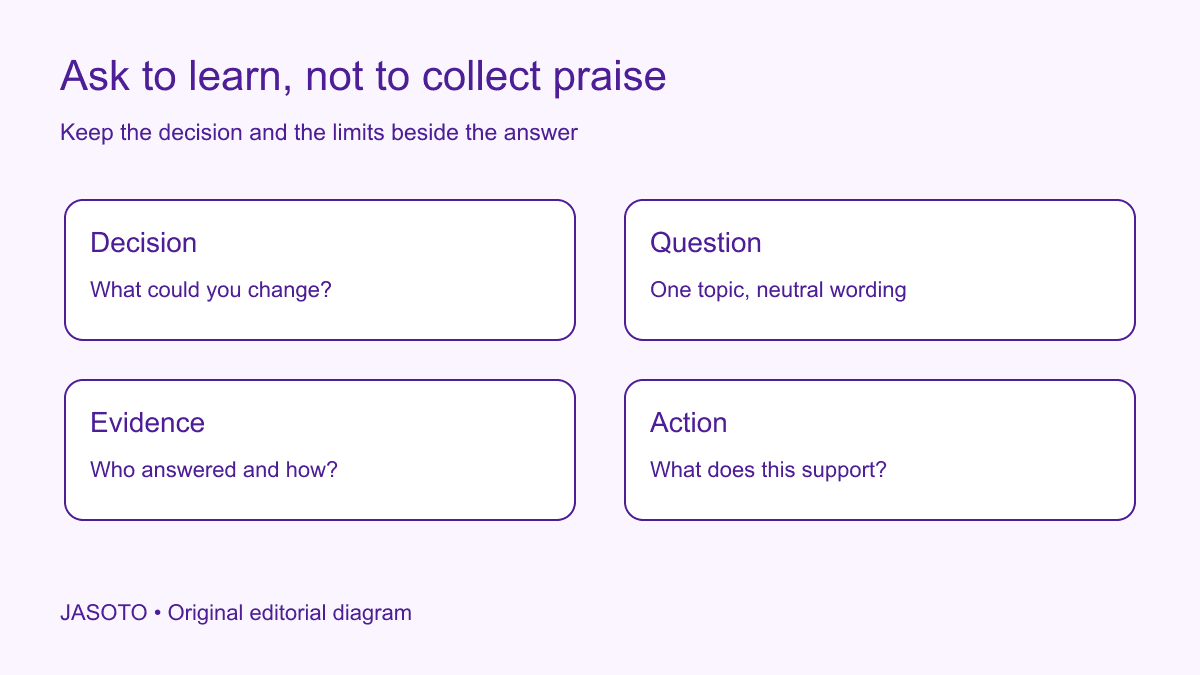
Original JASOTO editorial diagram. Its complete workflow is explained in the article; no actual customer outcome is depicted.
Useful event feedback starts with a decision, uses neutral questions and reports the limits of the responses. Ask about one topic at a time and avoid assuming that the guest enjoyed the experience. A short form that helps improve the next event is more useful than a long satisfaction survey designed mainly to produce a flattering percentage.
This guide uses US English and an invented workshop example. It offers an editorial method for a small event, not a claim to provide statistically representative research. The UK Government Analysis Function's questionnaire guidance is a primary reference for question-design principles; the page was marked under review when checked. The examples and decision workflow below are original and should be tested in your own context.
The practical answer
- Start with the decision the feedback should inform.
- Ask about one topic at a time without assuming a positive experience.
- Make room for not applicable and unexpected observations.
- Report who responded and what the answers cannot establish.
Name the decision before writing questions
List what you could realistically change: arrival information, the balance of presentation and discussion, the usefulness of a demonstration or how follow-up material is delivered. Choose a small number of priorities. If nobody can act on a question's answer, consider whether it belongs in the form. This helps keep the request proportionate and avoids asking guests to spend time producing information that will never be reviewed.
Separate learning from promotion. A request for permission to use a testimonial is not the same as a neutral feedback question. If the business wants both, make the purposes clear and use appropriate processes for each. Do not let a desire for a positive quotation shape the wording of a question that you later describe as research. The most useful response may identify a problem you can solve rather than provide a sentence suitable for an advertisement.
Remove the praise hidden inside the question
A question such as “How much did you enjoy our excellent demonstration?” supplies the judgment before the guest answers. A more useful version identifies the subject without telling the person how to feel about it. Ask what, if anything, helped them understand the product or what information was still missing. Keep the wording consistent with the decision you are trying to make.
The Government Analysis Function guidance includes avoiding leading questions. Apply that principle during review by looking for flattering adjectives, assumptions about the experience and wording that makes one response seem expected. Neutral wording does not require a cold or unfriendly tone. You can thank people for their time while allowing them to say that an activity was unhelpful, confusing or irrelevant. If an answer would make the organiser uncomfortable, that is not a reason to design it out of the question.
Ask one thing at a time
Avoid combining the speaker, venue and catering into a single rating. A guest might find the content useful while struggling to hear it, and a combined question does not show which part needs attention. Split topics only when the answers matter to your decisions. The alternative to a confusing combined question is not automatically a much longer survey; it may be choosing the one topic you need to understand now.
Check the same issue in free-text prompts. “What did you learn and how will you use it?” asks for two different judgments. If both matter, make them distinguishable. Otherwise a short answer may address one while you later interpret it as covering both. Keep instructions close to the question and avoid jargon used only by the organising team. Guests should not need knowledge of your internal session names or project terminology to report their experience accurately.
Make response options fit the actual experience
If you use closed options, check that they allow the experiences a guest could reasonably have. Someone who did not attend the demonstration may need an appropriate way to say so rather than choosing a neutral rating that you later treat as an evaluation. A guest who joined remotely may not be able to assess the in-person room. Keep those distinctions visible when interpreting the results.
Use labels consistently and explain what the question concerns. Do not change the direction of a scale casually between questions or treat unlike scales as interchangeable in a report. This guide does not recommend a universal number of response options. Choose and test a format that readers understand and that supports the intended decision. If the question remains hard to answer, a simpler prompt may provide better information than an elaborate numerical scale with unclear meaning.
Ask for an example where explanation matters
An open prompt can show what a general rating conceals. Instead of asking only whether instructions were clear, invite the guest to identify an instruction they could not follow, if any. That can lead to a specific correction such as a missing entrance description. Keep the request focused enough that respondents know what kind of information would help, while allowing an answer the organiser did not anticipate.
Do not require a long explanation for every rating. Some guests may want to give a brief response or leave a question blank. Review how required fields affect the experience and avoid collecting unnecessary personal details. If a response reports an urgent individual problem, handle it through an appropriate support route rather than leaving it buried in the event analysis. A feedback form can inform improvement without becoming the only channel through which somebody can obtain practical help.
Test the form with a realistic reader
Ask someone outside the organising group to read the questions and explain what they think each one asks. Watch for unfamiliar labels, assumed knowledge and options that do not fit their situation. Test the actual form on the intended device, not just a document containing the questions. A prompt that appears straightforward on a desktop may be difficult to use when a guest receives it on a phone after travelling home.
Keep a short record of what the test revealed and what changed. You do not need to claim that a small review validates the survey for every audience. Its value is exposing avoidable confusion before many people encounter it. If the feedback will support a consequential public claim or a major investment, obtain suitable research advice. A quick event form and a professionally designed study can answer different questions and should not be described as equivalent evidence.
Worked example: finding the room after arrival
Imagine a business workshop where the organiser wants to improve arrival information. This invented example begins with a draft asking whether guests enjoyed the convenient venue. The revised question instead asks whether the arrival instructions enabled them to find the room and invites them to describe any difficulty. It separates reaching the building from finding the correct entrance and room, because those lead to different practical actions.
Several hypothetical responses mention that the street address was clear but the reception route was not. The organiser would have a reason to check and improve the entrance instruction, rather than assuming the entire location needs replacing. No actual response numbers or outcomes are claimed here. The example shows how a question tied to a decision can reveal an actionable distinction that a broad request for approval would miss.
Keep response context beside your summary
Record how many people were invited to respond, how many responses were received and which questions were answered. State the collection period and any relevant difference between in-person and remote participants. Do not silently treat missing answers as positive, negative or neutral. A concise report should show the limits alongside its conclusion, not hide them in a separate document that the decision maker may never see.
Avoid turning a small set of voluntary comments into a claim about every attendee or future customer. You can accurately describe a recurring issue in the responses without asserting a population-wide percentage. If you quote a comment, use the appropriate permission and privacy process and preserve its meaning. Do not remove qualifications merely to create a more flattering statement. The credibility of the review depends on distinguishing observations from interpretations and both from promotional claims.
Turn the finding into an owned improvement
For each useful finding, record the action, owner and evidence that prompted it. If arrival instructions caused confusion, confirm the correct route with the venue and update the guest message. JASOTO travel can help explore journey options, but verify destination details directly. If the issue concerns support or delivery, find relevant businesses and give them the specific problem instead of asking vaguely for a better event.
If review work requires sustained staffing, explore relevant jobs. Keep the improvement proportionate to the evidence. One ambiguous comment may justify a follow-up question; several consistent reports of an incorrect address may justify immediate correction. A useful feedback process does not promise that every suggestion will be adopted. It ensures that findings can reach someone able to assess them and that completed actions are distinguished from ideas still awaiting a decision.
Check the next event without rewriting the past
If you compare feedback across events, keep questions and collection conditions sufficiently clear to understand what changed. Record modifications to wording, audience or format rather than treating every number as directly comparable. A higher score after a different question does not automatically demonstrate that the event improved. Keep earlier responses intact and label interpretations honestly.
Close the loop by reviewing whether the intended correction was implemented and whether the same confusion reappears. You can tell guests what changed where appropriate, without claiming that their answers proved more than they did. The practical goal is a feedback process that respects the respondent's time and helps the business make a better decision. Neutral questions, usable forms and modest reporting support that goal more reliably than a collection of leading prompts designed to manufacture praise.
Put the guide into practice
- Link each question to a decision you can act on.
- Review wording for assumed praise or combined topics.
- Test the form with someone outside the organising team.
- Keep response counts and limitations beside conclusions.
Frequently asked questions
Is asking for a score enough?
A score may summarize a response to a clearly defined question, but it may not explain what needs changing. Add a focused opportunity to describe a useful or difficult part when that information will inform a real decision.
Can I say all guests were satisfied if every respondent was positive?
Only describe the evidence you actually have. Respondents are not automatically the same group as all guests. Report the number and scope of responses and avoid claiming that people who did not respond shared the same view.
Should I ask people to provide their names?
Only collect identifying details for a clear appropriate purpose. Decide whether feedback needs to be linked to a person, explain the arrangement and keep any follow-up request separate where that makes the process clearer.
Explore JASOTO tools
Discuss the actual question and evidence needed with a suitable provider.
Explore event and research support roles →Consider staffing where feedback review needs a continuing owner.
Explore event journey options →Review practical travel information when arrival feedback identifies a problem.
Continue with JASOTO
Compare your next step
Discover UK businesses, compare services and request written quotes before making a decision.