
Business Growth · UK Guide 2026
Intermittent Faults: How to Write a Useful Repair Brief
JASOTO · Updated 5 November 2026 · 1,555 words
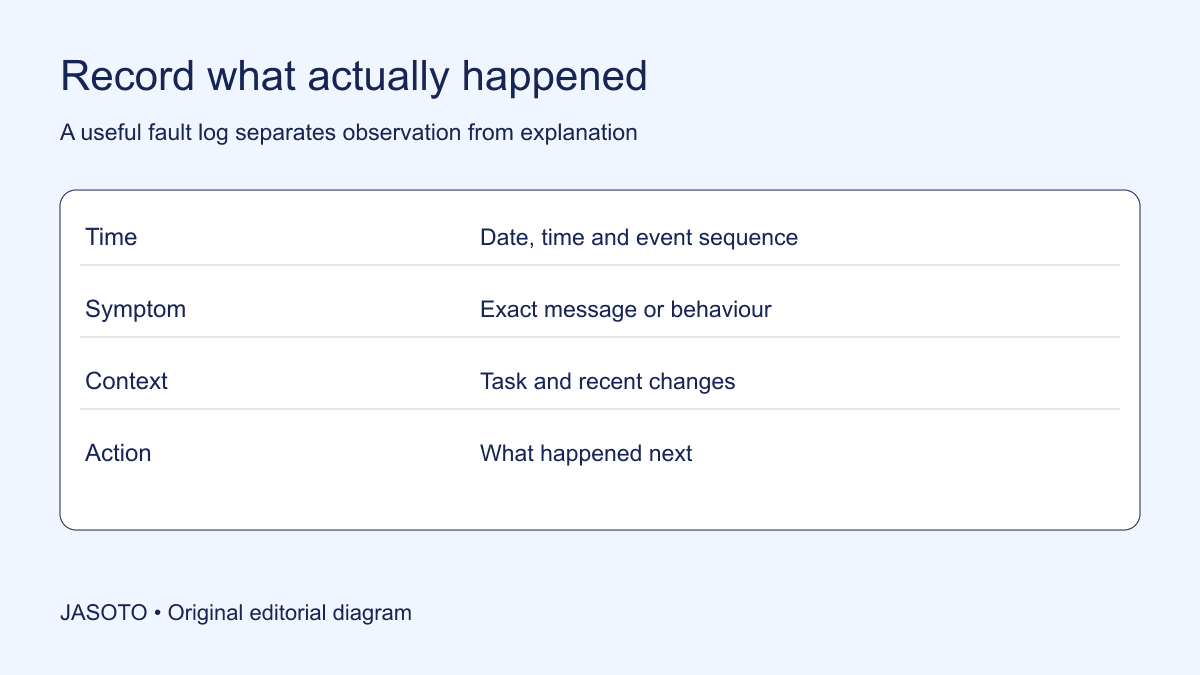
Original JASOTO editorial diagram. Its complete workflow is explained in the article; no actual customer outcome is depicted.
For an intermittent fault, send the repairer a short history of what happened, the exact equipment identity, the conditions around each event and the next decision you need. Distinguish observed symptoms from your theory about the cause. A description such as “the print queue paused twice after a large job” is more useful than “the network is broken” when the network has not been diagnosed.
This guide helps UK small businesses prepare an investigation brief. It is about communication and records, not instructions for repairing equipment. HSE guidance says maintenance needs competent people and suitable planning. Do not operate faulty equipment or create hazardous conditions merely to obtain a better recording. The suggested log and examples below are original editorial tools rather than a diagnostic standard.
The practical answer
- Record observations separately from suspected causes.
- Identify the exact item and the conditions around the fault.
- Agree the investigation scope before the visit.
- Do not reproduce a fault at the expense of safety.
Identify the item before describing the fault
Start with a description that lets a provider determine whether the work is within its scope. Record the manufacturer, model and identifying number where these can be read safely. Add the site or room and the business contact responsible for the item. If several similar devices exist, give the affected one an internal name that matches the photographs and log. “Front desk printer” is useful only if everyone knows which printer that means.
Include the relevant service history you already possess: installation information, earlier repair references and the date of a recent change. Mark missing information honestly. A model number copied from an online photograph of a similar product can send the investigation in the wrong direction. If a label cannot be reached safely, say so and ask the repairer what information would be sufficient for the initial enquiry. Avoid removing panels or moving heavy equipment just to complete the brief.
Describe the event in a consistent sequence
For each occurrence, write the task that was underway, what the person expected, what happened instead and what happened afterwards. Use exact screen messages where possible. Keep a distinction between an item stopping, producing an incorrect result and responding more slowly than expected. These may sound similar in a hurried telephone call but give the repairer different questions to investigate.
Record dates and approximate times even if the history is incomplete. Label an estimate as an estimate rather than inventing precision. A note saying “around opening time on Monday, according to the receptionist” is more trustworthy than a fabricated timestamp. If two people report the same event, link their accounts instead of counting it as two separate failures. Preserve the first account and add corrections visibly, so a later summary does not accidentally turn uncertainty into fact.
Capture context without trying unsafe experiments
Useful context can include the ordinary task, the material being used, an authorised setting, environmental observations and a recent service visit. Record only what was actually known at the time. A symptom happening after a software update does not prove the update caused it. Equally, a repeated pattern deserves to be passed on so the person investigating can decide whether it matters.
Do not design your own stress test, bypass a protective feature or repeatedly restart equipment to make the symptom appear. HSE's maintenance resource explains the importance of safe arrangements and competent work; the business should use its own appropriate safety procedures. Ask the repairer which observations can be collected safely during normal authorised activity, if any. Where the item has been withdrawn from use, the log should say that clearly so another colleague does not assume it is available.
Keep evidence small enough to review
A concise evidence pack might contain one page of event notes, a photograph of the readable label, an image of an error message and the relevant earlier job reference. Name each file to match the log. A thirty-second clip that shows the reported behaviour can be more useful than several long videos with no indication of when the event occurs. Ask whether the provider accepts video before sending large attachments.
Review the material for customer information, passwords, unrelated documents and identifiable people. Share only what is relevant to the repair enquiry and use the provider's agreed channel. Keep the original evidence available if a cropped version needs clarification, but do not circulate it indiscriminately. If a display includes sensitive information, describe the message in text or arrange an appropriate secure exchange rather than assuming a public upload is the only option.
Agree what the first visit is intended to establish
Ask whether you are booking diagnosis, a fixed repair, a routine service or an initial assessment. Confirm the charge basis, access requirements and any information the repairer needs before travelling. If parts cannot be selected until inspection, the confirmation should make that dependency clear. A visit that establishes a fault may still need a later quotation; neither party benefits from discovering that difference in expectation at the doorway.
Discuss what happens if the fault does not appear. Ask which checks are included, how findings will be recorded and what the repairer may recommend next. Avoid demanding a guaranteed diagnosis from an intermittent symptom. If the enquiry involves a journey to a workshop, research travel options after confirming that the workshop can accept the item. Check transport arrangements directly, including whether the item can be carried appropriately and who is responsible for delivering it.
Worked example: a reception printer that sometimes stops
Consider an invented small office where a printer occasionally stops halfway through a document. The first message to the provider says only “printer unreliable”. The office then produces a short log: which device was involved, the document type, whether the display showed a message and which ordinary action followed. It notes that one incident happened before a recent update and another afterwards, avoiding the assumption that the update explains both.
The office contact sends two relevant photographs and asks whether the provider services that model. They agree an investigation visit and identify who can answer questions about the print process. No employee opens the machine or attempts an improvised repair. This does not guarantee that the technician will reproduce the fault. It means the visit begins with an identifiable item, a traceable history and an agreed question, rather than a vague instruction to replace whatever seems most likely.
Make the handover work when the main contact is absent
Store the current brief where the authorised site contact can find it. Include the appointment reference, equipment location, access instructions and the person who can approve additional work. If the usual reporter is absent, distinguish facts that the substitute can confirm from details that came from someone else's account. A colleague should not have to invent an explanation to avoid appearing unprepared.
Use JASOTO businesses to discover potential repair providers, then verify their suitability for the equipment directly. If reporting, scheduling and service coordination have become substantial continuing work, JASOTO jobs may help you explore relevant staffing. A new role does not replace competent technical advice; its purpose may be to maintain a consistent record and make sure reported faults receive a response. Keep those responsibilities explicit so technical decisions are not accidentally delegated to reception staff.
Describe business impact without claiming a diagnosis
Tell the provider what the interruption prevents you doing. For a reception printer, the impact might be delayed customer paperwork, while a backup printer remains available elsewhere. For another item, an interruption may stop an entire task. Describe the actual dependency so scheduling decisions can reflect the situation. Avoid changing the technical description to make the job sound more urgent; impact and diagnosis belong in different fields.
Identify any genuine workaround and its limits. “We can send documents electronically, but a customer sometimes needs a printed copy” helps explain the requirement. It is different from saying the fault has been resolved. Do not improvise a workaround that creates a safety risk or contradicts the provider's instructions. If the business has an authorised alternative process, record who knows how to use it and what customer communication is needed while the affected equipment is unavailable.
Ask the provider to distinguish a temporary measure from a permanent correction in its response. That distinction helps the next colleague understand whether the item is ready for ordinary use, awaiting further assessment or still unavailable. It also prevents a temporary arrangement from disappearing into the records as a completed repair.
Close the visit with findings, not just a completion tick
Ask for a record of what was inspected, the findings, any authorised changes and remaining uncertainty. If a component was replaced, link that work to the job reference. Record any further instructions from the competent provider and who is responsible for following them. “Attended” and “repaired” describe different outcomes; your internal log should not automatically convert one into the other.
Afterwards, update the history with later observations without rewriting the earlier evidence. If the symptom returns, the next enquiry should show what happened before and after the intervention. If the item remains out of use, make its status clear through the business's proper procedures. The value of a good intermittent-fault brief is not a promise of a first-visit fix. It is a better starting point for the person investigating and a clearer record of the decisions the business has made.
Put the guide into practice
- Identify the item, location and main contact.
- Save a short dated fault history with exact messages.
- Confirm investigation charges and what happens if no fault appears.
- Keep safety decisions with competent people.
Frequently asked questions
What if the fault does not happen during the visit?
Give the repairer the event history and ask what was checked, what remains uncertain and what observation would help next. A quiet visit is not proof that the equipment has been repaired.
Should I keep using the item to capture the problem?
Do not continue using faulty or potentially unsafe work equipment to obtain evidence. Follow the responsible person's safety arrangements and obtain competent advice. A useful repair brief never requires someone to take a risk.
Can I name the component I think is broken?
Yes, as a clearly labelled suspicion, with the observation that prompted it. Do not present a guess as a diagnosis or authorise replacement parts merely because a search result suggested them.
Explore JASOTO tools
Ask potential providers whether they work on the specific equipment.
Explore maintenance roles →Consider an internal role when reporting and coordination are continuing responsibilities.
Plan a repair-related journey →Research transport if an item must be delivered to a workshop.
Continue with JASOTO
Compare your next step
Discover UK businesses, compare services and request written quotes before making a decision.