
Business Growth · UK Guide 2026
Photos for a Remote Estimate: What to Show a Service Provider
JASOTO · Updated 5 November 2026 · 1,504 words
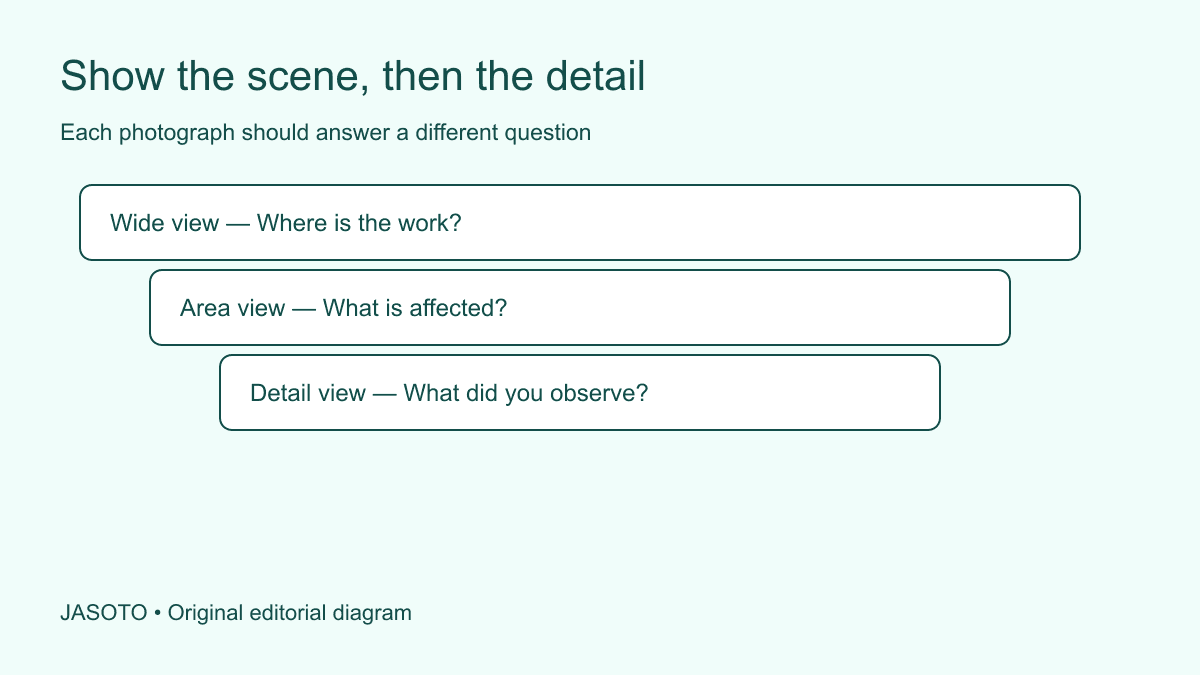
Original JASOTO editorial diagram. Its complete workflow is explained in the article; no actual customer outcome is depicted.
For a remote estimate, send photographs that explain where the work is, what is affected and what you have observed. Add a short written brief, relevant dimensions already known and any access constraints. Ask the provider which further views it needs. A photograph can support a conversation, but it cannot establish hidden conditions or turn an unconfirmed assumption into a reliable quotation.
This guide is for ordinary service enquiries from households and small businesses. The suggested photo sequence is an editorial method, not a surveying or diagnostic standard. It applies across locations, with UK spelling here. Do not enter an unsafe area, climb, dismantle equipment or disturb materials to obtain a view. Explain missing evidence and let an appropriate professional decide the next step.
The practical answer
- Ask which views the provider needs before taking many photographs.
- Show context, the affected area and any safely available scale reference.
- Label uncertainty and let the provider decide whether inspection is needed.
- Remove unrelated personal or confidential information before sharing.
Start with the question, not your camera roll
Before taking pictures, describe the job in two or three sentences. Explain the result you want and the observation that prompted the enquiry. “We want to replace this damaged cupboard door without changing the surrounding unit” gives a provider a more usable starting point than “please quote”. It also tells you which part of the scene needs to be visible and which photographs would add little.
Contact a suitable provider and ask what it needs to make an initial assessment. Some will have a form or a preferred upload channel. Others may first need the product model, broad dimensions or location. Respect the requested format rather than sending a large folder immediately. A provider should be able to explain whether the images will support an estimate, determine suitability or help plan a visit. Those are different purposes, and the evidence needed may differ accordingly.
Take a context view that locates the work
A wide view helps someone unfamiliar with the space understand the surroundings. Show the affected item in relation to relevant walls, adjoining fittings or the working area, from a position you can reach normally and safely. The objective is orientation. A close-up of a damaged corner can be difficult to interpret if the person cannot tell whether it belongs to a door, a worktop or a free-standing unit.
Keep the scene honest. You can remove unrelated private paperwork before taking the photograph, but do not conceal an obstruction that affects the work. If a table normally blocks access and will remain there, mention it. If something will be moved before the appointment, say who will move it and whether that is already agreed. The provider needs the likely working conditions, not a carefully staged impression that no longer matches the practical job.
Add a middle view and a specific detail
The middle view should identify the area discussed in the brief. The detail should show the specific observation, such as a visible gap, damaged finish or readable label. Use ordinary lighting and check that the image is in focus. When reflections obscure the observation, take another safely available angle rather than relying on a caption to explain what the camera failed to capture.
Avoid sending many images that all show the same thing. If a second angle reveals a different edge or the relationship between parts, explain that in the index. If it merely repeats the first image, it may not be needed. Do not use digital enhancement to exaggerate damage or remove an inconvenient feature. Where an annotated copy would help, preserve the original and label the copy clearly so the provider can distinguish your explanation from the recorded scene.
Record scale and measurements honestly
Write known dimensions in the brief with units and explain what each measurement spans. “Door width, left edge to right edge” is more useful than an unexplained number. If a measurement is approximate, label it that way. Do not let a provider infer precision from a photograph containing a ruler that is angled, partly hidden or positioned on a different plane from the object.
Only measure where it is safe and straightforward. If a dimension would require lifting a heavy item or reaching an inaccessible area, leave it unconfirmed. Ask whether the provider needs to measure on site. Existing product specifications can be useful if you identify their source and confirm they relate to the actual item. A visually similar online product is not dependable evidence of your item's dimensions, material or internal construction.
Explain access separately from condition
The condition of an item and the route to reach it are different questions. A provider may need to know about parking arrangements, steps, a narrow doorway, a booked loading slot or a reception procedure. Describe the relevant constraints in text and add an image only when it clarifies the route. Do not include a building security code in a photo index that will be sent to several possible suppliers.
If the job concerns a rented or shared property, establish who can authorise the work and arrange access before promising an appointment. That is a practical coordination step, not a conclusion about tenancy law. If a visit requires travel, use JASOTO travel to explore options only after the provider has confirmed the destination and timing. A remote estimate should not lead to an unnecessary journey because the customer and provider assumed different workshop or site locations.
Review information before sharing the files
Look for names on post, customer records on screens, people, vehicle registrations and other details unrelated to the enquiry. The ICO's data minimisation principle concerns keeping personal data adequate, relevant and limited to what is necessary. For a photo enquiry, that supports a simple question: does this recipient need this information to consider the job? If not, remove it from the proposed evidence pack where possible.
Check that you have permission to share photographs of someone else's premises or work. Use the provider's agreed channel and understand who will receive a shared-folder link. If an image must be cropped, keep enough context to avoid misleading the viewer and say that it is a crop. Do not publish a public social-media album as a substitute for a private enquiry unless that is genuinely the intended and appropriate use of the images.
Give the photographs a readable index
Name files in a simple sequence and write one line about each: “01: whole unit from entrance”; “02: affected left door”; “03: lower edge detail”. This lets a provider ask a precise follow-up question. Put the job description above the index and include the contact who can answer questions. If you send a revised pack, say what changed rather than mixing new and old files without explanation.
When an image is embedded in a web form or page, its text description should convey the useful information. W3C's images tutorial explains the purpose of text alternatives. For a direct email enquiry, a descriptive index serves a related communication purpose: it tells the reader why each image is present. Avoid labels such as “photo one” that identify the file but not the observation. The important detail should also be explained in ordinary text, not left solely inside an image.
Worked example: a café's damaged cabinet front
Imagine a café asking whether a cabinet front can be repaired or needs replacing. This is an invented example. The manager supplies one view of the counter, one of the affected door and one close-up of the finish. The brief gives the safely measured door dimensions, explains that the hinges have not been assessed and states when the café could make the area available for a visit.
The provider asks for the existing product details, which the manager does not have. Rather than guessing the material from a similar catalogue photograph, the manager records that uncertainty. The provider offers an assessment visit and explains which pricing assumptions remain open. The photographs have helped establish the next step. They have not proved that a particular replacement part will fit, that the damage has a specific cause or that access behind the counter is suitable for every repair method.
Use the response to improve the buying decision
Read the response for assumptions, exclusions and further evidence needed. Ask which parts are firm and which depend on inspection. Save the evidence pack with the response so a later conversation refers to the same scene and scope. If the job changes, send an updated brief; do not assume a price based on one damaged item covers additional work discovered later.
You can find potential service providers on JASOTO, then confirm suitability directly. If organising many site enquiries has become continuing work, explore relevant jobs rather than relying on an informal handover between busy colleagues. A successful photo enquiry produces an understandable next action: a provider declines unsuitable work, asks a targeted question, offers a bounded estimate or recommends inspection. It does not require a large image library or a claim that photographs can answer everything.
Put the guide into practice
- Match each image to a question in the enquiry.
- Keep the full scene and the detail in separate labelled files.
- Review privacy and permission before sending.
- Confirm whether the response is an estimate, quotation or inspection offer.
Frequently asked questions
How many photographs should I send?
Send enough to answer the provider's stated questions, with a short index. There is no universal number. A few clear views of context and detail are usually easier to discuss than many nearly identical images.
Can photographs replace a site inspection?
Sometimes a provider can give an initial response from images. Hidden conditions, safety questions, access and measurements may still require inspection. Ask the provider to explain the assumptions and limits of its response.
Should I add arrows and captions?
A clearly labelled annotated copy can help locate the issue. Keep the original available and explain what an arrow identifies. Do not edit an image in a way that changes the apparent condition or scale.
Explore JASOTO tools
Check who can assess your specific type of work.
Explore facilities and coordination roles →Research staffing if organising site enquiries is a continuing responsibility.
Research a provider visit →Consider journeys only after the location and appointment are confirmed.
Continue with JASOTO
Compare your next step
Discover UK businesses, compare services and request written quotes before making a decision.